Problem 1
Step-1
Operating system:
It is an environment to interact with computer hardware and software in an easy and efficient way by providing convenient services to users.
Step-2
The three main purposes of an operating system are as follows:
Resource allocation:
• The first important purpose of an operating system is Resource allocation.
• If any application is terminated, then the resources are deallocated. Those deallocated resources may allocate to another program.
• Different kinds of available resources are allocated as per the need to perform the provided tasks in an efficient manner.
Step-3
Supervision:
• The data may be lost while accessing the resources. Hence, the operating system provides protection to the allocated resources in a different way.
• It supervises the execution of user programs to restrain the occurrence of errors and to avoid the misusage of computer and its resources.
Step-4
Managing input and output devices:
• The communication between the system and the user is handled by I/O devices. The user can access all the devices in uniform manner.
• The Operating system manages the functioning of the input and output devices.
Problem 2
Step-1
Computer Resources
It may be appropriate for operating systems to forsake the principle to make efficient use of the computer hardware and waste resources in case of Single – User Systems. In such systems, the use of computer resources must be maximized for the user.
Such a system is not really wasteful because although a graphical user interface may waste CPU cycles, but by maximizing the use of the system, it optimizes the user’s interaction with the system.
Problem 3
Step-1
2481-1-17E SA: 8683
SR: 4578
A real-time system has well-defined, fixed time constraints. Processing must be done within the defined constraints, or the system will fail. For example, it would not do for a robot arm to be instructed to halt after it had smashed into the car it was building. A real-time system functions correctly only if it returns the correct result within its time constraints. So, the main difficulty is keeping the operating system within the fixed time constraints of a real-time system. Therefore when writing an operating system for a real- time system, the writer must be sure that his scheduling schemes don’t allow response time to exceed the time constraint.
Problem 4
Step-1
The application programs like mail programs and web browsers should not be added to the operating system because:-
• As per computer architecture, the computer system is categorised into four major components: application programs, operating system, hardware and user. The mail program and web browser belongs to application program, not to operating system.
• Operating system is defined as the program which is running all the time on the computer system. But the mail programs and the web browsers do not run all the time on the system. Hence they cannot be regarded as operating systems.
Step-2
The arguments in favour of the mail programs and web browser to be included in operating system are:
• Operating system is defined as the program which acts as the interface between the hardware and the user. As the mail program and the web browser are the part of program between hardware and the computer user, controlling and allocating the resources, thus they are part of operating system.
• Also, the operating systems generally include all those applications which are provided by vendors. As many vendors provide mail programs and web browsers along with operating systems, they are also included in operating systems.
Problem 5
Step-1
There is a distinction in execution between kernel mode and user mode of the operating system. This distinction in execution provides a rudimentary form of protection system.
Kernel mode:
• It is mandatory that certain instructions must be executed only when the operating system in kernel mode.
• Access to hardware devices can be done only when the program is executing in kernel mode.
• Interrupts can be controlled only when the CPU is executing in kernel mode.
• The privileged instructions can be executed only when the CPU is in kernel mode.
Step-2
User mode:
• When the CPU is executing in user mode, its capacity is limited.
• Executing privileged instructions in user mode will cause a trap to the operating system.
Thus, dual mode of operation provides a rudimentary form of protection system.
Problem 6
Step-1
The privileged instructions must execute in the kernel mode only. These instructions cannot execute in the user mode. The instruction which switches to the kernel mode is the privileged instructions.
Step-2
a.
The Set value of timer instruction is privileged. This instruction is interfaced with the kernel. If the timer goes off, then the task will stop, and the kernel starts a new task.
Step-3
b.
The Read the clock instruction is not privileged. This instruction is not interfaced with the kernel. The kernel does not read the clock value.
Step-4
c.
The Clear memory instruction is privileged. The kernel checks whether a process needs to clear the memory and if the process wants to clear the memory, then the kernel uses this instruction.
Step-5
d.
The Issue a trap instruction is not privileged. The trap instruction issued in the user mode but not in the kernel mode.
Step-6
e.
The Turn off interrupt’s instruction is privileged. This instruction is interfaced with the kernel. The kernel provides the instruction to maintain the flow of control of the processes.
Step-7
f.
The Modify entries in device-status table instruction are privileged. These instructions are interfaced with the kernel mode. The instructions which must not modify are interfaced with the kernel mode.
Step-8
g.
The Switch from user to kernel mode instructions is privileged instruction. The system must transition from user to kernel model to accomplish the user request. At the time of system start the hardware starts in the kernel mode and then run the user applications in the user mode.
Step-9
h.
Access I/O device instructions are privileged. These instructions execute in the kernel mode. The kernel mode protects these instructions against the attempts by the user to modify these instructions. The instructions which must not modify are interfaced with the kernel mode.
Step-10
Privileged instructions and Un-privileged instructions are tabulated as below:
| S.no | Instruction | Type |
|---|---|---|
| a. | Set the Value of timer | Privileged |
| b. | Read the clock | Un-Privileged |
| c. | Clear memory | Privileged |
| d. | Issue a trap instruction | Un-Privileged |
| e. | Turn off interrupts | Privileged |
| f. | Modify entries in device-status table | Privileged |
| g. | Switch from user to kernel mode | Privileged |
| h. | Access I/O device | Privileged |
Problem 7
Step-1
Operating System
By placing the operating system in a memory partition that could not be modified by either the user job or the operating system itself, the difficulties that can arise are listed below:
-
The critical data such as passwords and access control information that are required by or generated by the operating system would have to be passed through or stored in unprotected memory slots and would be accessible to unauthorized users.
-
The operating system can never be updated or patched, since it is not modifiable or accessible by the user or the operating system itself.
Problem 8
Step-1
2481-1-20E SA: 8683
SR: 4578
Most of the CPUs provides two modes of operation.
1. Kernel mode
2. User mode
Step-2
Some CPUs have supported multiple modes of operation by providing different distinctions in kernel mode and user mode separately, rather than distinguishing between just kernel and user mode.
Step-3
Two possible uses of these multiple modes are:
1. One possibility would be to provide different distinctions within kernel code. For example, a speci◊c mode could allow USB device drivers to run. This would mean that USB devices could be serviced without having to switch to kernel mode, there by essentially allowing USB device drivers to run in a quasi-user/kernel mode.
2. Second possibility would be to provide different distinctions within user mode. Multiple user modes could be used to provide a ◊ner-grained security policy. Perhaps users belonging to the same group could execute each other’s code. The machine would go into a speci◊ed mode when one of these users was running code. When the machine was in this mode, a member of the group could run code belonging to anyone else in the group.
Problem 9
Step-1
Computing Current Time
Timers can take the help of a program that uses the following steps to calculate the current time with the help of timer interrupts:
1. Sets the timer for some time later than the current time and goes to sleep.
2. An interrupt wakes up the program; that is when it updates its local state, which it uses to keep a record of the number of interrupts it has received by far.
3. Then it repeats this process of establishing timer interrupts and updating its local state when these timer interrupts are raised.
Problem 10
Step-1
If the active portions of program and data are placed in a fast small memory the average memory access time can be reduced, thus reducing the total execution time of program. Such a fast small memory is referred as cache memory.
Caches are useful when two or more components need to exchange data, and the components perform transfers at different speeds. Caches solve the transfer problem by providing a buffer of intermediate speed between the components. If the fast device finds the data it needs in the cache, it needs not wait for the slower device. The data in the cache must be kept consistent with the data in the components. If a component has a data value change, and the datum is also in the cache, the cache must also be updated. This is especially a problem on multiprocessor systems where more than one process may be accessing a datum. A component may be eliminated by an equal-sized cache, but only if: a) the cache and the component have equivalent state-saving capacity (that is, if the component retains its data when electricity is removed, the cache must retain data as well), and b) the cache is affordable, because faster storage tends to be more expensive.
Problem 11
Step-1
Differences between client-server and peer-to-peer models of distributed systems are as follows:
| Client-server model | Peer-to-peer model |
|---|---|
| In this model, systems are categorized as server systems and client systems. | In this model, all nodes are considered as peers. |
| Client systems request for services from server systems. Server systems satisfy the requests of the client systems. | Each peer can act as client or server depending on the operation it is performing. |
| Resources are controlled and available at the server system. | Resources are distributed among the peers and are easy to be shared among the peers. |
| Client-server model offers greater security than peer-to-peer model as authentication of users is done at the central server. | Peer-to-peer model offers lesser security than client-server model as there is no central server to authenticate users. |
| The setup of client-server model is expensive. | The setup of peer-to-peer model is less expensive. |
| Client-server model is difficult to configure. | Peer-to-peer model is easy to configure. |
| For large offices setups and for organizations where there is sensitive data, client-server model is suggestable. | At home and for small office setups, peer-to-peer model is suggestable. |
Problem 12
Step-1
 300-1-1E
Step-2
(a)
In a multiprogramming and time-sharing environment, several users share the system simultaneously. This situation results in two problems. Stealing or copying a user’s files; writing over another program’s (belonging to another user or to the OS) area in memory; using system resources (CPU, disk space) without proper accounting; causing the printer to mix output by sending data while some other user’s file is printing.
Step-3
(b)
Probably not, since any protection scheme devised by a human can also be broken — and the more complex the scheme is, the more difficult it is to be confident of its correct implementation.
.
Problem 13
Step-1
Resource Management
Resource utilization is a major issue that occurs in different forms in different types of operating systems. It is important to manage resources to perform tasks efficiently and in a fair manner.
a) The resources that must be managed in Mainframe or Minicomputer Systems are listed below:
1. Memory Resources : Main memory (RAM) is an important part of the mainframe systems that must be carefully managed, as it is shared amongst a large number of users.
2. CPU Resources : Again, due to being shared amongst a lot of users it is important to manage CPU resources in mainframes and minicomputer systems.
3. Storage : Storage is an important resource that requires to be managed due to being shared amongst multiple users.
4. Network Bandwidth : Sharing of data is a major activity in systems shared by multiple users. It is important to manage network bandwidth in such systems.
Step-2
b) The resources that must be managed in Workstations Connected to Servers are mentioned below:
1. Memory Resources : When workstations are connected to servers, multiple applications run on multiple workstations on a single server. This is an important factor due to which memory management is required in workstations connected to servers.
2. CPU Resources : Multiple workstations make requests to access resources to accomplish the tasks assigned to them. To ensure the fair and efficient completion of tasks, it is important to manage CPU resources in workstations connected to servers.
Step-3
c) The resources that need to be managed in Handheld Computers are listed below:
1. Power Consumption : Handheld computers use compact, portable and small batteries as a source of power. It is important to manage power consumption in such devices to be able to make their use efficient and easy.
2. Memory Resources: Due to being small in size, the memory devices used in such computers are also small, thus deteriorating its storage capacity. This makes memory resource management an important requirement in handheld devices.
Problem 14
Step-1
Time sharing system or multitasking is a logical extension of multiprogramming. In time-sharing, CPU executes multiple jobs by switching one after another process to execute. When switches occur frequently, then the user can interact with each program while it is running. But, multitasking and multiprogramming is not possible on single user work station.
Step-2
The time sharing is best under following circumstances:
• In a work station, if there are few users to complete the large task, and hardware is fast, then at the point of time timesharing system is useful to complete the task with in the stipulated time.
• The other way to use the time sharing is when lots of users need so many resources at the same time.
The Personal Computer is best under following circumstances:
• Personal computer is best, when the job is small enough to be executed with in short amount of time.
Step-3
The time-sharing system is better than PC under following circumstances:
• A time-sharing operating system uses CPU scheduling and multiprogramming to provide each user with a small portion of a time-shared computer.
• If other users need to access the same system, then a time-sharing system would work better than a PC or a single-user workstation.
• If there is only a single and exclusive user, then a PC or single-user workstation would be better to use the less amount of resources.
• To work remotely on the system, then time sharing system is useful then PC.
• Time sharing system is better than PC when compared to cost, and ease of use.
Problem 15
Step-1
• Symmetric processing treats all processors as equals; I/O can be processed on any of them. Asymmetric processing designates one CPU as the master, which is the only one capable of performing I/O; the master distributes computational work among the other CPUs.
• Advantages: Multiprocessor systems can save money, by sharing power supplies, housings, and peripherals. Can execute programs more quickly and can have increased reliability.
• Disadvantages: Multiprocessor systems are more complex in both hardware and software. Additional CPU cycles are required to manage the cooperation, so per-CPU efficiency goes down.
In detail…
The three advantages of multiprocessor systems are:-
i. Increased throughput: - By increasing the member of processor, we hope to get more work done in less time.
ii. Economy of scale: - Multiprocessor system can cost less than equivalent multiple slave-relationships exists between processors. Each processor concurrently runs a copy of the operating system.
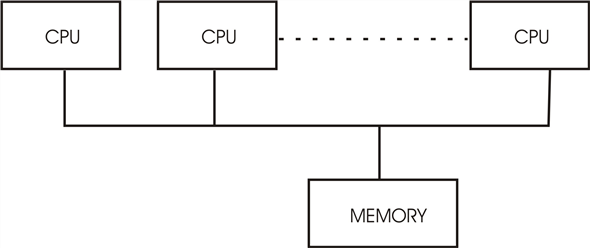 SMP Architecture
Example of SMP is Solaris, a commercial version of Unix designed by Sun Micro system.
The difference between symmetric and asymmetric multi processing may result from either hardware or software. Single processor system because they can share peripherals, mass storage, and power supplies.
iii. Increased reliability: if functions can be distributed properly among several processors, then the failure of one processor will not halt the system, only slows it down.
The main disadvantage of multi process or system is that if the operation is continued in the presence of failures, requires a mechanism to allow the failure to be detected, diagnosed, and if possible, corrected. The tandem system uses both hardware and software duplication to insure continued operation despite faults. The system consists of two identical processor, each with its own local memory. The processors are connected is the primary and the other is the backup. Two copies are kept of each process. One on the primary processor and the other on the primary processor
And the other on the back up. At fixed check points in the execution of the system the state information of each job:-
Including a copy of the memory image is copied from the primary machine to the backup. If a failure is detected, the backup copy is activated and is started from the most recent checkpoint. This solution is expensive, since it involves considerably hardware duplication.
Symmetric Multi procession (SMP) is one in which each processor runs a copy of the operating system and these copies communicate with one another as needed.
Asymmetric multi processing is one in which each processor is assigned a specific task. A master processor controls the system, the other processor either look to the master for instruction or have pre-defined tasks. This scheme defines a master-slave relationship. The master processor schedules to allocates work to the slave processors. SMP (symmetric multi processor) means that all processors are peers; no master
Problem 16
Step-1
Clustered Systems
It is made up of together of multiple CPUs to accomplish computational work. Clustered systems differ from multiprocessor systems, however, in that they are composed of two or more individual systems compiled together. It shares storage and are closely linked via LAN networking.
It provides high- availability service. i.e. service will continue to be provided even if one or more systems in the cluster fails. High- availability is generally obtained by adding a level of redundancy in the system. A layer of cluster software runs on the cluster nodes. Each node can monitor one or more of the others (over LAN). If the monitored machine fails, the monitoring machine can take ownership of its storage and restart the application that were running on failed machine.
Problem 17
Step-1
Cluster Systems gather together multiple CPUs to accomplish computational work.
cluster system differs from parallel system. The cluster computer share storage and are closely linked via LAN networking.
Clustering provides high-availability service will continue to be provided even if one or more system in the cluster fail. Clustering can be structured symmetrically or asymmetrically. In asymmetric clustering, one machine is in hot-standby mode, while the other is running the applications. The host – standby host machine does nothing but monitor the active server. If that server fails, the hot – standby host becomes the active server.
In symmetric mode, two or more hosts are running applications, and they are monitoring each other. This mode is more efficient, as it uses all the available hardware. It requires more than one application be available to run.
Problem 18
Step-1
Network computers versus personal computers
Personal computers (PC) : PCs are general purpose computers; those that are independent and can be used by a single user. Sharing of resources, communication is not possible in PCs. They have all the necessary resources local to the machine and are efficient in processing all the requests locally.
Network Computers: Network computers are the computers that are connected to each other through a network. It is possible to share resources and communicate with other computers in the network. They have very less resources locally and minimal operating system too. They rely on the server for all their required resources.
Step-2
Types of networks:
LANs and WANs are the two basic type of network. LANs enable computers distributed over a small geographical area to communicate and share their resources. Where as WAN allow computers distributed over a large geographical area to communicate.
Real time examples and advantages of using network computers:
• E-mail a type of communication. Passing messages from one system to another system is possible using network computers.
• Web based computing helps to share information and files to all the systems that are connected to the network.
• Using messenger applications, real time communication (voice/text) is possible between the computers that are connected through network.
• Hardware resources can be shared between the systems that are connected through network.
• Troubleshooting the problems of a system can be done using another system on network from a remote location.
Problem 19
Step-1
Purpose of Interrupts:
Interrupts are generated by the hardware devices. In the case of happening of interrupts, there is no role of software. Interrupts are asynchronous or passive means if there is any instruction running then interrupt has to wait to happen.
Step-2
Difference between Trap and Interrupt:
| Interrupt | Trap |
|---|---|
| It is a hardware signal. | It is a software interrupt. |
| It is caused by external events like graphic card, I/O port etc. | It is caused by software programs like divided by zero. |
| It will not repeat as it is caused by an external event. | It can be repeat as it is software program. It can be repeated according to the calling of that instruction. |
| They can be handled by jump statements. | They cannot be handled by jump statements. |
| Interrupts are asynchronous events as they are related to external events. | Traps are caused by current program instructions; thus they are called as synchronous events. |
Step-3
Yes, traps can be generated by the user program intentionally.
Purpose of calling Traps:
Traps can be used to call intentionally to call Operating system routines or to catch arithmetic errors like divide by zero.
Problem 20
Step-1
(a)
• Direct memory access (DMA) command block is written to main memory which contains pointers to the source and destination of the transfer.
• The central processing unit (CPU) writes the address of the command block to the DMA controller. It can initiate a DMA operation by writing values into special registers that can be independently accessed by the device.
• The device initiates the corresponding operation once it receives a command from the CPU. When the device is finished with its operation, it interrupts the CPU to indicate the completion of the operation.
• Here, all devices have special hardware controllers. Normally, an operating system (OS) has device drivers that communicate with the controllers. The device drivers have registers, counters and buffers to store arguments and results.
Step-2
(b)
• After the completion of the task the dive controller interrupts the CPU.
• The CPU initiates the transfer by supplying the interface with starting address and number of words needed to be transferred and then proceeds to execute other tasks when transfer is made.
Step-3
(c)
• CPU is allowed to execute the other programs when device controller performs transfer of entire block of data from buffer to memory.
• When the device controller sends the interrupt to the CPU, the current task of the CPU is suspended until the interrupt is finished.
• It can access data in its primary and secondary cache memory because there is no interference with the user task.
Problem 21
Step-1
Designing an operating system without the use of processor privilege levels is possible.
MS-DOS or CP/M (single tasking operating systems) or Microsoft’s Windows 3.1 (a multitasking operating system), none of which use this capability are some of the examples of such design.
Step-2
• However, security for those designs will become difficult to achieve. All code must be verified by the operating system prior to being run or interpreted with extensive run-time checks when the design requires security. The vaporware operating system JOS is an example of that design.
• The user ID and group ID are sufficient for the users to use the system normally. Sometimes escalate privileges are needed to gain extra permission for some activities.
Step-3
• Privileged mode is not provided by few systems, but the data will be secure. This is possible in which the security is provided by operating system by maintaining a list of user names and associated user identifiers (UIDs).
• The ID’s for each and every user will be unique. The authentication stage determines the appropriate user Id for the user when the user logged in to the system. User ID’s are associated with all the name of the processes and threads. The ID is translated back to username using the user name list if an ID needs to be user readable.
Problem 22
Step-1
Caching system:
• Cache is the temporary memory which is used for fast access. When a particular piece of information is needed, it is firstly searched into the cache. It is used directly from the cache if it is present here otherwise this information is used form the memory by putting a copy of the information into the cache.
• The design of cache into different levels with local caches near each processing core and the one shared by all cores is due to access speed and cost. The access will be faster if the cache is near the processing core. But the fast caches are costly.
• Hence smaller and faster cache is placed local to each core and the shared cache which is larger but slower is shared among different processing cores.
Problem 23
Step-1
Symmetric Multiprocessing (SMP):
In Symmetric Multiprocessing ( SMP) system, each processor performs all tasks within the operating system. All the processors in SMP are peers; the relationship of master-slave does not exist between processors. Each processor has its own set of registers, as well as a private or local cache. These processors share physical memory. In SMP, N-processors can run N-processes simultaneously. The I/O should be controlled properly so that the data reaches appropriate processor.
Step-2
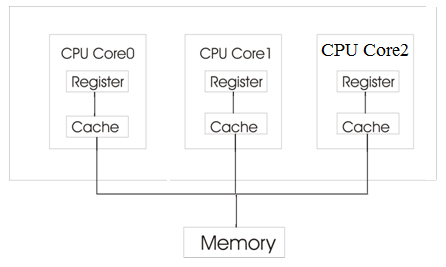
Symmetric multiprocessing architecture
Step-3
Let us consider an example how data residing in memory could in fact have two different values in each of the local caches. Consider a process ‘a’ gets the data from the main (physical) memory. The process is running in the CPU core0. It performs certain operation on the data and it is changed. Before the data is returned to the memory, another process ‘b’ gets the same data from the main memory. Again the process ‘b’ which is running in the CPU core1 performs some operations on the data. Initially the data taken from the physical memory is same. But the data after reading from the memory is stored in the CPU’s own cache and the operations are performed.
Step-4
The data in the local cache of CPU core0 is obtained after the operations of process ‘a’ are performed. Similarly, the data in the local cache of CPU core1 is obtained after the operations of process ‘b’ are performed. So, the data will be different. From this we can say that the data residing in the memory could in fact have two different values in each of the local caches.
Problem 24
Step-1
(a)Single-processor system
In an environment where only one process executes at a time, arrangement of cache makes no difficulties. Where as in multi tasking environment it should be dealt properly.
(b)Multiprocessor system
Since the CPU switches back and forth among various process, cache should be taken special care. The situation becomes more complicated in a multiprocessing environment where in addition to maintaining internal registers, each of CPUs also contains a local cache. Hence may exist simultaneously in several caches. Since CPU (various) can execute concurrently, we must make sure that an update to the value ‘a’ in one cache is immediately reflected in all other cache where ‘a’ resides. This situation is called Cache Coherency. And is usually hardware problem.
(c) In distributed environment situation becomes even more complex. Several copies of same file can be kept on different systems that are distributed in space.
Since the various replicas may be accessed and updated concurrently, some distributed system ensures that when a replica is updated in one place, all another replicas are brought up to date as soon as possible.
Problem 25
Step-1
Memory protection:
A program can modify the memory allocated to another program if it requires more memory. This process can cause problems in memory management; this can be avoided by enforcing memory protection mechanism.
• Memory for a program should be allocated as a chunk which is of fixed size.
• If the program requires more memory for execution, allocate extra chunk of free memory.
• The system should keep track of fixed memory chunks allocated to a program, and it should not allow a program to access memory outside of its allocation.
• Simpler method is to keep track of all chunks of memory allocated to programs and during access to the memory chunks its bounds should be checked.
Problem 26
Step-1
Network configurations for different environments are as follow:
A campus student union
LAN is defined as a computer network which helps in interconnecting computers in a limited geographical area such as school, home, laboratory or office building.
Local area network is used by the campus student union if all the students of the union live in a short distance because it covers a small geographical area.
Step-2
Several campus locations across a statewide university system
WAN is defined as the computer network which helps in connecting computers in a large geographical area such as cities or countries.
Wide area network is used for connecting several campus locations across a statewide university stream as they are spread over a large geographical area.
Step-3
A neighborhood
Local area network or Wide area network may be used for connecting to the computers in neighborhood depending on the size of the neighborhood. LAN is suitable for smaller neighborhoods while WAN is suitable for larger ones.
Problem 27
Step-1
In the mobile operating system there is a kernel and also a middleware. The middleware consist of set of software framework which helps in providing additional services to the application developers.
Challenges of designing operating system for mobile devices in comparison to Computer:
• In mobile operating system, besides designing a core kernel, a middleware also has to be designed for supporting set of software frameworks which helps in providing additional services to the application developers. But, in the computer middleware is not required.
• The mobile operating system has to balance its performance with the available battery life. Battery life in the mobile operating system is limited. But, in computer PC they need not to balance its performance with the available battery.
• The mobile operating system should have good support for peripheral such as HDMI or GPS. There are no such facilities of GPS and HDMI in mobile operating system.
• Owing to smaller size of mobile devices, limited resources, like memory and processors, are available. As a result, mobile operating system must manage these resources carefully. In computer PC there is no issues in the management of the resources.
• The security issue of mobile operating system must also be taken care of as mobile devices are related with privacy of people.
Problem 28
Step-1
In order to know the advantages of Peer-to-Peer system in comparison to the client-server architecture user need to know the definition of peer-to-peer system and client-server model.
Peer to Peer system : In peer to peer system, client and server are not different to each other. All the nodes belonging to the system are considered as the peers. Client can act as server if it is providing services and the server can act as the client if it is requesting for the service.
Client server system : In client server system, client always requests for the service and the server always responds to the services made by the clients
Step-2
Advantages of Peer to Peer systems over client server system:
• Peer to peer system is easy to install and hence the configuration of this type of network is easy.
• Due to constant migration of peers, security is maintained which is not so in case of client server system as he location of server is known on the internet.
• Peer to peer systems facilitate higher bandwidth compared to client server systems because all the bandwidth of peers can be collectively used rather than a server’s single bandwidth.
• All contents and the resources are shared by all the nodes unlike client server system in which all the contents and resources are shared by the server only. This minimizes burden on a single server.
• Central dependency which is the dependency on the server is eliminated by the peer to peer system which makes it more reliable than the client server system. If one node fails then another node can act as server in peer to peer network but in client server network, if server goes down then whole system will be affected.
• Peer to peer systems can work even on basic operating system while specialized operating systems are needed by the client server system.
Problem 29
Step-1
In peer to peer system, client and server are not different to each other. All the nodes belonging to the system are considered as the peers. Client can act as server if it is providing services and the server can act as the client if it is requesting for the service.
Following are some distributed application of peer to peer system:
• File sharing: Peer to peer substrate is used by the file sharing application for discovering that which peer has made the request.
As soon as the requesting peers are found, a connection between the supplier and the requester is established for providing and storing the files to the requesting nodes. Grokster, Gnutella, kazaa and Overnet are some examples of file sharing application.
• File and storage system : Functions which are similar to centralized file server are provided by the distributed file system for file and storage system. Replication, data integration and consistency, caching, directory structure and access control are some functions which are provided by the distributed file system.
Structured peer to peer substrate is used by the distributed file system for providing efficiency and guarantee of locating files. OceanStore and cooperative file system are examples of file and storage system Building the file system by peer to peer substrate will achieve:-
• Cost effectiveness
• High availability
• Huge storage capacity
• Distributed cycle sharing : In distributed cycle sharing applications, CPU processing power is the resource of interest. Pieces of large computational problems are processed independently by the peers in which enormous amount of CPU processing is needed. The large computational problem has to be divided into smaller pieces for facilitating distributed processing.
• Intellectual property law and illegal sharing: Intermediate server is not used in peer to peer networking for the data transfer purpose. In peer to peer network, the file sharing is legal until the developer has no authority to prevent sharing of copyright material.
Problem 30
Step-1
Advantages of open-source operating system:
1. There are many benefits to open-source operating systems, including a community of interested programmers who contribute to the code by helping to debug it, analyze it, provide support, and suggest changes.
2. Open-source code is more secure than closed-source code because many more eyes are viewing the code.
3. Open –source code has bugs, but open-source advocates argue that bugs tend to be found and fixed faster owing to the number of people using viewing the code.
4. Companies that earn revenue from selling their programs tend to be hesitant to open-source their code.
Step-2
Disadvantages of open-source operating system:
1. The disadvantage of open-source operating system is software incompatibility means that the open-source operating system may not support all the software present in the computer.
2. Open-source operating system has certain limitations and will work with in this limitation.
3. Open-source operating system is also hardware incompatibility means that the open-source operating system may not support all the hardware devices present in the computer.
4. The open-Source operating system has limited hardware requirements because these systems are free.