Problem 1
Step-1
System Calls
A system call is aprogram that describes how a program requests a service from kernel of operating system. This may include services like accessing hard disk, executing and creating new processes and defines communication with kernel services like scheduling. These calls provide an interface between operating system and a process.
Purpose of system calls are given as follows:
• Basic purpose: Calls provide basic functionality to users to operate the operating system.
• Process control: System calls loads, execute and create processes and terminate when the user’s task is finished with the process.
• File management: It provides file management such as creating a file, deleting it, open, close and save it. It also provides read, write and reposition functionalities.
• Device management: All hard disks are managed by system calls such as requesting for a device, releasing the device, reading and writing the device.
• Information maintenance: System calls helps in making information maintenance such as get/set time or date, get/set data of system, process, files or attributes of device.
• Communication between processes: System calls are useful for communication purpose as they help in creating and deleting communications, sending or receiving messages. They help in attaching or detaching remote devices and in transfer of status information.
Problem 2
Step-1
Operating System Activities
An operating system is a collection of various softwares that helps in managing the resources of computer hardware and provides common services for all computer programs.
Five activities of operating system with regard to the process management are given as follows:
1. It helps in protecting the processes from deadlocks.
2. It helps in providing mechanisms for communication between processes.
3. It provides process synchronization for multiple processes.
4. It provides resumption and suspension of processes.
5. It creates and deletes processes of both user processes and system processes.
Problem 3
Step-1
2481-2-2E SA: 8683
SR: 4578
The three major activities of an operating system in connection with regard to memory management are:
1. Keep track of which parts of memory are currently being used and by whom.
2. Decide which processes are to be loaded into memory when memory space becomes
available.
3. Allocate and de allocate memory space as needed.
Problem 4
Step-1
OS with Secondary Storage System
A general system has several layers of storage such as primary, secondary and cache storage. Any program to be executed needs data available in primary memory or in cache storage as main memory can’t keep all the data present at a time since it is small in size. In case if the power is lost then computer system must provide secondary storage for backup. Secondary storage is made up of tapes, disks and other things to hold the information that will be accessed in primary memory when needed. The memory is generally divided into fixed number of bytes in which information is stored. Every information or data inside memory has its own address and the set of addresses available to execute a program is called an address space.
Three important activities of operating system with regard to the secondary memory is given as follows:
1. It manages the free space available on the secondary storage media.
2. Whenever a new file has to be written, it provides the storage space for it.
3. It schedules the various requests for memory accesses.
Problem 5
Step-1
The main function of command interpreter is to get and execute the next user – specified command. It reads commands from the user or from a file of commands and executes them, usually by turning them into one or more system calls. It is usually not part of the kernel since the command interpreter is more subject to changes. The command interpreter allows a user to create and manage processes and also determine ways by which they communicate (such as through pipes and files). As all of this functionality could be accessed by a user-level program using the system calls, it should be possible for the user to develop a new command-line interpreter.
Problem 6
Step-1
The fork() system call creates a new process. The new process will have the same address space of the process that executed the fork().
After execution of fork(), exec() has to be called by one of the two processes. The exec() system call loads the new program into memory.
Problem 7
Step-1
Purpose of System Programs:
• System programs are also known as system utilities.
• The system programs provide a convenient environment for development and execution of programs.
• A system program is a collection of many system calls and they provide basic functionality to users so that they can operate the system easily.
• These programs allow user level processes to use the services of operating system.
Problem 8
Step-1
2481-2-10E SA: 8683
SR: 4478
The layered approach , in which the operating system is broken up into a number of layers (or levels), each built on top of lower layers. The bottom layer (layer 0) is the hardware and the highest (layer N) is the user interface.
Fig. An operating-system layered approach.
Step-2
The main advantage of the layered approach is simplicity of construction and debugging.
As in all cases of modular design, designing an operating system in a modular way has several advantages. The layers are selected such that each uses functions (or operations) and services of only lower-level layers. So, this approach simplifies debugging and system verification. The first layer can be debugged without any concern for the rest of the system to implement its functions. Once the first layer is debugged, its correct functioning can be assumed while the second layer is debugged, and so on. If an error is found during the debugging of a particular layer, the error confined to that layer, because the layers below it are already debugged. Thus, the design and implementation of the system are simplified when the system is broken down into layers.
Step-3
Some of the disadvantages or difficulties involved with layered approach are:
1. The major difficulty with the layered approach involves the careful definition of the layers, because a layer can use only those layers below it. For example, the device driver for the disk space used by virtual-memory algorithms must be at a level lower than that of memory management routines, because memory management requires the ability to use the disk space.
2. Another problem with layered implementations is that they tend to be less efficient than other types. For instance, when a user program executes an I/O operation, it executes a system call that is trapped to the I/O layer, which calls memory management layer, which in turn calls the CPU-scheduling layer, which is then passed to the hardware. At each layer, the parameters may be modified; data may need to be passed, and so on. Each layer adds overhead to the system call, results in layered system takes longer time to execute system call than the non layered system.
Problem 9
Step-1
Five services provided by the operating system are given as follows:
1. Program execution
2. I/O operations
3. File-system manipulation
4. Communications
5. Error detection
Step-2
Program Execution:
• It allows the user to execute programs by providing convenient environment for development and execution of programs.
• The operating system handles memory allocation, multitasking etc.
• A user level program cannot properly allocate CPU time.
I/O Operations:
• Every program may require some input/output such as a file or an I/O device.
• The operating system provides an environment to handle I/O operations.
• A user level program cannot control the I/O devices directly. For some I/O devices, special functions are necessary.
Step-3
File-system manipulation:
• All tasks related to files such as creating a file, deleting a file, reading a file, writing to a file etc. are handled by the operating system.
• A user need not have to know the details of secondary storage system. All a user can see is that his task is accomplished.
• User made programs cannot be made to allocate free blocks when available and deallocate the blocks after deletion.
Communications:
• There are times when a process needs to communicate with other process. All this is taken care by operating system.
• Communication takes place in the form of data packets and they needs access to the network device but user level programs cannot provide that.
Step-4
Error detection:
• An operating system constantly monitors the system and checks for errors which can cause malfunctioning to the system.
• All the data before writing to the hard disk must be ensured that they are not corrupted and they are not modified when they were written to the media.
• All these errors can frequently occur on the system and there must be a global program to handle all such errors.
• It is difficult for a user level program to handle detection of errors efficiently.
Problem 10
Step-1
2481-2-21E SA: 8683
SR: 4478
Firmware: All forms of ROM (Read Only memory) are also known as firmware , since their characteristics fall somewhere between those of hardware and those of software.
Step-2
For certain devices, such as PDAs, cellular phones and game consoles, a disk with a ◊le system may not be available for the device. In this situation, the operating system must be stored in ◊rmware, because firmware usually contains all of the code necessary to boot the operating system. So, devices with small operating system and simple supporting hardware store their operating system in firmware rather than on disk.
Problem 11
Step-1
2481-2-18E SA: 8683
SR: 4478
Consider a system that would like to run both Windows 7 and three different distributions of Linux (e.g., Red Hat, OpenSuse, and Ubuntu). Each operating system will be stored on disk. During system boot-up, a special program (which we will call the boot manager) will determine which operating system to boot into. This means that rather initially booting to an operating system, the boot manager will ◊rst run during system startup. It is this boot manager that is responsible for determining which operating system to boot into. Typically boot managers must be stored at certain locations of the hard disk to be recognized during system startup. Boot managers often provide the user with a selection of operating systems to boot into; boot managers are also typically designed to boot into a default operating system if no choice is selected by the user.
Step-2
The bootstrap program can perform a variety of tasks. It will run diagnostics to determine the state of the machine. If the system passes the diagnostic, then the program can continue with the booting steps. It can also initialize all aspects of the system, from CPU registers to device controllers and the contents of main memory. Sooner or later, it starts the operating system.
Problem 12
Step-1
The operating system provides a convenient environment for development and execution of programs.
The services and functions provided by an operating system are divided into two main categories.
• Services and functions for helping the user.
• Services and functions for efficient operation of the system and provide protection.
Step-2
Services and functions for helping the user:
• User interface: It provides command-line interface, batch interface and graphical-user interface so that the user can interact with the system.
• Program Execution: It allows the user to execute programs by providing convenient environment for development and execution of programs.
• I/O Operations: Every program may require some input/output such as a file or an I/O device. The operating system provides an environment to handle I/O operations.
• File-system manipulation: All tasks related to files such as creating a file, deleting a file, reading a file, writing to a file etc. are handled by the operating system.
• Communications: There are times when a process needs to communicate with other process. All this is taken care by operating system.
• Error detection: An operating system constantly monitors the system and checks for errors which can cause malfunctioning to the system.
Step-3
Services and functions for efficient operatio n of the system:
• Resource allocation: In multiuser environment or multitasking environment, operating system acts as a resource allocator. It allocates resources to multiple users or multiple jobs.
• Accounting: Operating system provides services to keep track of usage of resources by the users. It helps in accounting purpose.
• Protection and security: Operating system provides services for protection and security of the system.
Step-4
The main difference between the two categories is that one category of services is for the convenience of the user and another category of services is for the efficient execution of the system.
Problem 13
Step-1
Three general methods are used to pass parameters to the OS.
-
Pass parameters in registers
-
Registers pass starting addresses of blocks of parameters
-
Parameters can be placed or pushed onto the stack by the program and popped off the stack by the operating system.
Problem 14
Step-1
Every program executes different sections of code when the interrupts are occurred and spent some time on their execution. The statistical profile of the amount of time required to execute the different sections of code can be obtained by using Periodic timer interrupts.
Periodic timer interrupts:
This is an interrupt records the value of the program counter for every occurrence of interrupt and record the time spent on the different sections or parts of the program.
• The statistical profile of a program which is active must be consistent with the time spent by the sections of code in the program because the section must return to original program after completing the execution.
Step-2
Importance to obtain the statistical profile:
The programmer can determine how much time spent by executing the different sections code, since programmer can optimize the time by optimizing the utilization of resources by obtaining the statistical profile.
Problem 15
Step-1
The five major activities of an operating system with regard to file management are :
• Creation and deletion of files.
• Creation and deletion of directories.
• Supporting primitives for manipulating files and directories.
• Mapping the files onto secondary storage.
• Backing up files on non volatile storage media
Problem 16
Step-1
System calls:
• It provides interface to communicate with the kernel.
• It is a software interrupt, which ensure that the user program can obtain system privileged services through some instruction which will be executed by the operating system.
Step-2
The advantage of using the same interface are as follows:
• The same set of system call can be used for device and file because once the device has been requested, we can read write and reposition the device, just as we can with files.
Step-3
The Disadvantage of using the same interface are as follows:
• The potential for device contention and perhaps leads to dead lock.
Problem 17
Step-1
2481-2-6E SA: 8683
SR: 4578
It would be possible for the user to develop a new command interpreter using the system call interface provided by the operating system because that is how they are made. A command interpreter is simply program that forward commands and arguments to the necessary programs, or make the necessary system calls directly
The command interpreter reads commands from the user or from a ◊le of commands and executes them, usually by turning them into one or more system calls.
For example, if we want to delete a file using the UNIX command
_rm file.txt _
First it would search for a file called rm , load the file into memory, and execute it with the parameter file.txt. The function associated with the rm command would be defined completely by the code in the file rm. While running this command, we may go across so many system calls. It may find that there is no file with the given name or that file is protected against access. In this case the program should print a message on the console (sequence of system calls) and then terminate abnormally ( another system call). If input file exists then we must delete the file (another system call). It means executing command in command interpreter involves accessing sequence of system calls. So, to develop a new command interpreter by the user, system calls should be available to the user level programs. The system call interface serves as the link to system calls made available by the operating system. In this way user should be able to develop a new command interpreter using the system call interface.
Problem 18
Step-1
There are two models of inter process communication are:
i. Message – passing model: In this, the communicating process exchange messages with one anther to transfer information. Messages can be exchanged between the processes either directly or indirectly through a common mail box. Message passing is useful for exchanging smaller amounts of data, because no conflicts need be avoided. It is also easier to implement than is shared memory for inter computer communication. But the main disadvantage is it can handle only small amounts of data.
ii. Shared – Memory model: In this, processes use shared memory creates and shared memory attaches system calls to create and gain access to regions of memory owned by other processes. Two or more processes can exchange information by reading and writing data in the shared areas. Shared memory allows maximum speed and convenience of communication, since it can be done at memory speeds when it takes place within a computer .Problems exist, however, in the areas of protection and synchronization between the processes sharing memory.
Problem 19
Step-1
Problem 20
Step-1
The backing – store driver would normally be above CPU scheduler, because the driver may need to wait for I/O and CPU can be rescheduled during this time. However on large system, the CPU scheduler may have more information about all the active processes than can fit in memory. Therefore, this information may need to be swapped in and out of memory, requiring the backing-store driver routine to be below the CPU schedule.
When a user program executes an I/O operation, it executes an I/O operation, it executes a system call that is trapped to the I/O layer, which calls the memory management layer, which in turn calls CPU –scheduling layer, which is then passed to hardware. At each layer parameter may be modified, data may need to be passed and so on. Each layer adds overhead to system call, the net result is a system call that takes longer than does one on a non layered system.
The layers are designed, providing most of the advantages of modularized code while avoiding difficult problem of layer definition and interaction
Problem 21
Step-1
Microkernel:
It is an approach in operating system to limit the usage of kernel space. It can be done by removing the nonessential components from kernel and implement on the user space. Therefore kernel space is smaller than the user space.
Step-2
Advantages:
1. Microkernel provides efficient communication between the client programs and different services running on the user space.
2. Easy to extend the operating system. Because, new services are added easily in user space than the kernel space.
3. Easy to port from one hardware design to another design because modifications required in the kernel are less as it has the small space.
4. Most of the services are running on the user space therefore it provides more security and reliability.
Step-3
Interaction in microkernels:
User programs and system services are communicated with message passing. Consider the case if a user program wants to access a file; it needs to interact with file server. Interaction between user programs and services like file servers, disks can’t be done directly. Therefore user programs uses message passing to communicate with the file servers.
Step-4
Disadvantages:
The performance of the microkernel is decreased as the overhead due to message passing increases. As the operating system communicates with message passing to interact with the user programs and system services, overhead is increases.
Problem 22
Step-1
Loadable kernel module is defined as the source file which contains code for extending the running kernel. It is also called as base kernel. Loadable kernel modules are generally used for supporting new hardware and file system for adding system calls. Whenever the functionality provided by the loadable kernel module is not required, it can be unloaded for making resources and memory free.
Following are the advantages of the loadable kernel module:
• Whenever a new functionality is added or a bug is fixed, there is no need of rebuilding the whole kernel. Just compile the new functionalities.
• Memory can be saved because the operating system need not include the functionality which is already compiled in the base kernel.
• Loadable kernel module is more flexible than the layered system because any module can call any other module.
• Loadable kernel module is more efficient than the microkernel approach as there is no need of invoking message passing.
Problem 23
Step-1
Similarities between iOS and Android:
• The information flow architecture is same in both the operating systems.
• Both are layered stack of software which helps in providing a very rich framework for developing mobile application.
• In both platforms, the applications are organized in hierarchical structure. The user gets access to an application in detail on traversing that path.
• They provide robust framework for developers.
Step-2
Differences between iOS and android:
| Android | iOS |
|---|---|
| Android is open source | iOS is not open source |
| Android can be customized to a large extent due to openness in design specifications. | iOs has a very limited customizability due to more defined design specifications. |
| Programmed using C, C++ and java. | Programmed usingC and C++ besides objective C. |
| The media transfer depends upon the model | The media transfer is done by desktop applications |
| Android uses virtual machine for running applications. | iOSruns the program code on native machine only. |
Problem 24
Step-1
Reason why the Java program which is running on Android system does not use Java API and Virtual machine:
• The Java programs running on android systems do not use the standard java API and virtual machine because they are designed for desktop systems and server systems, not for the mobile devices.
• Dalvik virtual machine and set of library are included by the android runtime environment. The standard Java API is not used by the java environment but it uses android API and virtual machine for mobile devices for java development. This separate API is developed by Google.
• When a java class file is compiled, java byte code is produced which is platform independent and robust. The Dalvik virtual machine is responsible for converting the java byte code into the executable files.
Problem 25
Step-1
The advantage of layered approach is modularity. This simplifies debugging and system verification. The design and system implementation is simplified. When the system is broken down into layers. A layer does not need to know how these operations are implemented, it know only what these operations do. Hence, each layer hides the existence of data structure, the operations and hardware from higher level layers.
The disadvantage of layered approaches defining the various layers in appropriate manner. Planning of layers is necessary because always the lower-level layer is used. Secondly, layered approach is less efficient than other method.
Problem 26
Step-1
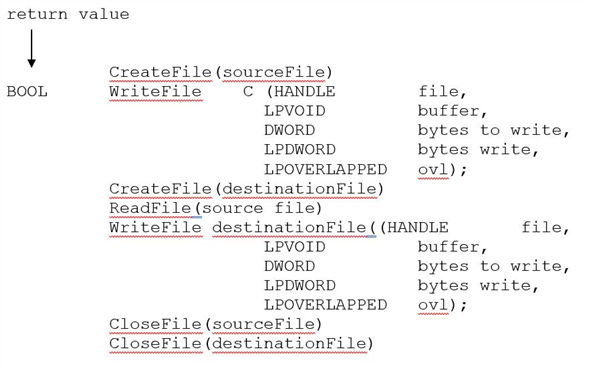
Program to copy the contents of one file to a destination file:
** **
**
A description of the parameters passed to WriteFile () function.
• HANDLE file – file to be written.
• LPVOID buffer – where file to be read into and write from.
• DWORD bytesToWrite - number of bytes written into buffer.
• LPDWORD bytesWrite - number of bytes written during last writing.
• LPOVERLAPPED ovl – If overlapped I/O is being used.
In windows, the system calls can be traced by using the tool dr strace.