Problem 1
Step-1
The fork()is a system call that create a new process. A system call split a process into two processes. These two processes are:
• Parent Process
• Child Process
Step-2
The memory pages which are used by original process are then duplicated after fork() system call. Therefore the Parent and Child processes will get the same image because they have same memory as original process.
The difference between both processes is when the call returns.
• If call returns in parent process, return value will be process id of child process.
• If returns in child process then return value will be ‘0’.
• If call fails and no new process created then return value will be -1.
If process created successfully then parent and child process will run the code from the same place where fork() call was running, due to duplicate memory. There may be two possibilities:
• The parent process ends before child process.
• The child process ends before parent process.
If wait() is called in some parent process then that process will be suspended until child ends.
Step-3
Hence, the output of this program will be 5 at Line A. The child process updates only its copy of value and after that control will be returned to parent process in which the value of value is 5 hence print statements will print the value as 5. Wait()is used in parent process hence firstly child will end then parents execute. Therefore final value will be from parent process.
Problem 2
Step-1
There are 8 processes created, because whenever a fork () function called, it creates processes as child nodes of a growing binary tree. If fork() function is called two times, it will create  processes. All these 4 processes will be the child node of binary tree.
If fork() function is called unconditionally l times, we will have 2l processes.
In this program fork() function is being called 3 times without any condition. So this program will generate total  processes. There will be one parent process and seven child processes.
Problem 3
Step-1
Concurrent systems:
• Concurrent systems are those which support the concept of executing more than one applications or processes at the same time. Here the processes running can either be a duplicate of each other or simply two different processes in all.
• The main motive behind going for concurrency lies beneath reducing the overall execution time that may be required in executing a series of processes individually.
Step-2
Complications with Concurrency
Concurrency may reduce the overall processing time for some situations, but it has few of its complications as well. Three major complications that concurrency adds to an operating system are as follows:
• As multiple processes are concurrently running on the system, the operating system requires keeping track of all the storage space addresses on main memory to prevent one process from mixing with another or using the information stored for any other running process.
• Context switching between two simultaneous processes requires enough time to locate and maintain register values for programs running. A continuous communication between operating system and program control block may overload the system.
• Process that requires big data blocks for execution may enter deadlocks in wait of getting resources freed up by other processes.
Problem 4
Step-1
2481-3-6E SA: 8683
SR: 4478
Context switch time pure overhead, because system does no useful work while switching. Context switch times are highly dependent on hardware support. In Sun Ultra SPARC , context switch simply requires the CPU current-register-set pointer is changed to the register set containing the new context, which takes very little time.
If the new context is in memory rather than register set and all the register sets are in use, then one of the contexts in a register set must be chosen and be moved to memory, and the new context must be loaded from memory into the set. This process takes a little more time than on systems with new context is already on one of the register set.
Problem 5
Step-1
Processes
When a process uses the fork() to create a new process, allthe new processes corresponding to the parent process are created and loaded into a separate memory location for the child process by the operating system. The parent process and the newly created child process only share the shared memory segments.
Therefore, the correct answer is C) Shared memory segments.
Step-2
Stacks and heaps are not shared by these processes. Instead, new copies of the stack and the heap are made for the newly created process, when a process tries to write into these. Therefore, option “A ” and “B ” are incorrect.
Problem 6
Step-1
2481-3-3E SA: 8683
SR: 4478
The “exactly once” semantics ensure that a remote procedure will be executed exactly once. For “exactly once”, we need to remove the risk that the server will never receive the request. To accomplish this, the server must implement the “at most once” protocol but must also acknowledge to the client that the RPC call was received and executed. The client must resend each RPC call periodically until it receives the ACK for that call.
The general algorithm for ensuring this combines an acknowledgment (ACK) scheme combined with timestamps (or some other incremental counter that allows the server to distinguish between duplicate messages) is described as below.
The general strategy is for the client to send the RPC to the server along with a timestamp. The client will also start a timeout clock.
Step-2
The client will then wait for one of two occurrences :
(1) It will receive an ACK from the server indicating that the remote procedure was performed, or
(2) It will time out.
If the client times out, it simply assumes the server was unable to perform the remote procedure so the client invokes the RPC a second time, sending a later timestamp.
The client may not receive the ACK for one of two reasons :
(1) The original RPC was never received by the server, or
(2) The RPC was correctly received—and performed—by the server but the ACK was lost.
In situation (1), the use of ACKs allows the server ultimately to receive and perform the RPC. In situation (2), the server will receive a duplicate RPC and it will use the timestamp to identify it as a duplicate so as not to perform the RPC a second time. It is important to note that the server must send a second ACK back to the client to inform the client the RPC has been performed. So, the server will perform the RPC operation “exactly once” by combining ACK and timestamps.
Problem 7
Step-1
Distributed Systems
The server should keep a history of information and requests regarding the received RPC operations, a track of the successfully performed RPC operations, and the results affiliated to the operations, in stable storage like as a disk log.
In this manner, whenever a server crashes and an RPC message is received, the server can verify whether the RPC had previously been executed or not and therefore guarantee “exactly once” semantics for the execution of RPCs.
Problem 8
Step-1
Step-2
Step-3
Problem 9
Step-1
The process of context switching between the processes is accomplished by the kernel.
This process is performed as follows:
1. In reply to the clock interrupt, Operating System stores the value of the Program Counter and the user Stack Pointer of the presently implementing process, and handovers charge to the kernel clock interrupt handler,
2. The clock interrupt handler hold back the remaining registers, along with other machine status, such as the status of the floating point registers in the Process Control Block of the process.
3. The Operating System call upon the scheduler to decide the next process that has to be implemented.
4. The Operating System takes the status of the next process from its Process Control Block and fix up the registers. This restore task takes the processor back to the state in which the process was earlier interrupted, implementing in user code with user mode privileges.
Problem 10
Step-1
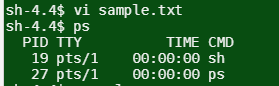
ps command:
This command displays the process ID,**** information about a selection of the active processes and the list contains the processes to kill.
The screen shot of the ps command on the terminal window is as given below:
Create a sample text file the enter the command ps
Step-2
The screen shot of the ps –ael command on the terminal window is as given below:

Step-3
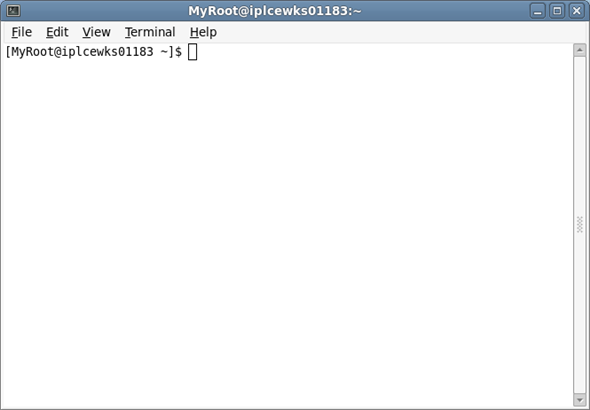
In the Unix terminal is opened by following the given path:
Applications → System tools → Terminal
The screen shot of the terminal window is as given below:
Step-4
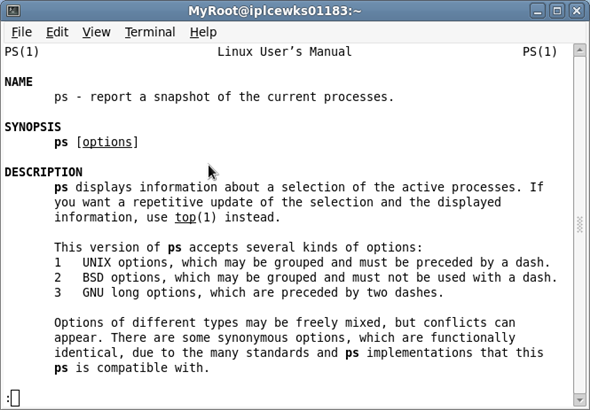
ps command gives a snapshot of the current processes. The screen shot of the man ps command on the terminal window is as given below:
**
Step-5
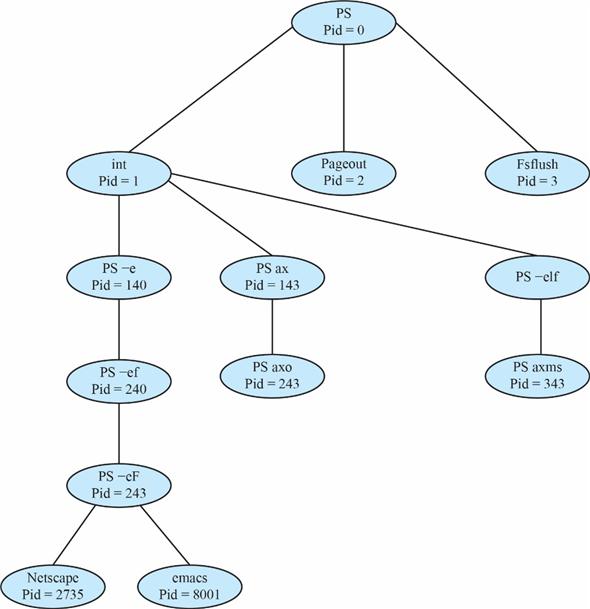
Process Tree:**
Process tree command shows the current running process ID’s as a tree format. Here PS Pid with 0 is the root of the tree and remaining nodes are the child nodes. The process tree as follows:
Problem 11
Step-1
Role of init process with respect to the process termination:
• The initial thing an init process does on initialization is reading the status of etc/init tab file. This file is the initialization file for this process and commands the system about several to-do instructions on a program.
• Besides this, init process has role in process termination too. If the parent process terminates before calling the wait(), it makes the child as orphans. This case is handled in UNIX and LINUX systems by assigning init process.
• This process periodically calls wait(), helping in collection of exit status of any orphaned child process and releasing its processID and process-table entries.
• It also commands terminated processes to restart with the help of “respawn” action.
Problem 12
Step-1
The fork()is a system call that create a new process. A system call split a process into two processes. These two processes are:
• Parent Process
• Child Process
Step-2
To determine the number of processes created, take the code piece as below:
for(i=0; i<4; i++)
fork();
This piece of code is equivalent to four consequent fork() calls. Hence the code can be written as:-
fork();
fork();
fork();
fork();
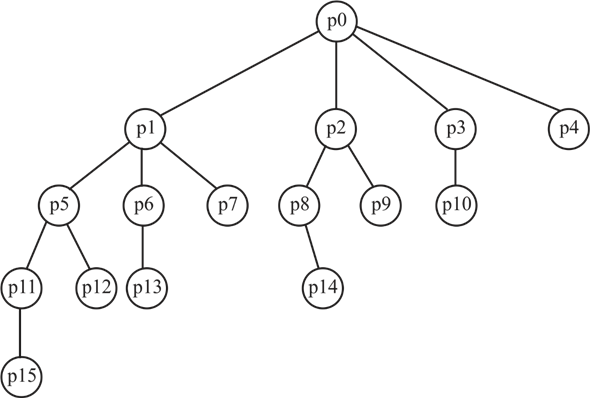
The diagram in figure 1 illustrates how the child processes are created with calls to fork in the program:-
Step-3
Explanation:
• The parent process is taken as “p0”. As there are 4 fork calls in the main program, 4 child processes, named p1, p2, p3 and p4 are created initially with call to each fork (). These child processes execute in similar and in parallel with parent process.
• The newly created child process p1 now encounters the bottom 3 of the four fork calls and create 3 child processes named p5, p6 and p7 with call to second, third and fourth fork () respectively.
• The child process p5 now encounters bottom two fork () calls and creates two new child processes called p11 and p12.
• The process p11 will encounter just one fork () call, that is, the bottom most and create a child p15.
• As p6 is created with call to third fork (), it will also encounter just one fork () call, that is, the bottom most and create a child p13.
• The process p12, created with last fork () call will not meet any new fork () and thus will not create any new child process. Similar will be the case for processes p15, p13 and p7.
• Similarly, the process p2, being created with call to second fork (), encounters bottom two fork () calls and creates two new child processes called p8 and p9.
• As p8 is created with call to third fork (), it will encounter just one fork () call, that is, the bottom most and create a child p14. Similarly, p3 will create p10.
• The processes p14 and p9, each created with last fork () call will not meet any new fork () and thus will not create any new child process. Similar will be the case for p4 and p10.
The whole procedure is depicted with the help of Figure 1.
Thus 15 new child processes will be created. Including the initial parent process, there are 16 processes created by the program.
Hence, in all  processes are created.
Problem 13
Step-1
Consider the code provided in figure 3.33 of chapter 3. The explanation of the code is as follow:
• In main function, the first statement declare a variable pid of pid_t type to store the return value of fork() function.
• After that fork() function is called and store its return value in pid variable. The return value of fork() are as follow:
• If call returns in parent process, return value will be process id of child process.
• If returns in child process then return value will be ‘0’.
• If call fails and no new process created then return value will be -1.
• When value of variable pid becomes 0 then the condition statement else if (pid == 0)is true. Now all the statement inside this conditional statement get executes.
• After this execlp(“/bin/ls”,”ls”,NULL) function get executes. The argument of this function contains the list of other executable files, if file exist then that file execute otherwise returns a value -1 which represent the error.
• If name of the file provided in the execlp() function does not exist then the line Printf(“LINE J”) get executes.
Step-2
The above explanation gives a clear view that an error in executing execlp() function would result in achieving the print command for the program. The reasons for this may be absence of “bin/ls” or it might have been corrupted or no permission for its access.
Problem 14
Step-1
fork() system call:
The fork() function is used to create the new process.
Step-2
The fork() system call returnsthe child’s actual PID to the parent**, “0”** to the child.
Given actual pid of parent = 2600.
actual pid of child = 2603.
So, in the given program
• At line A – It will print “child : pid = 0 ” ( value returned by fork to child)
• At line B – It will print “child : pid1 = 2603 ”.(actual pid of the child)
• At line C – It will print “parent: pid = 2603 ”. (value returned by fork to parent)
• At line D – It will print “parent: pid1 = 2600 ”. (actual pid of the parent).
Problem 15
Step-1
2481-3-8E SA: 8683
SR: 4460
In the following situation ordinary pipes are more suitable than named pipes.
• If we want to establish communication between two specific processes on the same machine, then using ordinary pipes is more suitable than using named pipes because named pipes involve more overhead in this situation.
• In the situation, where we will not allow access to our pipe after the communication is finished between processes using ordinary pipes is more suitable than named pipes.
Step-2
In the following situations named pipes are more suitable than ordinary pipes.
• Named pipes are more suitable than ordinary pipes when the medium is bidirectional, and there is no parent child relationship between processes.
• Named pipes are more suitable than ordinary pipes in situations where we want to communicate over a network rather than communicating with the processes resides on the same machine.
• Named pipes can be used to listen to requests from other processes (similar to TCP/ IP ports). If the calling processes are aware of the name, they can send requests to this. Unnamed pipes cannot be used for this purpose.
Problem 16
Step-1
When local procedure fails under extreme circumstances, RPC can fail, or be duplicated and executed more than once, as a result of network errors. This is said to be semantics of call.
• Let us consider “at most once” semantic in which this can be made possible by attaching a time stamp to each message.
• The server must keep a history of all the time stamp of messages it has already processed or ensure that repeated message it has already processed or ensure that repeated messages are detected.
Step-2
• Incoming message with time stamp will be ignored. The client will send a message more than one times and it will be executed only once.
• “Exactly once” will remove the risk that the server will never receive the request. In order to complete this, the server must implement the “at most once” protocol as well as the acknowledgement should be provided to client that RPC was received and executed.
• These “ACK” message are common throughout networking. The client must resend each RPC call periodically until it receives the “ACK” for that call.
• The concern for communication between a server and a client is of the form of binding takes place during link, load or the execution time, in which the name of the procedure call will be replaced by memory address of the procedure call.
Similar binding of the client and server port is required for the RPC scheme. RPC scheme may be useful.
Problem 17
Step-1
In the program code there are two process loops; one named as child process and another one as parent process. The program typically runs the child process and after that execution is handed over to the parent process.
The child process provides output at “X” line, with the below written code patch:-
for (i = 0; i < SIZE; i++)
{
nums [ i ] *= -i;
printf (“CHILD: %d”, nums [ i ]);
}
As value of SIZE is 5, here each element of the array is multiplied respectively by numbers 0,-1,-2,-3 and -4.


Hence, the output at Line X would be:
CHILD: 0
CHILD: -1
CHILD: -4
CHILD: -9
CHILD: -16
Step-2
The parent process provides output at “Y” line, with the below code patch:
wait (NULL);
for (i = 0; i < SIZE; i++)
printf (“PARENT: %d”, nums [ i ]);
As value of SIZE is 5, here every element of the array is printed. Hence, the output at Line Y would be:
PARENT: 0
PARENT: 1
PARENT: 2
PARENT: 3
PARENT: 4
Problem 18
Step-1
Step-2
Step-3
Step-4
Step-5
Problem 19
Step-1
Program Plan:
• Make a startup function main() to forks a child process.
• Call the fork function.
• If process id is grater then 0 than parent process will invoked.
• If process id 0 child process become zombie.
• If fork() did not work it will create error message.
Step-2
Program:
//Include the header files for performing the operations.
Step-3
//The startup function
int main**(** int argc**,** char ****** argv**)**
{
// Fork off a process
pid_t pid = fork**();**
if ( pid > 0**)**
{
// Parent process
printf**(** “Pid of child %d\n”, pid**);**
// Sleep for 10 seconds
sleep**(** 10u**);**
childpid is storing the status of child process and executing child process. In else condition it is terminated by status.
// Wait for child processes
int status**;**
pid_t childpid = wait**( &status);**
if ( WIFEXITED**(** status**))**
printf**(** “Child %d exited with status %d\n”,
childpid**,** WEXITSTATUS**(** status**));**
else if ( WIFSIGNALED**(** status**))**
printf**(** “Child %d was terminated by signal
%d\n”,
childpid**,** WTERMSIG**(** status**));**
return 0**;**
}
if ( pid == 0**)**
// The child process → do nothing just exit
// so we can become a zombie
return 0**;**
Step-4
Else condition will run if fork is unable to run. Else statement will give an error message and return -err.
Step-5
else
{
// Check if fork didn’t work
int err = errno**;**
printf**(** “fork blew %d\n”, err**);**
return - err**;**
}
}
Step-6
Sample Output:
[abc@localhost 3]$ ./3-19PP &
[2] 5563
Pid of child 5566
[abc@localhost 3]$ ps -l
F S UID PID PPID C PRI NI ADDR SZ WCHAN TTY TIME CMD
0 S 1000 5563 21589 0 80 0 - 1037 hrtime pts/2 00:00:00 3-19PP
1 Z 1000 5566 5563 0 80 0 - 0 exit pts/2 00:00:00 3-19
0 R 1000 5568 21589 0 80 0 - 30315 - pts/2 00:00:00 ps
0 S 1000 21589 2144 0 80 0 - 29118 wait pts/2 00:00:00 bash
0 S 1000 22210 21589 0 80 0 - 150788 poll_s pts/2 00:00:13 emacs
[abc@localhost 3]$ Child 5566 exited with status 0
!!
ps -l
F S UID PID PPID C PRI NI ADDR SZ WCHAN TTY TIME CMD
0 R 1000 5572 21589 0 80 0 - 30307 - pts/2 00:00:00 ps
0 S 1000 21589 2144 0 80 0 - 29118 wait pts/2 00:00:00 bash
0 S 1000 22210 21589 0 80 0 - 150788 poll_s pts/2 00:00:13 emacs
[2]+ Done ./3-19PP
Problem 20
Step-1
Program Plan:
• Make a header file for allocation and release of bitmap.
• Make header for allocate and release process id.
• Make a main function to allocate and de-allocate bitmap and process id.
• Allocate the map for the pids. It will return 1 if unable to allocate pids.
• Calculate the size of the bitmap required. Allocate the bitmap.
• Release the bitmap. Allocate a pid in a range. It assumes that bitmap is valid.
Step-2
Program:
//Include the header files for performing the operations.
ifndef API_3_20PP_H
define API_3_20PP_H
// Allocate the bitmap
extern int allocate_map**(** void**);**
// Release the bitmap
extern void release_map**(** void**);**
// Allocate a pid
extern int allocate_pid**(** void**);**
// Release a pid
extern void release_pid**(** int pid**);**
Step-3
//Include the header files for performing the operations.
include “3-20PP.h”
Define the value of minimum pid, maximum pid and number of bits at position in the bitmap.
// Minimum value of pid
define MIN_PID 300
// Maximum value of pid
define MAX_PID 5000
// The number of bits at a position in the bitmap
define NUM_BITS 8
Initialize the size. Index, offset and process id of bitmap. All variable are declared as static as there value is not changing throughout the program.
// The bitmap of pids
static unsigned char ***** s_bitmap = NULL**;**
// The size of the bitmap
static int s_size = - 1**;**
// The current index into the bitmap
static int s_index = - 1**;**
// The current offset into the index of the bitmap
static int s_offset = - 1**;**
// The last assigned pid
static int s_pid = - 1**;**
Allocate the map for process ids calculating the size of bitmap that is required.
//Allocate the map for the pids.
int allocate_map**(** void**)**
{
// Does the bitmap need to be allocated?
if (! s_bitmap**)**
{
// Calculate the size of the bitmap required
s_size = ( int**)** (( double**)** ( MAX_PID
- MIN_PID + 1
+ NUM_BITS - 1**)**
/ NUM_BITS**);**
// Allocate the bitmap
s_bitmap = ( typeof( s_bitmap**))** malloc**(** s_size**);**
}
// Does the bitmap exist?
if ( s_bitmap**)**
{
// Initialize the variables
s_index = s_offset = 0**;**
s_pid = MIN_PID - 1**;**
return 1**;**
} else
return - 1**;**
}
//Release the bitmap
void release_map**(** void**)**
{
// Does the bitmap exist?
if ( s_bitmap**)**
Step-4
{
// Free it & deinitialize the variables
free**(** s_bitmap**);**
s_bitmap = NULL**;**
s_index = s_offset = s_pid = - 1**;**
}
}
Allocate a pid in a range. It assumes that bitmap is valid. While loop is used to execute the condition until pindex is less then size.
static int allocate_pid_range**(** int ***** pindex**,**
const int size**)**
{
// While the index is less than the size
while (* pindex < size**)**
{
// While the offset within an element
// is less than the number of bits
while ( s_offset < NUM_BITS**)**
{
// Increment the pid
s_pid**++;**
// Did the pid exceed the maximum?
if ( s_pid > MAX_PID**)**
{
// Reset the pid and the offset
s_pid = MIN_PID - 1**;**
s_offset = 0**;**
return - 1**;**
}
// Is the offset free?
if (!( s_bitmap**[*** pindex**]**
& ( 1u < < s_offset**)))**
{
// Fill the offset
s_bitmap**[*** pindex**]** |= 1u < < s_offset**;**
// Increment the offset
s_offset**++;**
return 0**;**
}
// Increment the offset
s_offset**++;**
}
// Reset the offset
s_offset = 0**;**
// Increment the index
(* pindex**)++;**
}
return - 1**;**
}
In allocate_pid function allocate the pid from current index to size of bitmap. If pid is allocated then ret value will be 0 otherwise less than 0.
//Allocate a pid.
int allocate_pid**(** void**)**
{
// Does the bitmap exist?
if ( s_bitmap**)**
{
// Try to allocate a pid from the current index
// to the size of the bitmap
int index = s_index**;**
int ret = allocate_pid_range**( &index,** s_size**);**
// Could a pid be allocated?
if ( ret < 0**)**
{
// Reset the index and try again
index = 0**;**
ret = allocate_pid_range**( &index,** s_index**);**
}
// Was a pid successfully allocated?
if ( ret == 0**)**
{
// Update the index
s_index = index**;**
// Return the pid
return s_pid**;**
}
}
return - 1**;**
}
//Release an allocated pid.
void release_pid**(** int pid**)**
{
// Does the bitmap exist and is the pid valid?
if ( s_bitmap & & pid >= MIN_PID & & pid < = MAX_PID**)**
{
// Subtract MIN_PID so it can be
Step-5
// used to access the bitmap
pid -= MIN_PID**;**
// Clear the entry for the pid in the bitmap
s_bitmap**[** pid / NUM_BITS**]**
& = ~( 1u < < ( pid % NUM_BITS**));**
}
}
Step-6
//Importing header files
include “3-20PP.h”
int main**(** void**)**
{
// Allocate the bitmap
if ( allocate_map**()** != 1**)** {
fputs**(** “allocate_map blew\n”, stdout**);**
return - 1**;**
}
// Allocate 10 pids
int pida**[** 10**],** i**;**
for ( i = 0**;** i < sizeof**(** pida**)** / sizeof**(*** pida**);** i**++)** {
pida**[** i**]** = allocate_pid**();**
printf**(** “allocate_pid %d\n”, pida**[** i**]);**
}
// Release 5 pids
for ( i = 0**;** i < sizeof**(** pida**)** / sizeof**(*** pida**);** i += 2**)** {
release_pid**(** pida**[** i**]);**
}
fputc**(** ‘\n’, stdout**);**
// Allocate 10 pids
for ( i = 0**;** i < sizeof**(** pida**)** / sizeof**(*** pida**);** i += 2**)** {
pida**[** i**]** = allocate_pid**();**
printf**(** “allocate_pid %d\n”, pida**[** i**]);**
}
release_map**();**
return 0**;**
}
Step-7
Sample Output:
allocate_pid 300
allocate_pid 301
allocate_pid 302
allocate_pid 303
allocate_pid 304
allocate_pid 305
allocate_pid -1
allocate_pid -1
allocate_pid -1
allocate_pid -1
allocate_pid 300
allocate_pid 302
allocate_pid 304
allocate_pid -1
allocate_pid -1
Problem 21
Step-1
Program plan:
Input the number from command line.
Apply conditional loop to check that only positive numbers are provided to command line.
Call fork()function that will return processID of the new process created
Apply conditional loop to check if it is child process, parent process or some error occurred while calling fork()function.
If child process is created, change the value of number as per Collatz conjecture.
Step-2
Program:
/*********************************************************** * Program to implement Collatz conjecture*
***********************************************************/
//header file section
Define main method with number and processed as variables.
int main**()**
{
int number**,** processID**;**
/to get number from command line/
fprintf**(** “Enter the number for series \n”);
fscanf**(** “%d”, &number);
/ensure that positive integer is passed/
Error checking to guarantee that positive number is passed.
if ( number**<** 0**)**
{
fprintf**(** “The number cannot be negative”);
}
For positive number,
else
{
/fork() function will return processID of the process/
processID**=** fork**();**
/if any error occurs while process creation/
Depending on processID it is determined whether child process(processID**=** 0) is created or some error occurred while callingfork**().**
if ( processID**<** 0**)**
{
fprintf**(** stderr**,** “The child process could not be
created.”\n**);**
return 1**;**
}
/for child process/
else if ( processID**==** 0**)**
{
do
{
/for odd number/
if ( number**%** 2**!=** 0**)**
{
number**=(** number***** 3**)+** 1**;**
}
/for even number/
else
{
number**=** number**/** 2**;**
}
fprintf**(** “%2d”, number**);**
} while ( number**!=** 1**);**
}
When processID of parent is generated, parent will wait till child process completes its execution.
else
/for parent process/
{
fprintf**(** “\n child process completed”);
wait**(NULL);**
}
}
return 0**;**
}
**
Step-3
Sample Output:**
Enter the number for series
5
16 8 4 2 1
child process completed
Step-4
Output Explanation:
On calling fork() function to create child process, the processID is returned. In child process, the numbers are generated as per Collatz conjecture. The parent process will wait using wait(NULL)command till child process is completed. After that parent process gets completed.
Problem 22
Step-1
Program Plan:
• Make a function shm_allocate to allocate a shared memory segment.
• Create a child process and check that the child executed normally.
• Print out the contents of the shared memory.
• Release the shared memory object using shm_release function.
Step-2
Program:
//Include the header files for performing the operations.
Initialize a variable name as const for shared memory segment, then initialized increment size in shared memory segment in variable size.
// The name of the shared memory segment
const char ***** NAME = “/13258-3-22PP”;
// The size by which to increment the size
// of the shared memory segment
const size_t SIZE = 4096**;**
// The size of the shared memory segment
static size_t s_size = 0**;**
In shm_allocate function, create a shared memory object and shared memory segment.
//Allocate a shared memory segment
static int shm_allocate**(** size_t size**,** int ***** pshm_fd**,**
void ****** pptr**)**
{
if (! pshm_fd || ! pptr**)**
return - 1**;**
// Set the ptr to shared memory to an invalid value
***** pptr = MAP_FAILED**;**
// Create a shared memory object
***** pshm_fd = shm_open**(** NAME**,** O_CREAT | O_RDWR**,** 0666**);**
if (* pshm_fd < 0**)**
return - 2**;**
// Set the size of the shared memory object
if ( ftruncate**(*** pshm_fd**,** size**)** < 0**)**
return - 3**;**
// Create a shared memory segment
***** pptr = mmap**(NULL,** size**,** PROT_WRITE | PROT_READ**,**
MAP_SHARED**,** ***** pshm_fd**,** 0**);**
if (* pptr == MAP_FAILED**)**
return - 4**;**
return 0**;**
}
Use shm_release function to unmap the shared memory segment and unlink the shared memory segment.
//Release a shared memory segment and object
static void shm_release**(** size_t size**,** int shm_fd**,**
void ***** ptr**)**
{
// Unmap the shared memory segment
if ( ptr != MAP_FAILED**)**
munmap**(** ptr**,** size**);**
// Unlink the shared memory segment
if ( shm_fd >= 0**)**
shm_unlink**(** NAME**);**
}
//The startup function
int main**(** int argc**,** char ****** argv**)**
{
int n**;**
int status**;**
// Check that a positive integer was passed
if ( argc != 2**)** {
fprintf**(** stderr**,** “%s [+ve integer]\n”, ***** argv**);**
return 1**;**
}
// Set n to the argument the program was invoked with
n = atoi**(** argv**[** 1**]);**
if ( n < = 0**)** {
fprintf**(** stderr**,** “%s [+ve integer]\n”, ***** argv**);**
return 2**;**
}
do {
s_size += SIZE**;**
// The file descriptor of the shared memory object
Step-3
int shm_fd**;**
// Pointer to the shared memory
void ***** ptr**;**
// Allocate the shared memory
if ( shm_allocate**(** s_size**,** & shm_fd**,** & ptr**)** < 0**)** {
fprintf**(** stderr**,** “Couldn’t allocate ”
“shared memory of size %lu ”
“bytes\n”, s_size**);**
return 3**;**
}
Fork process is called and process id is stored in variable pid. If pid is greater than zero than wait for child to execute.
// Fork off a child process
pid_t pid = fork**();**
// Is is the parent process?
if ( pid > 0**)** {
// Wait for the child to exit
wait**( &status);**
}
// Is it the child process?
else if ( pid == 0**)** {
int out**;**
// While n is greater than 1
while ( n > 1**)** {
// Print n to the shared memory
out = snprintf**(** ptr**,** s_size**,** “%d\n”, n**);**
// Did we run out of space?
if ( out >= s_size**)**
return 1**;**
// Decrement size
s_size -= out**;**
// Increment the pointer into
// the shared memory
ptr += out**;**
// Apply the Collatz conjecture
n = ( n % 2**)** ? 3 ***** n + 1 : n / 2**;**
}
// Print out the final value of n
// to the shared memory
out = snprintf**(** ptr**,** s_size**,** “%d\n”, n**);**
// Return 1 if we ran out of space,
// else return zero
return ( out >= s_size**)** ? 1 : 0**;**
}
// Did the fork system call not work?
else if ( pid < 0**)** {
fprintf**(** stderr**,** “fork blew %d\n”, errno**);**
// Release the shared memory and exit
shm_release**(** s_size**,** shm_fd**,** ptr**);**
return 4**;**
}
// Check that the child exicuted normally
if (! WIFEXITED**(** status**))** {
fputs**(** “Child did not exit normally”, stderr**);**
// Was it killed by a signal?
if ( WIFSIGNALED**(** status**))**
fprintf**(** stderr**,** ”, it was terminated by ”
“signal %d”, WTERMSIG**(** status**));**
fputc**(** ‘\n’, stderr**);**
// Release the shared memory
shm_release**(** s_size**,** shm_fd**,** ptr**);**
return 5**;**
}
// Did the child exit with a value of zero?
else if ( WEXITSTATUS**(** status**)** == 0**)**
// Print out the contents of the shared memory
fputs**(** ptr**,** stdout**);**
// Release the shared memory
shm_release**(** s_size**,** shm_fd**,** ptr**);**
}
// Loop while the child did not exit
// with a valid value
while ( WEXITSTATUS**(** status**)** > 0**);**
return 0**;**
}
Step-4
Sample Output:
21:32 3$ ./3-22PP 35
35
106
53
160
80
40
20
10
5
16
8
4
2
1
Problem 23
Step-1
Program Plan:
• Define a main() function and create a new server socket.
• Write a Try block in which server socket is created and if error occurred then cached by catch block.
• Create an Object to output to the client.
• Check if the file couldn’t be opened. Close the connection to the client.
Step-2
Program:
//Importing the package
import java**.** net**.*;**
import java**.** io**.*;**
//The quote of the day server class
public class QotdServer
{
//The startup function
public static void main**(** String**[]** args**)**
In the main function create a server socket. Use a try catch block for handling exceptional error. In the while loop connect to the client and read the QOTD file using buffer reader.
{
try {
// Create a new server socket
ServerSocket sock = new ServerSocket**(** 6017**);**
// Loop forever
while (true) {
// Wait for a client to connect
Socket client = sock**.** accept**();**
// Object to output to the client
PrintWriter pout = null**;**
// Object to read the QOTD file
BufferedReader rin = null**;**
try {
// Create an output stream
pout = new PrintWriter**(**
client**.** getOutputStream**(),** true**);**
// Open the QOTD file
rin = new BufferedReader**(**
new FileReader**(** “3-23PP.qotd”));
// Loop while a line can be read
String line**;**
while (( line = rin**.** readLine**())**
!= null**)**
// Write it to the client
pout**.** println**(** line**);**
}
Check if the file couldn’t be opened using catch block and if unable to open then print and error message.
catch ( FileNotFoundException
exception**)** {
System**.** err**.** println**(** exception**);**
}
// Check if an error occurred on
// reading from the file
catch ( IOException exception**)** {
System**.** err**.** println**(** exception**);**
}
finally
{
// Close the file input object
if ( rin != null**)**
rin**.** close**();**
// Close the output object
if ( pout != null**)**
pout**.** close**();**
}
// Close the connection to the client
client**.** close**();**
}
}
// Did accepting a client blow up?
catch ( IOException exception**)** {
System**.** err**.** println**(** exception**);**
}
}
}
Step-3
Sample Output:
[abc@localhost 3]$ javac QotdServer.java
[abc@localhost 3]$ java QotdServer &
[1] 5916
[abc@localhost 3]$ telnet localhost 6017
Trying ::1…
Connected to localhost.
Escape character is ’^]’.
The best definition of a gentleman is a man who can play the accordion —
but doesn’t.
Step-4
— Tom Crichton
Connection closed by foreign host.
Problem 24
Step-1
Program Plan:
• Make a class HaikuServer that contain main function.
• Use try catch block for error handling related to file.
• Create a server socket in Try block.
• Connect to the client and read the Haiku file using BufferReader.
• Write the lines to the client.
• If file is unable to open print an error message in catch block.
Step-2
Program:
//Importing the package
import java**.** net**.*;**
import java**.** io**.*;**
//The Haiku server
public class HaikuServer
{
//The startup function
public static void main**(** String**[]** args**)**
{
In the try block create a server socket. Use a while loop and inside this loop connect to the client and read the Haiku File using BufferReader.
try {
// create a new server socket
ServerSocket sock = new ServerSocket**(** 5575**);**
// Loop forever
while (true) {
// Wait for a client to connect
Socket client = sock**.** accept**();**
// Object to output to the client
PrintWriter pout = null**;**
// Object to read the Haiku file
BufferedReader rin = null**;**
try {
// Create an output stream
pout = new PrintWriter**(**
client**.** getOutputStream**(),** true**);**
// Open the Haiku file
rin = new BufferedReader**(**
new FileReader**(** “3-24PP.haiku”));
// Loop while a line can be read
String line**;**
while (( line = rin**.** readLine**())**
!= null**)**
// Write it to the client
pout**.** println**(** line**);**
}
In the catch block file exception is handled. If file could not be opened then it will show an error message. In finally block, close the file input object.
// Check if the file couldn’t
// be opened
catch ( FileNotFoundException
exception**)** {
System**.** err**.** println**(** exception**);**
}
// Check if an error occurred on
// reading from the file
catch ( IOException exception**)** {
System**.** err**.** println**(** exception**);**
} finally {
// Close the file input object
if ( rin != null**)**
rin**.** close**();**
// Close the output object
if ( pout != null**)**
pout**.** close**();**
}
// Close the connection to the client
client**.** close**();**
}
}
// Did accepting a client blow up?
catch ( IOException exception**)** {
System**.** err**.** println**(** exception**);**
}
}
}
Step-3
Sample Output:
[abc@localhost 3]$ javac HaikuServer.java
[abc@localhost 3]$ java HaikuServer &
[1] 5512
[abc@localhost 3]$ telnet localhost 5575
Trying ::1…
Connected to localhost.
Escape character is ’^]’.
An old silent pond…
Step-4
A frog jumps into the pond,
splash! Silence again.
Connection closed by foreign host.
Problem 25
Step-1
An echo server is server that echoes back whether it receives from a client.
Scenario:
If a client sends the server string Hello there! The server will respond with the exact data it received from the client-that is, Hello there!
It is need to write the echo server program using the Java networking API to perform the following steps:
• Read data from the socket into a buffer.
• Write the contents of the buffer back to the client.
Step-2
Client Program by using Java networking API:
EchoClient.Java:
//import the header package
import java.io.*;
import java.net.*;
//Create the class EchoClient
public class EchoClient
{
//define the main() function
public static void main(String[] args)
{
//use try-catch block
try
{
//define the local host
Socket st = new Socket(“localhost”, 1000);
BufferedReader read = new BufferedReader
(new InputStreamReader
(st.getInputStream()));
//get the local host
PrintWriter pw = new PrintWriter
(st.getOutputStream(), true);
BufferedReader con = new BufferedReader
(new InputStreamReader(System.in));
String li;
//use do-while loop
do
{
li = read.readLine();
if ( li != null )
System.out.println(li);
li = con.readLine();
pw.println(li);
}
while(!li.trim().
equalsIgnoreCase((“bye”)));
}
//throw the exception
catch (Exception e)
{
System.out.println(e);
}
}
}
Step-3
Server Program by using Java networking API:
EchoServer.Java:
//import the header package
import java.io.*;
import java.net.*;
//Create the class EchoServer
public class EchoServer
{
//define the main() function
public static void main(String[] args)
throws IOException
{
//define the server host
ServerSocket server = new ServerSocket(1000);
//use while loop to check true
while (true)
{
//Accept the method
Socket client = server.accept();
//read the buffer
BufferedReader read = new BufferedReader
(new InputStreamReader
(client.getInputStream()));
//get the host
PrintWriter pw = new PrintWriter
(client.getOutputStream(), true);
pw.println(“Welcome to Echo Server. ”
+ “Enter ‘bye’ to quit.”);
String li;
Step-4
//use do-while loop
do
{
li = read.readLine();
System.out.println(li);
if ( li != null )
pw.println(li);
}
while ( !li.trim().
equalsIgnoreCase(“bye”) );
//close the operation
client.close();
}
}
}
Problem 26
Step-1
Program Plan:
• Create an index for reading and writing files from pipe.
• Initialize the size of buffer.
• Create a function write_string that takes the size of string.
• Create another function read_buffer that read the string.
• Write the main() function that create the pipes. It uses fork function and also calls other function to print string in reverse order.
Step-2
Program:
//Include the header files for performing the operations.
// The index of the file descriptor for reading from a pipe
const int READ_END = 0**;**
// The index of the file descriptor for writing from a pipe
const int WRITE_END = 1**;**
// The size of the buffer
const int BUFFER_SIZE = 512**;**
Step-3
Write a null terminated string to a file descriptor.
ssize_t write_string**(** int fd**,** char ***** string**)**
{
// Used to store the size of the string
size_t size**;**
if ( fd < 0 || ! string**)**
return - 1**;**
// Get the size of the string
size = strlen**(** string**);**
// While there are bytes left to send
while ( size > 0**)** {
// Try to write size bytes
ssize_t sent = write**(** fd**,** string**,** size**);**
// Check for error
if ( sent < 0**)** {
int err = errno**;**
fprintf**(** stderr**,** “write error %d - %s\n”,
err**,** strerror**(** err**));**
return - 2**;**
}
// Update size & buffer
size -= sent**;**
string += sent**;**
}
return 0**;**
}
Read_buffer function is created to initialized index and attempt to read (size - index) bytes into buffer at offset index. Read from a file descriptor into a buffer of size bytes.
ssize_t read_buffer**(** int fd**,** char ***** buffer**,** size_t size**)**
{
// The index into the buffer
ssize_t index**;**
if ( fd < 0 || ! buffer || size < 0**)**
return - 1**;**
// Initialize the index
index = 0**;**
// While the index into the buffer is less
// than its size
while ( index < size**)** {
// Attempt to read (size - index) bytes
// into buffer at offset index
ssize_t bytes_read = read**(** fd**,** buffer + index**,**
size - index**);**
// If nothing left then break out of the loop
if ( bytes_read == 0**)**
break**;**
// Has an error occurred?
if ( bytes_read < 0**)** {
int err = errno**;**
fprintf**(** stderr**,** “read blew %d - %s\n”,
err**,** strerror**(** err**));**
return - 2**;**
}
// Add the bytes read to update the index
index += bytes_read**;**
}
return index**;**
}
main() function is defined that defines files descriptor for first and second pipe and creating them. A child process is forked to run different pipelines.
//The startup function
int main**(** int argc**,** char ****** argv**)**
{
Step-4
// File descriptors for the 1st pipe
int fd1**[** 2**];**
// File descriptors for the 2nd pipe
int fd2**[** 2**];**
// A buffer to store data read from or written to
// a file descriptor
char buffer**[** BUFFER_SIZE**];**
// Check if we were invoked with strings to reverse
if ( argc == 1**)** {
fprintf**(** stderr**,** “%s [strings to reverse]\n”,
***** argv**);**
return 1**;**
}
// Create the 1st pipe
if ( pipe**(** fd1**)** < 0**)** {
fprintf**(** stderr**,** “pipe blew %d\n”, errno**);**
return 2**;**
}
// Create the 2nd pipe
if ( pipe**(** fd2**)** < 0**)** {
fprintf**(** stderr**,** “pipe blew %d\n”, errno**);**
// Close the file descriptors of the 1st pipe
close**(** fd1**[** WRITE_END**]);**
close**(** fd1**[** READ_END**]);**
return 2**;**
}
// Fork a child process
pid_t pid = fork**();**
// Check if are we in the parent process?
if ( pid > 0**)** {
int index**,** bytes_read**;**
// Close the reading end of the 1st pipe
close**(** fd1**[** READ_END**]);**
// Close the writing end of the 2nd pipe
close**(** fd2**[** WRITE_END**]);**
// For all the arguments the program
// was invoked with
for ( index = 1**;** index < argc**;** index**++)**
// Write current argument to the writing
// end of the 1st pipe
if ( write_string**(** fd1**[** WRITE_END**],**
argv**[** index**])** < 0**)**
break**;**
// Close the writing end of the 1st pipe
close**(** fd1**[** WRITE_END**]);**
// Loop while data can be read from the
// reading end of the 2nd pipe
while (( bytes_read = read**(** fd2**[** READ_END**],**
buffer**,**
sizeof**(** buffer**)** - 1**))**
> 0**)** {
// Null terminate the string read
buffer**[** bytes_read**]** = ‘\0’;
// Output the string
fputs**(** buffer**,** stdout**);**
}
// Output a newline
fputc**(** ‘\n’, stdout**);**
// Close the reading end of the 2nd pipe
close**(** fd2**[** READ_END**]);**
// Wait for the child to exit
wait**(NULL);**
}
// Is it the child process?
else if ( pid == 0**)** {
int bytes_read**,** index**;**
// Close the writing end of the 1st pipe
close**(** fd1**[** WRITE_END**]);**
// Close the reading end of the 2nd pipe
close**(** fd2**[** READ_END**]);**
Read data into buffer from the reading end of the 1st pipe**.** Assume that no more than the buffer’s (size - 1) bytes are written.
bytes_read = read_buffer**(** fd1**[** READ_END**],**
buffer**,**
sizeof**(** buffer**)** - 1**);**
// Close the reading end of the 1st pipe
close**(** fd1**[** READ_END**]);**
// Cycle from the 1st byte of the buffer to
// the middle of it
for ( index = 0**;** index < bytes_read / 2**;** index**++)**
{
// Interchange the byte at index with
// the byte at (bytes_read - index - 1)
char tmp = buffer**[** index**];**
buffer**[** index**]** = buffer**[** bytes_read
- index - 1**];**
buffer**[** bytes_read - index - 1**]** = tmp**;**
}
// Null terminate the buffer
buffer**[** bytes_read**]** = ‘\0’;
// Write the buffer to the writing end
// of the 2nd pipe
write_string**(** fd2**[** WRITE_END**],** buffer**);**
// Close the writing end of the 2nd pipe
close**(** fd2**[** WRITE_END**]);**
}
// Did the fork system call malfunction?
else {
Step-5
fprintf**(** stderr**,** “fork blew %d\n”, errno**);**
// Close the file descriptors of both the pipes
close**(** fd1**[** WRITE_END**]);**
close**(** fd1**[** READ_END**]);**
close**(** fd2**[** WRITE_END**]);**
close**(** fd2**[** READ_END**]);**
return 3**;**
}
return 0**;**
}
Step-6
Sample Output:
[abc@localhost 3]$ ./3-26PP abcdefghijklmnopqrstuvwxyz
zyxwvutsrqponmlkjihgfedcba
Problem 27
Step-1
Program Plan:
• Create an index for reading and writing files from pipe.
• Write to a file descriptor from a buffer of size bytes using function write_buffer.****
• Read from a file descriptor into a buffer of size bytes using function read_buffer.
• Write a main() function. It uses fork function and also calls other function to read and write file. ****
Step-2
Program:
//Include the header files for performing the operations.
// The index of the file descriptor for reading from a pipe
const int READ_END = 0**;**
// The index of the file descriptor for writing from a pipe
const int WRITE_END = 1**;**
// The size of the buffer
const int BUFFER_SIZE = 512**;**
Step-3
//Write to a file descriptor from a buffer of size bytes
ssize_t write_buffer**(** int fd**,** char ***** buffer**,** size_t size**)**
{
if ( fd < 0 || ! buffer || size < 0**)**
return - 1**;**
// While there are bytes left to send
while ( size > 0**)** {
// Try to write size bytes
ssize_t sent = write**(** fd**,** buffer**,** size**);**
// Was there an error?
if ( sent < 0**)** {
int err = errno**;**
fprintf**(** stderr**,** “write error %d - %s\n”,
err**,** strerror**(** err**));**
return - 2**;**
}
// Update size and buffer
size -= sent**;**
buffer += sent**;**
}
return 0**;**
}
Step-4
Read from a file descriptor into a buffer of size bytes. Read_buffer function is created to initialized index and attempt to read (size - index) bytes into buffer at offset index. Read from a file descriptor into a buffer of size bytes.
Step-5
ssize_t read_buffer**(** int fd**,** char ***** buffer**,** size_t size**)**
{
// The index into the buffer
ssize_t index**;**
if ( fd < 0 || ! buffer || size < 0**)**
return - 1**;**
// Initialize the index
index = 0**;**
// While the index into the buffer is less
// than its size
while ( index < size**)** {
// Attempt to read (size - index) bytes
// into buffer at offset index
ssize_t bytes_read = read**(** fd**,** buffer + index**,**
size - index**);**
// If nothing left then break out of the loop
if ( bytes_read == 0**)**
break**;**
// Has an error occurred?
if ( bytes_read < 0**)** {
int err = errno**;**
fprintf**(** stderr**,** “read blew %d - %s\n”,
err**,** strerror**(** err**));**
return - 2**;**
}
// Add the bytes read to update the index
index += bytes_read**;**
}
return index**;**
}
Step-6
main() function is defined that defines files descriptor for first and second pipe and creating them. A child process is forked to run different pipelines.
//The startup function
int main**(** int argc**,** char ****** argv**)**
{
Step-7
// The file descriptors for the pipe
int fd**[** 2**];**
// The buffer used to store data
char buffer**[** BUFFER_SIZE**];**
// Name of the source file
char ***** source**;**
// Name of the destination file
char ***** destination**;**
// Were we invoked with the right arguments?
if ( argc != 3**)** {
fprintf**(** stderr**,** “%s [source file] ”
“[destination file]\n”, ***** argv**);**
return 1**;**
}
// Initialize the source & destination filenames
source = argv**[** 1**];**
destination = argv**[** 2**];**
// Create the pipe
if ( pipe**(** fd**)** < 0**)** {
fprintf**(** stderr**,** “pipe blew %d\n”, errno**);**
return 2**;**
}
// Fork off a process
pid_t pid = fork**();**
// Are we in the parent process?
if ( pid > 0**)** {
int fd_source**,** status**;**
size_t bytes_read**;**
// Close the reading end of the pipe
close**(** fd**[** READ_END**]);**
// Open the source file
fd_source = open**(** source**,** O_RDONLY**);**
if ( fd_source < 0**)** {
int err = errno**;**
fprintf**(** stderr**,** “Couldn’t open file ‘%s’ ”
“for reading - %d, %s\n”, source**,**
err**,** strerror**(** err**));**
close**(** fd**[** WRITE_END**]);**
wait**(NULL);**
return 3**;**
}
// While bytes can be read from the file
while (( bytes_read = read**(** fd_source**,**
buffer**,**
sizeof**(** buffer**)))**
> 0**)**
// Write the data read into the writing
// end of the pipe
if ( write_buffer**(** fd**[** WRITE_END**],**
buffer**,** bytes_read**)** < 0**)**
break**;**
// Close the source file descriptor
close**(** fd_source**);**
// Close the writing end of the pipe
close**(** fd**[** WRITE_END**]);**
// Wait for the child to exit
if ( wait**( &status)** >= 0**)** {
// Was the child killed by a signal?
if ( WIFSIGNALED**(** status**))** {
fprintf**(** stderr**,** “Child process was ”
“terminated by signal %d\n”,
WTERMSIG**(** status**));**
return 4**;**
}
// Did the child not exit with code 0?
if ( WEXITSTATUS**(** status**)** != 0**)**
return 5**;**
return 0**;**
} else
return 6**;**
}
// Is it the child process?
else if ( pid == 0**)** {
ssize_t bytes_read**;**
int fd_destination**;**
// Close the writing end of the pipe
close**(** fd**[** WRITE_END**]);**
// Create the destination file
fd_destination = open**(** destination**,**
O_CREAT | O_WRONLY | O_TRUNC**,**
S_IRUSR**);**
if ( fd_destination < 0**)** {
int err = errno**;**
fprintf**(** stderr**,** “Couldn’t open ”
“destination file ‘%s’ - %d, %s\n”,
destination**,** err**,** strerror**(** err**));**
close**(** fd**[** READ_END**]);**
return 1**;**
}
// While bytes can be read from the reading
// end of the pipe
while (( bytes_read = read_buffer**(** fd**[** READ_END**],**
buffer**,**
sizeof**(** buffer**)))**
> 0**)**
// Write the bytes read to the file
write**(** fd_destination**,** buffer**,** bytes_read**);**
// Close the destination file descriptor
close**(** fd_destination**);**
// Close the reading end of the pipe
Step-8
close**(** fd**[** READ_END**]);**
return 0**;**
}
// Did the system call fork malfunction?
else {
fprintf**(** stderr**,** “fork blew %d\n”, errno**);**
// Close the pipe
close**(** fd**[** WRITE_END**]);**
close**(** fd**[** READ_END**]);**
return 7**;**
}
}
Step-9
Sample Output:
[abc@localhost 3]$ fortune | tee 3-27PP.source
My opinions may have changed, but not the fact that I am right.
[abc@localhost 3]$ ./3-27PP 3-27PP.source 3-27PP.destination
[abc@localhost 3]$ cat 3-27PP.destination
My opinions may have changed, but not the fact that I am right.