Problem 1
Step-1
Multithreading in programming languages
To execute any application program, a number of threads (light weight processes) are used. This is done, because if any single thread is blocked, the application will not stop. Most of the programming languages uses the concept of multithreading. The examples to show the use of multithreading in programming languages are as given below:
• In a web server environment, a number of users request for the application. Thus, when any application is executed through the web server, a number of different threads are executed for different users.
• In graphic user interface, different threads are executed for different tasks. For example, first thread is used to fix the bugs, the second thread is responsible for the execution of the program and another one is responsible for the performance of the program.
If any program is executed using only one thread, then, if that thread is blocked, the total application will stop responding. So, it can be said that the performance of multi-threading is much better than system with single thread.
Problem 2
Step-1
Following are the differences between user-level threads and kernel-level threads:
| User-level threads | Kernel-level threads |
|---|---|
| The existence of user-level threads is unknown to the kernel. | The existence of kernel-level threads is known to the kernel. |
| User-level threads are managed without kernel support. | Kernel-level threads are managed by the operating system. |
| User-level threads are faster to create than are kernel-level threads. | Kernel-level threads are slower to create than are user-level threads. |
| User-level threads are scheduled by the thread library. | Kernel-level threads are scheduled by the kernel. |
Step-2
Circumstances where kernel-level threads are better than user-level threads:
• If the kernel is single-threaded, then kernel-level threads are better than user-level threads, because any user-level thread performing a blocking system call will cause the entire process to block, even if other threads are available to run within the application.
For example a process P1 has 2 kernel level threads and process P2 has 2 user-level threads. If one thread in P1 gets blocked, its second thread is not affected. But in case of P2 if one thread is blocked (say for I/O), the whole process P2 along with the 2nd thread gets blocked.
• In a multiprocessor environment, the kernel-level threads are better than user-level threads, because kernel-level threads can run on different processors simultaneously while user-level threads of a process will run on one processor only even if multiple processors are available.
Step-3
Circumstances where user-level threads are better than kernel-level threads:
• If the kernel is time shared, then user-level threads are better than kernel-level threads, because in time shared systems context switching takes place frequently. Context switching between kernel level threads has high overhead, almost the same as a process whereas context switching between user-level threads has almost no overhead as compared to kernel level threads.
Problem 3
Step-1
Kernel:
• Kernel is the head of any operating system.
• Several threads with different tasks are executed by the kernel.
• The interrupts generated by multi-threading are handled by kernel.
Step-2
The Role of kernel in threading are as follows:
When a context switch is occurred among the threads of kernel level, the kernel suspends all the threads and their respective values from the registers of the central processing unit (CPU). The newly scheduled threads restore the values in the registers.
Thus, due to this the current process state is also saved as well as the state og the incoming processes can also be restored.
For a kernel, the execution time is the main issue. If the new processes are created for the execution, rather than threads, it becomes more time consuming. So, the context stored in the registers of the CPU is switched.
Problem 4
Step-1
2481-4-10E SA: 8683
SR: 4578
A thread is a basic unit of CPU utilization, also known as light weight process. So, creating either a user or kernel thread involves allocating a small data structure to hold a thread ID, a program counter, a register set, stack and priority, whereas creating a process involves allocating the large data structure called as PCB(Process Control Block) which includes a memory map, list of open files, and environment variables. Allocating and managing the memory map is typically the most time-consuming activity.
Resources are used when a thread is created:
1. Code section
2. Data section and
3. Other operation system resources such as open files and signals with other threads belonging to the same process whereas each and every process has separate code section, data section and operating system resources.
Problem 5
Step-1
Threads with real time system
In an application which is based on real time processing, time plays an important role for execution. Threads are the parts of the process and also known as light weight process (LWP).
When a thread is noticeable as the thread of real time but a Light weight process is not bounded with this thread, then, the thread must have to be waiting for the attachment of LWP.
When a LWP is attached to any thread, the priority of that thread becomes higher. So, in a condition of dead lock, if a thread is having LWP, the thread has a minimum waiting time for the execution and time is saved. Thus, it can be said that the LWP attached thread is required in the real time systems.
Problem 6
Step-1
The programming examples in which multithreading do not provide better performance than a single-threaded solution is as follows:
• In the linear programming, the multithreading does not provide better performance than a single-threaded solution. In the single-threaded solution, the linear programing has better performance. Programs like, computing the factorial of a number, sorting numbers, and minimizing the linear equations provide better performance using the single thread.
• The multithreading does not provide better performance in the “shell programs”. The shell programs use the single thread to execute the program. C-shell and Korn shell programs do not provide better performance in multithreading.
Problem 7
Step-1
Solution:
In a single-processor system, the multithreaded solution uses the multiple kernels than a single-threaded solution for better performance because of the following scenarios :
• In a single-processor system, when the system suffers a page fault the kernel thread switches into another kernel thread while running the process.
• It leaves the time in a useful manner.
• Also, for the single-threaded solutions, when the page fault occurs, it is not capable to perform the process on the useful note in the system.
• It leads to the waiting time and suffers the events in the process of the system.
These are the scenarios does the multithread solutions perform better than the single-thread solutions on a single-processor system.
Step-2
For instance,
• If the user schedules the process in the kernel threads, if one kernel thread is blocked, it automatically switches to the other.
• It is efficient for the system to schedule user level processes to the kernel threads.
• For scheduling purposes, some OS assigns the user-level threads to the kernel threads.
• Multithreaded solution performs faster on the single-processor system by using kernel threads.
• It is much more complicated for the single-threaded solution to achieve the efficiency achieved by the multi-threaded solution.
• The advantage that deals are multi-tasking processes in the system.
Step-3
Two programming examples for the better performance is as follows:
-
Sequential programs are not good for candidates for multiprogramming. Calculating individual Tax returns is one of the examples for this type of program.
-
The second example can be any shell programs like C-shell or Korn shell. These programs monitor its own working places such as open files, current working directory, and environment variables.
Problem 8
Step-1
Heap memory and Global variables shared across in multi-thread process. In multi thread process, each thread has its own stack and register values.
Problem 9
Step-1
Thus, a multithreaded system which has multiple user-level threads, cannot use different processors in multiprocessor system at the same time. Only a single process is visible to the operating system and the different threads of the process, present on separate processors are not scheduled.
Thus, on executing multiple user-level threads on multiprocessor system, no performance benefit occurs.
Step-2
Thus, user level threads cannot take advantage of multiple processors. They would perform the same.
Problem 10
Step-1
Processes and threads both can typically be defined as sequences of execution, for any program. The main difference lies beneath the memory space they share on the RAM or main memory of the system while getting executed.
• Each process acquires a unique address space on the memory; whereas threads of a program usually share the same memory space for their execution.
• Processes act independently while threads always remain dependent on their consequent thread for their execution. Threads remain a chain of instructions where a small breakdown may terminate the entire execution.
Step-2
Google Chrome Browser maintains to open each new website as an independent process rather than opening them as threads to ensure that no website breakdown affects others’ service.
One cannot maintain the efficiency of the browser while opening each new website as a thread, because threads are allocated with shared memory spaces. Hence they may affect each other if one of them crashes unexpectedly.
Problem 11
Step-1
Concurrency but not Parallelism
Both are a form of an operating system. Sometimes, to complete a task, both methods needed to finish the task and sometimes one. The priority to select, which form is better, depends upon the requirement of system and according to that operating system coding created.
Yes, it is possible to have concurrency but not parallelism.
Concurrency:
Concurrency means where two different tasks or threads start working together in an overlapped time period, however, it does not mean that they run at same instant.
Example:
Multi-task switch on a single-cored processor
In a Concurrency, minimum two threads are to be executed for processing.
A more generalized form of parallelism includes time-slicing which is a form of virtual parallelism.
Explanation:
Consider a Scenario, where Process ‘A’ and ‘B’ each have four different tasks P1, P2, P3, and P4. So in order to go for execution, first Process ‘A’ of P1 executes, then Process ‘B’ of P1 executes, Secondly, Process ‘A’ of P2 executes, then Process ‘B’ of P2 executes and goes on until all the threads are finished for their execution.
Step-2
Parallelism:
Parallelism is where two or more different tasks start their execution at the same time. It means that the two tasks or threads start working simultaneously.
Example:
Multi-cored Processor
Explanation:
Consider a Scenario, where Process ‘A’ and ‘B’ and each have four different tasks P1, P2, P3, and P4, so both process go for simultaneous execution and each works independently.
Therefore, concurrency can be occurring number of times which are same as parallelism if the process switching is quick and rapid. So, yes, it is possible to have concurrency but not parallelism.
Problem 12
Step-1
As per Amdahl’s law, formula for the speedup gain of an application is  where,
  is the portion of the application that must be performed serially and N is the no of processing cores.
Step-2
(a)
For two processing cores and 60 percent parallel component,  is 40 percent that is 0.4 and N is 2.


Speedup gain is 1.428 times.
Step-3
(b)
For four processing cores and 60 percent parallel component
Here,  is 40 percent that is 0.4 and
  is 4.
is 4.


Speedup gain is 1.81 times.
Problem 13
Step-1
Refer to the question provided in Exercise 4.21 for defining the answer for part (a).
Refer to the Project 1 provided in chapter 4 for defining the answer of part (b).
Refer to the Project 2 provided in chapter 4 for defining the answer of part (b).
Refer to the multithreaded web server provided in Section 4.1.
Step-2
Task Parallelism: The task or thread is allocated across the multiple computing cores and each thread operates different operation.
Data Parallelism: The subset of same data is allocated across the multiple computing cores and each core operates same operation on those data.
Step-3
a)
• Here, multiple threads are created and each thread will perform its dedicated task.
• For example, first thread is assigned to calculate average for all the numbers in the list.
• Whereas, second thread is performing the function to find minimum value and third thread is assigned to calculate maximum value in the program.
• Hence, the problem exhibits Task Parallelism.
Step-4
b)
• In Sudoku validator example, there are constraints that each row or column should contain the digits from 1 to 9. And each grid should have digits from 1 to 9 in its column, row and subgrids without repetitions.
• So, in this problem, different threads will perform the same task of checking digits from 1 to 9 but they will do this for different content.
• Hence, the problem exhibits Data Parallelism.
Step-5
c)
• Here, in sorting list, the list is divided in two halves by threads from process. Then, those two separate threads run concurrently and execute individually to generate two sorted sub lists from the global/original list. Thus, here it is using data parallelism.
• Then, third thread is also used which is combining the two sorted lists into single sorted list. Here, it is using task parallelism.
• Hence, this can be interpreted as the example of hybrid parallelism, that is, it is using both data parallelism and task parallelism.
Step-6
d)
• As described, the multithreaded web server creates different threads in such a way that each thread is dedicated to perform a specific task. This leads to better performance of the server.
• For example, threads for tasks like receiving the requests of clients and completing those requests exists separately.
• Hence, the problem exhibits Task Parallelism.
Problem 14
Step-1
Threads count depends upon the priority and requirements of the application. So only thread is enough for this kind of application and this thread is going to handle both input and output operation.
• It is a concurrency approach. Here, it only make sense to create as many threads as there are blocking system calls, as the threads will be spent blocking.
• It doesn’t provides any benefits to create an additional threads.
Thus, only a single thread creation makes sense for input and a single thread for output.
Four threads are created to perform the CPU-intensive portion of the application. It is because, there should be as many threads as there are processing cores.
• It would be the waste of processing resources to use fewer threads.
• Also any number greater than four would be unable to run.
Problem 15
Step-1
Unique processes created by the given code segment:
The fork() system call allows a parent process to create a new process call child process.
• The statement pid = fork();before the if statement creates one process. The parent process say p0 creates this process. Let it be p1.
• The statement fork();in the if statement creates one process. The parent process p1 creates this process. Let it be p2.
• After the if statement, parent process p0, process p1 and process p2 will execute fork(); creating three new processes.
o One process is created by parent process p0.
o One process is created by process p1.
o One process is created by process p2.
• Let the three new processes created by p0, p1, and p2 are p4, p5, and p6.
Therefore, 6 unique processes (p0, p1, p2, p3, p4, p1, p5) will be created.
Hence, the number of unique processes created are  .
.
Step-2
Unique threads created by the given code segment:
• Thread creation is done in if block by the function pthread_create(). Only child process p1 is executed in the if block. Therefore, process p1 will create one thread.
• In the if block one process p2 is created using fork(). Therefore, process p2 will also create a thread.
Hence, the number of unique threads created are  .
.
Problem 16
Step-1
Threads and processes in Linux:
Linux operating systems consider both threads and processes as tasks; it cannot able to distinguish between them. In contrast, windows operating system threads and processes differently.
This approach has pros and cons while modelling threads and processes inside the kernel.
Step-2
Pros:
• Linux consider this as similar, so codes belong to operating system can be cut down easily.
• Scheduler present in the Linux operating systems do not need special code to test threads coupled with each processes.
• It considers different threads and processes as a single task during the time of scheduling.
Cons:
• This ability makes it harder for the Linux operating system to inflict process-wide resource limitations directly.
• Extra steps are needed to recognize the each processes belong to appropriate threads and complexity in performing relevant tasks.
Problem 17
Step-1
Output of LINE C in the program:
The output is  .
.
• The child process in the thread is forked by parent process; the parent process and child process each have its own memory space.
• After forking, the parent process waits for the completion of child process.
• New thread is created for child process and the runner() function is called which set the value of global variable to 5.
• Thus, after execution of this line, the value displayed will be  .
.
Step-2
Output of LINE P in the program:
The output is  .
.
• After completing the child process, the value of the global variable present in parent process remains 0.
• Thus, after execution of this line, the value displayed will be  .
.
Problem 18
Step-1
Performance implications multiprocessor system and a multithreaded program:
a) Kernel < Number of processors
The scheduler in the system can schedule only one kernel thread at a time to one user level process. Since, the system is many-to-many threading model, many user level processes and kernel threads will be idle.
The number of processors is greater than the kernel threads, processes can be mapped to kernel threads which is available and can be accessed quickly. Most of the processors will not be utilized and they will be idle.
Step-2
b) Kernel = Number of processors
The scheduler in the system can schedule one kernel thread at a time to one user level processor. Since, the system is many-to-many threading model, many user level processes and kernel threads will be idle.
The number of processors is equal to the kernel threads; hence all the user level processors run concurrently in the kernel threads assuming all kernel threads are free and none of them are blocked.
Step-3
c) Kernel > Number of processors
The scheduler in the system can schedule only one kernel thread at a time to one user level process. Since, the system is many-to-many threading model, many user level processes and kernel threads will be idle.
The number of processors is lesser than the kernel threads, processes can be mapped to kernel threads which is available and can be accessed quickly. If a kernel thread is busy, the user level processes will be swapped with kernel threads which are idle.
Problem 19
Step-1
Thread cancellation
Thread cancellation is a process of cancelling thread before its completion. Thread cancellation leads to termination of the executing thread in the process.To cancel a thread, below given functions are used:
• Inorder to cancel thread, pthread_cancel() function is used.
• pthread_cancel() functions depends on pthread_setcancelstate() function.
• To cancel thread immediately PTHREAD_CANCEL_ASYNCHRONOUS type is set.
• The default cancellation type is PTHREAD_CANCEL_DEFERED which means thread is cancelled only when it reaches its termination point.
Step-2
Thread cancellation state and type
Thread cancellation state and type determine when the thread cancellation request is placed. There are two states in thread cancellation:
• PTHREAD_CANCEL_DISABLE in all cancellation state are held pending.
• PTHREAD_CANCEL_ENABLE in which cancellations requests are acted on according to thread cancellation types.
• The default thread cancellation type is PTHREAD_CANCEL_DISABLE.
Step-3
Thread cancellation points
The system test for pending cancellation requests in certain blocking functions, if cancellation function is ENABLED and its type is DEFERED. These points are known as cancellation points.
pthread_testcancel() function is used to create cancellation points.
Problem 20
Step-1
Program Plan:
• Define a function runner which takes one value as an arguments and it is a starting function for the threads.
• In the function runner allocation of a pid, sleep time, release time and releasing of the thread is done.
• In the main function header file which is needed is imported, execution of the thread starts from the main function by calling the method.
• In header file 3-20PP.h allocation and releasing of the bitmap and pid is done.
• In source file 3-20PP.c methods are implemented.
Step-2
Program:
/*********************************************************** Program for managing the process id in such a way that * * process identifier is unique for each and every process.* **********************************************************/
3-20PP.h
ifndef API_3_20PP_H
define API_3_20PP_H
// Allocate the bitmap
extern int allocate_map**(** void**);**
// Release the bitmap
extern void release_map**(** void**);**
// Allocate a pid
extern int allocate_pid**(** void**);**
// Release a pid
extern void release_pid**(** int pid**);**
Step-3
3-20PP.c
include “3-20PP.h”
Define the value of minimum pid, maximum pid and number of bits at position in the bitmap.
// Minimum value of pid
define MIN_PID 300
// Maximum value of pid
define MAX_PID 5000
// The number of bits at a position in the bitmap
define NUM_BITS 8
Initialize the size. Index, offset and process id of bitmap. All variable are declared as static as there value is not changing throughout the program.
// The bitmap of pids
static unsigned char ***** s_bitmap = NULL**;**
// The size of the bitmap
static int s_size = - 1**;**
// The current index into the bitmap
static int s_index = - 1**;**
// The current offset into the index of the bitmap
static int s_offset = - 1**;**
// The last assigned pid
static int s_pid = - 1**;**
Allocate the map for process ids calculating the size of bitmap that is required.
//Allocate the map for the pids.
int allocate_map**(** void**)**
{
// Does the bitmap need to be allocated?
if (! s_bitmap**)**
{
// Calculate the size of the bitmap required
s_size = ( int**)** (( double**)** ( MAX_PID
- MIN_PID + 1
+ NUM_BITS - 1**)**
/ NUM_BITS**);**
// Allocate the bitmap
s_bitmap = ( typeof( s_bitmap**))** malloc**(** s_size**);**
}
// Does the bitmap exist?
Step-4
if ( s_bitmap**)**
{
// Initialize the variables
s_index = s_offset = 0**;**
s_pid = MIN_PID - 1**;**
return 1**;**
} else
return - 1**;**
}
//Release the bitmap
void release_map**(** void**)**
{
// Does the bitmap exist?
if ( s_bitmap**)**
{
// Free it & deinitialize the variables
free**(** s_bitmap**);**
s_bitmap = NULL**;**
s_index = s_offset = s_pid = - 1**;**
}
}
Allocate a pid in a range. It assumes that bitmap is valid. While loop is used to execute the condition until pindex is less then size.
static int allocate_pid_range**(** int ***** pindex**,**
const int size**)**
{
// While the index is less than the size
while (* pindex < size**)**
{
// While the offset within an element
// is less than the number of bits
while ( s_offset < NUM_BITS**)**
{
// Increment the pid
s_pid**++;**
// Did the pid exceed the maximum?
if ( s_pid > MAX_PID**)**
{
// Reset the pid and the offset
s_pid = MIN_PID - 1**;**
s_offset = 0**;**
return - 1**;**
}
// Is the offset free?
if (!( s_bitmap**[*** pindex**]**
& ( 1u < < s_offset**)))**
{
// Fill the offset
s_bitmap**[*** pindex**]** |= 1u < < s_offset**;**
// Increment the offset
s_offset**++;**
return 0**;**
}
// Increment the offset
s_offset**++;**
}
// Reset the offset
s_offset = 0**;**
// Increment the index
(* pindex**)++;**
}
return - 1**;**
}
In allocate_pid function allocate the pid from current index to size of bitmap. If pid is allocated then ret value will be 0 otherwise less than 0.
//Allocate a pid.
int allocate_pid**(** void**)**
{
// Does the bitmap exist?
if ( s_bitmap**)**
{
// Try to allocate a pid from the current index
// to the size of the bitmap
int index = s_index**;**
int ret = allocate_pid_range**( &index,** s_size**);**
// Could a pid be allocated?
if ( ret < 0**)**
{
// Reset the index and try again
index = 0**;**
ret = allocate_pid_range**( &index,** s_index**);**
}
// Was a pid successfully allocated?
if ( ret == 0**)**
{
// Update the index
s_index = index**;**
Step-5
// Return the pid
return s_pid**;**
}
}
return - 1**;**
}
//Release an allocated pid.
void release_pid**(** int pid**)**
{
// Does the bitmap exist and is the pid valid?
if ( s_bitmap & & pid >= MIN_PID & & pid < = MAX_PID**)**
{
// Subtract MIN_PID so it can be
// used to access the bitmap
pid -= MIN_PID**;**
// Clear the entry for the pid in the bitmap
s_bitmap**[** pid / NUM_BITS**]**
& = ~( 1u < < ( pid % NUM_BITS**));**
}
}
Step-6
13258-4-20PP.c
Include a header file for performing the operation.
include “3-20PP.h”
// The number of threads that will be created
const int NUM_THREADS = 100**;**
// The maximum amount of time a thread can sleep for
const int MAX_SLEEP_TIME = 10**;**
Create a function for the execution of the thread.
void ***** runner**(** void ***** param**);**
Define the main function form where the execution of the thread begins.
int main**(** void**)**
{
// The pthread attributes
pthread_attr_t attr**;**
// An array for storing the thread ids
pthread_t thread_ids**[** NUM_THREADS**];**
// Used to index into the thread_ids array
int index**;**
// The value returned by functions
int ret**;**
// Allocate a map of pids
ret = allocate_map**();**
Check the conditions whether ret is equal to 1 or not.
if ( ret != 1**)** {
printf**(** “allocate_map didn’t work - %d\n”, ret**);**
return 1**;**
}
// Initialize the random number generator
// with the current time
srand**(** time**(NULL));**
// Initialize pthreads
if ( pthread_attr_init**( &attr)** != 0**)**
{
fputs**(** “pthread_attr_init didn’t work\n”,
stdout**);**
Call the release_map function to release the map of pids.
release_map**();**
return 2**;**
}
// Loop NUM_THREADS times to create the threads
printf**(** “Creating %d threads\n”, NUM_THREADS**);**
for ( index = 0**;** index < NUM_THREADS**;** index**++)**
{
// Create a thread
ret = pthread_create**( &thread_ids[** index**],**
& attr**,** runner**,** NULL**);**
Checking the condition whether ret is equal to 0 or not.
if ( ret != 0**)**
Step-7
{
printf**(** “Couldn’t create thread number %d\n”,
index + 1**);**
thread_ids**[** index**]** = - 1**;**
}
}
Iterate the Loop NUM_THREADS times to wait for the threads to exit.
for ( index = 0**;** index < NUM_THREADS**;** index**++)**
// Check whether thread_ids[index] is greater than
// 0.
if ( thread_ids**[** index**]** >= 0**)**
{
// Wait for a thread to exit
ret = pthread_join**(** thread_ids**[** index**],**
NULL**);**
Checking the condition whether ret is equal to 0 or not.
if ( ret != 0**)**
printf**(** “pthread_join didn’t work for ”
“thread id %lx\n”,
thread_ids**[** index**]);**
}
Define a method for De-initializing the pthreads
pthread_attr_destroy**( &attr);**
// Release the map of pids
release_map**();**
return 0**;**
}
Define a function runner which takes one value as an arguments and it is a starting function for the threads.
void ***** runner**(** void ***** param**)**
{
// Allocate a pid
int thread_id = allocate_pid**();**
printf**(** “Allocated thread id %d\n”, thread_id**);**
// Sleep a random amount of time
sleep**(** rand**()** % MAX_SLEEP_TIME + 1**);**
// Release the pid
release_pid**(** thread_id**);**
printf**(** “Released thread id %d\n”, thread_id**);**
// Exit from the thread
pthread_exit**(** 0**);**
}
Step-8
Sample Output:
Creating 100 threads
Allocated thread id 300
Allocated thread id 301
Allocated thread id 302
Allocated thread id 303
Allocated thread id 304
Allocated thread id 305
Allocated thread id 306
Allocated thread id 307
Allocated thread id 308
Allocated thread id 309
Allocated thread id 310
Allocated thread id 311
Allocated thread id 312
Allocated thread id 313
Allocated thread id 314
Allocated thread id 315
Allocated thread id 316
Allocated thread id 317
Allocated thread id 318
Allocated thread id 319
Allocated thread id 320
Allocated thread id 321
Allocated thread id 322
Allocated thread id 323
Allocated thread id 324
Allocated thread id 325
Allocated thread id 326
Allocated thread id 327
Allocated thread id 328
Allocated thread id 329
Allocated thread id 330
Allocated thread id 331
Allocated thread id 332
Allocated thread id 333
Allocated thread id 334
Allocated thread id 335
Allocated thread id 336
Allocated thread id 337
Allocated thread id 338
Step-9
Allocated thread id 339
Allocated thread id 340
Allocated thread id 341
Allocated thread id 342
Allocated thread id 343
Allocated thread id 344
Allocated thread id 345
Allocated thread id 346
Allocated thread id 347
Allocated thread id 348
Allocated thread id 349
Allocated thread id 350
Allocated thread id 351
Allocated thread id 352
Allocated thread id 353
Allocated thread id 354
Allocated thread id 355
Allocated thread id 356
Allocated thread id 357
Allocated thread id 358
Allocated thread id 359
Allocated thread id 360
Allocated thread id 361
Allocated thread id 362
Allocated thread id 363
Allocated thread id 364
Allocated thread id 365
Allocated thread id 366
Allocated thread id 367
Allocated thread id 368
Allocated thread id 369
Allocated thread id 370
Allocated thread id 371
Allocated thread id 372
Allocated thread id 373
Allocated thread id 374
Allocated thread id 375
Allocated thread id 376
Allocated thread id 377
Allocated thread id 378
Allocated thread id 379
Allocated thread id 380
Allocated thread id 381
Allocated thread id 382
Allocated thread id 383
Allocated thread id 384
Allocated thread id 385
Allocated thread id 386
Allocated thread id 387
Allocated thread id 388
Allocated thread id 389
Allocated thread id 390
Allocated thread id 391
Allocated thread id 392
Allocated thread id 393
Allocated thread id 394
Allocated thread id 395
Allocated thread id 396
Allocated thread id 397
Allocated thread id 398
Allocated thread id 399
Released thread id 307
Released thread id 311
Released thread id 314
Released thread id 317
Released thread id 323
Released thread id 335
Released thread id 346
Released thread id 359
Released thread id 363
Released thread id 366
Released thread id 373
Released thread id 379
Released thread id 384
Released thread id 395
Released thread id 399
Released thread id 302
Released thread id 329
Released thread id 339
Released thread id 341
Released thread id 353
Released thread id 368
Released thread id 386
Released thread id 392
Released thread id 300
Released thread id 305
Released thread id 315
Released thread id 318
Released thread id 320
Released thread id 332
Released thread id 340
Released thread id 349
Released thread id 350
Released thread id 356
Released thread id 378
Released thread id 387
Released thread id 390
Released thread id 312
Released thread id 333
Released thread id 338
Step-10
Released thread id 342
Released thread id 345
Released thread id 371
Released thread id 374
Released thread id 369
Released thread id 377
Released thread id 383
Released thread id 391
Released thread id 394
Released thread id 303
Released thread id 321
Released thread id 334
Released thread id 357
Released thread id 358
Released thread id 367
Released thread id 375
Released thread id 393
Released thread id 308
Released thread id 326
Released thread id 336
Released thread id 337
Released thread id 348
Released thread id 347
Released thread id 365
Released thread id 380
Released thread id 376
Released thread id 388
Released thread id 389
Released thread id 304
Released thread id 313
Released thread id 316
Released thread id 327
Released thread id 352
Released thread id 355
Released thread id 361
Released thread id 381
Released thread id 397
Released thread id 309
Released thread id 319
Released thread id 322
Released thread id 328
Released thread id 343
Released thread id 344
Released thread id 372
Released thread id 370
Released thread id 398
Released thread id 301
Released thread id 310
Released thread id 324
Released thread id 360
Released thread id 306
Released thread id 325
Released thread id 330
Released thread id 331
Released thread id 351
Released thread id 354
Released thread id 362
Released thread id 364
Released thread id 382
Released thread id 385
Released thread id 396
Problem 21
Step-1
Program Plan:
• Declare and define the method for initializing the values buffer which takes two values as arguments.
• Declare and define the method for the thread that calculates the average and it takes one parameter as arguments.
• Declare and define the method for the thread that calculates the minimum value.
• Declare and define the method for the thread that calculates the maximum value.
• Variable which is use for representing average, minimum and maximum values is stored globally.
• Worker thread is responsible for setting the values, and parents thread is responsible for outputting the values.
Step-2
Program:
/*********************************************************** The program for finding average, minimum and maximum * * value * **********************************************************/
Include a header file for performing the operation.
// A buffer to hold the values input
static int ***** values = NULL**;**
// The size of the buffer
static int size = 0**;**
// The average of the list of numbers
static float average**;**
// The minimum of the list of numbers
static int minimum**;**
// The maximum of the list of numbers
static int maximum**;**
Declare the method for initializing the values buffer which takes two values as arguments.
int init_values**(** int argc**,** char ****** argv**);**
Declare the method for the thread that calculates the average and it takes one parameter as arguments.
void ***** average_value**(** void ***** param**);**
Declare the method for the thread that calculates the minimum value.
void ***** minimum_value**(** void ***** param**);**
Declare the method for the thread that calculates the maximum value.
void ***** maximum_value**(** void ***** param**);**
Define the main method from where the execution of the program begins.
int main**(** int argc**,** char ****** argv**)**
{
// The pthread’s attributes
pthread_attr_t attr**;**
// The ids of the threads that calculate
// the average, the minimum and the maximum
pthread_t average_id**,** minimum_id**,** maximum_id**;**
// The return value of functions
int ret**;**
Checking the condition whether the list of the arguments is being pass or not.
if ( argc == 1**)**
{
printf**(** “%s [list of values]\n”, ***** argv**);**
return 1**;**
}
// Initialize the values buffer
ret = init_values**(** argc - 1**,** argv + 1**);**
Checking the condition whether the value of ret is less than 0 or not.
if ( ret < 0**)**
return 2**;**
// Initialize the pthreads library
if ( pthread_attr_init**( &attr)** != 0**)**
{
fputs**(** “pthread_attr_init didn’t work\n”, stdout**);**
// Free the values buffer
Step-3
free**(** values**);**
return 3**;**
}
// Create the thread that finds the average value
ret = pthread_create**( &average_id,** & attr**,**
average_value**,** NULL**);**
if ( ret != 0**)**
{
printf**(** “Couldn’t create average value thread\n”);
// Free the values buffer
free**(** values**);**
return 4**;**
}
Create the thread that finds the minimum value.
ret = pthread_create**( &minimum_id,** & attr**,**
minimum_value**,** NULL**);**
if ( ret != 0**)**
{
printf**(** “Couldn’t create minimum value thread\n”);
// Free the values buffer
free**(** values**);**
return 4**;**
}
// Create the thread that finds the maximum value
ret = pthread_create**( &maximum_id,** & attr**,**
maximum_value**,** NULL**);**
Checking the condition whether ret is equal to 0 or not.
if ( ret != 0**)**
{
printf**(** “Couldn’t create maximum value thread\n”);
// Free the values buffer
free**(** values**);**
return 4**;**
}
// Wait for the average value thread to exit
// and print out the average value
if ( pthread_join**(** average_id**,** NULL**)** == 0**)**
printf**(** “The average value is %f\n”, average**);**
else
fputs**(** “pthread_join didn’t work for ”
“average value thread”, stdout**);**
// Wait for the minimum value thread to exit
// and print out the minimum value
if ( pthread_join**(** minimum_id**,** NULL**)** == 0**)**
printf**(** “The minimum value is %d\n”, minimum**);**
else
fputs**(** “pthread_join didn’t work for ”
“minimum value thread”, stdout**);**
// Wait for the maximum value thread to exit
// and print out the maximum value
if ( pthread_join**(** maximum_id**,** NULL**)** == 0**)**
printf**(** “The maximum value is %d\n”, maximum**);**
else
fputs**(** “pthread_join didn’t work for ”
“maximum value thread”, stdout**);**
// De-init the pthreads library
pthread_attr_destroy**( &attr);**
// Free the values buffer
free**(** values**);**
return 0**;**
}
Define the method init_values which takes two values as an arguments and it is use for initializing the values buffer.
int init_values**(** int argc**,** char ****** argv**)**
{
// The index into the passed arguments
int index**;**
// Are the passed arguments valid?
if ( argc < 1 || ! argv**)**
return - 1**;**
// Allocate space to the values buffer
values = ( typeof( values**))**
malloc**(** argc ***** sizeof**(*** values**));**
if (! values**)** {
printf**(** “Couldn’t allocate %lu bytes\n”,
argc ***** sizeof**(*** values**));**
return - 2**;**
}
// Set the size of the buffer
size = argc**;**
// Fill in the values in the buffer
for ( index = 0**;** index < argc**;** index**++)**
values**[** index**]** = atoi**(** argv**[** index**]);**
return 0**;**
}
Define the method average_value which takes one value as arguments to calculate the average of the integers in the values buffer.
void ***** average_value**(** void ***** param**)**
{
// Does the values buffer exist
// and is its size valid?
if ( values & & size > 0**)**
{
// Index into the values buffer
int index**;**
// Set the average to the 1st element
average = values**[** 0**];**
// For the rest of the values in the buffer
for ( index = 1**;** index < size**;** index**++)**
// Add the value to the average
average += values**[** index**];**
// Divide by size to get the average
average /= size**;**
}
// Exit from this thread
pthread_exit**(** 0**);**
}
Define the method minimum_value which take one value as an argument and calculate the minimum of the integers in the value buffer.
void ***** minimum_value**(** void ***** param**)**
{
// Does the values buffer exist
// and is its size valid?
if ( values & & size > 0**)**
{
// Index into the values buffer
int index**;**
// Set the minimum to the 1st element
minimum = values**[** 0**];**
// For the rest of the values in the buffer
for ( index = 1**;** index < size**;** index**++)**
// Is the minimum greater than this element
if ( minimum > values**[** index**])**
// Update the value of the minimum
minimum = values**[** index**];**
}
// Exit from this thread
pthread_exit**(** 0**);**
}
Define the method maximum_value which take one value as an arguments and thus calculate the maximum of the integers in the values buffer.
void ***** maximum_value**(** void ***** param**)**
{
// Does the values buffer exist
// and is its size valid?
if ( values & & size > 0**)**
{
// Index into the values buffer
int index**;**
// Set the maximum to the 1st element
maximum = values**[** 0**];**
// For the rest of the values in the buffer
for ( index = 1**;** index < size**;** index**++)**
// Is the maximum less than this element
if ( maximum < values**[** index**])**
// Update the value of the maximum
maximum = values**[** index**];**
}
// Exit from this thread
pthread_exit**(** 0**);**
}
Step-4
Sample Output:
11:09 4$ ./13258-4-21PP 90 81 78 95 79 72 85
The average value is 82.857140
The minimum value is 72
The maximum value is 95
Problem 22
Step-1
Program Plan:
• Define a random floating point number randf for calculating the value in range[-1,1].
• Define the method calc_num which takes one value as an argument and calculate the number of randomly chosen points that lie inside a circle with radius equal to 1.0.
• Define the main method from where the execution of the program begins.
• Checking the condition for the initialization of the pthreads
• Create the thread that will calculate the number of randomly chosen points that lie in the circle.
• Calculate the value of PI and print it out.
Step-2
Program:
/*********************************************************** Program for calculating the value of pie using the * * technique Monte Carlo which basically involves * * randomization. * **********************************************************/
Include a header file for performing the operation.
// The number of times the Monte Carlo technique
// will be used
const int COUNT = 10000**;**
// The number of times that the randomly chosen
// point lies inside the circle
static int num**;**
Declare the method randf which takes void as arguments and calculate a random floating point number in the range [-1, 1].
float randf**(** void**);**
Declare the method calc_num which takes one value as an arguments and the start function for the thread that determines the number of points that lie inside the circle.
void ***** calc_num**(** void ***** param**);**
Define the main method from where the execution of the program begins.
int main**(** void**)**
{
// The pthread attributes
pthread_attr_t attr**;**
// The id of the thread
pthread_t tid**;**
// Initialize the random number generator
// with the current time
srand**(** time**(NULL));**
Checking the condition for the initialization of the pthreads
// Initialize pthreads
if ( pthread_attr_init**( &attr)** != 0**)** {
fputs**(** “pthread_attr_init didn’t work\n”,
stdout**);**
return 1**;**
}
// Zero out the number of points that lie
// in the circle
num = 0**;**
Create the thread that will calculate the number of randomly chosen points that lie in the circle.
if ( pthread_create**( &tid,** & attr**,** calc_num**,** NULL**)**
!= 0**)**
{
fputs**(** “Couldn’t create thread\n”, stdout**);**
// De-initialize pthreads
pthread_attr_destroy**( &attr);**
return 2**;**
}
// Wait for the thread to exit
if ( pthread_join**(** tid**,** NULL**)** != 0**)** {
fputs**(** “pthread_join didn’t work for ”
“the thread”, stdout**);**
// De-initialize pthreads
pthread_attr_destroy**( &attr);**
return 3**;**
Step-3
}
// Calculate the value of PI and print it out
printf**(** “PI = %f\n”, 4.0f ***** num / COUNT**);**
// De-initialize pthreads
pthread_attr_destroy**( &attr);**
return 0**;**
}
Define a random floating point number randf for calculating the value in range[-1,1].
float randf**(** void**)**
{
return (( float**)** rand**())** / RAND_MAX ***** 2.0f - 1.0f**;**
}
Define the method calc_num which takes one value as an argument and calculate the number of randomly chosen points that lie inside a circle with radius equal to 1.0.
void ***** calc_num**(** void ***** param**)**
{
// Count how many times the points have been chosen
int index**;**
Iterate the loop for counting the number of times.
for ( index = 0**;** index < COUNT**;** index**++)**
{
// Get a random x co-ordinate
float x = randf**();**
// Get a random x co-ordinate
float y = randf**();**
// Is the square of the length of line between
// (x, y) and the origin less than or equal to
// the square of the radius
if ( x ***** x + y ***** y < = 1.0f**)**
num**++;**
}
// Exit from this thread
pthread_exit**(** 0**);**
}
Step-4
Sample Output:
11:35 4$ ./13258-4-22PP
PI = 3.143200
11:35 4$ ./13258-4-22PP
PI = 3.120000
11:35 4$ ./13258-4-22PP
PI = 3.136800
11:35 4$ ./13258-4-22PP
PI = 3.136400
Problem 23
Step-1
Program Plan:
• Define a random floating point number randf for calculating the value in range[-1,1].
• Define the method calc_num which takes one value as an argument and calculate the number of randomly chosen points that lie inside a circle with radius equal to 1.0.
• Define the main method from where the execution of the program begins.
• Initialize the random number generator with the current time.
• Calculate the number of random points that are inside the circle.
• Calculate the value of PI and print it out.
Step-2
Program:
/*********************************************************** Program for calculating the value of pie using the * * technique OpenMP for parallelize the generation of * * points. * **********************************************************/
Include a header file for performing the operation.
// The number of times the Monte Carlo technique
// will be used
const int COUNT = 10000**;**
// The number of times that the randomly chosen
// point lies inside the circle
static int num**;**
Declare the method randf which takes void as arguments and calculate a random floating point number in the range [-1, 1].
float randf**(** void**);**
Declare the method calc_num which takes one value as an arguments and the start function for the thread that determines the number of points that lie inside the circle.
void calc_num**(** void**);**
Define the main method from where the execution of the program begins.
int main**(** void**)**
{
// Initialize the random number generator
// with the current time
srand**(** time**(NULL));**
// Zero out the number of points that lie
// in the circle
num = 0**;**
// Calculate the number of random points that
// are inside the circle
calc_num**();**
// Calculate the value of PI and print it out
printf**(** “PI = %f\n”, 4.0f ***** num / COUNT**);**
return 0**;**
}
Define a random floating point number randf for calculating the value in range[-1,1].
float randf**(** void**)**
{
return (( float**)** rand**())** / RAND_MAX ***** 2.0f - 1.0f**;**
}
Define the method calc_num which takes one value as an argument and calculate the number of randomly chosen points that lie inside a circle with radius equal to 1.0.
void calc_num**(** void**)**
{
// Count how many times the points have been chosen
int index**;**
// Tell OpenMP that the for loop is to
// be executed in parallel pragma omp parallel for Loop
// for COUNT times
for ( index = 0**;** index < COUNT**;** index**++)**
{
// Get a random x co-ordinate
float x = randf**();**
// Get a random x co-ordinate
float y = randf**();**
// Is the square of the length of line between
// (x, y) and the origin less than or equal to
Step-3
// the square of the radius
if ( x ***** x + y ***** y < = 1.0f**)**
num**++;**
}
}
Step-4
Sample Output:
12:39 4$ ./13258-4-23PP
PI = 3.144800
12:39 4$ ./13258-4-23PP
PI = 3.134000
12:39 4$ ./13258-4-23PP
PI = 3.132400
12:39 4$ ./13258-4-23PP
PI = 3.134000
Problem 24
Step-1
Program plan:
• Include the required library files.
• Write a function to print the prime factorization.
• Write a function to run the prime computer.
• Write the loop to check the prime condition.
• Display the messages based on the factorization.
• Call the functions in the main.
Step-2
Program:
// include the required library files
typedef struct {
pthread_cond_t start_working;
// mutex to protect the condition variable
pthread_mutex_t cond_mutex;
// number searched by the thread
long max_search;
} thread_parameters_t;
typedef struct {
long f[2];
} factor_t;
// function to print prime factorization.
void print_factorization(long n, factor_t *sieve) {
// declare the variable i
int i;
if (sieve[n].f[0]) {
for (i = 0; i < 2; ++i)
if (sieve[n].f[i])
print_factorization(sieve[n].f[i], sieve);
} else
printf(” %ld ”, n);
}
// function to run the prime computer
void *primes_computer_runner(void *param) {
factor_t *sieve;
long i, prime, limit;
thread_parameters_t thread_parameters = (thread_parameters_t)param;
pthread_mutex_lock(&thread;_parameters→cond_mutex);
pthread_cond_wait(&thread;_parameters→start_working,
&thread;_parameters→cond_mutex);
// thread goes to sleep state untill the condition is true
// it woken up when it reaches the next line and signaled
// from the main thread
printf(“Thread woken to find the primes less than %ld.\n”,
thread_parameters→max_search);
sieve = (factor_t*)calloc(thread_parameters→max_search, sizeof(factor_t));
assert(sieve != NULL);
// calloc allocates the memory and initialize it to zero
// use this zero to represent “is prime” according to the algorithm
limit = (long)sqrt(thread_parameters→max_search) + 1;
// checking for prime condition
for (prime = 2; prime ⇐ limit; ++prime)
for (i=2; i*prime < thread_parameters→max_search; ++i) {
sieve[i*prime].f[0] = i;
sieve[i*prime].f[1]= prime;
}
// display the below message if the number is prime
for(i=2; i < thread_parameters→max_search; ++i)
if (!sieve[i].f[0])
printf(”* %ld is prime.\n”,i);
ifdef SHOW_NONPRIME
//display the below message if the number is nonprime
else {
printf(” %ld is nonprime, factorization: (“,i);
print_factorization(i, sieve);
puts(”)”);
}
free(sieve);
return NULL;
}
// main function begins
int main (int argc, char *argv[]) {
//pass a pointer to this struct to the computational thread
thread_parameters_t thread_parameters;
// Set the initial conditions of the thread to null
pthread_cond_init(&thread;_parameters.start_working, NULL);
pthread_mutex_init(&thread;_parameters.cond_mutex, NULL);
// This thread will do the computing of prime numbers.
pthread_t computational_thread;
// Create and start new thread.
pthread_create(&computational;_thread, NULL, primes_computer_runner,
(void*)&thread;_parameters);
puts(“Enter an integer \n”
ifdef SHOW_NONPRIME
“This program has been compiled to show prime factorizations of \n”
“the nonprimes it finds, with -DSHOW_NONPRIME in the Makefile.\n”
);
// Get the integer from the user
if (!scanf(“%ld”, &thread;_parameters.max_search)) return 0;
// Wake up the thread to do the computation.
pthread_cond_broadcast(&thread;_parameters.start_working);
//Wait for it to finish (makes this rather pointless, but I forgot
//about this assignment until the eleventh hour.)
pthread_join(computational_thread,NULL);
return 0;
}
Step-3
Sample output 1:
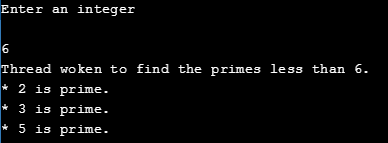
Sample output 2:
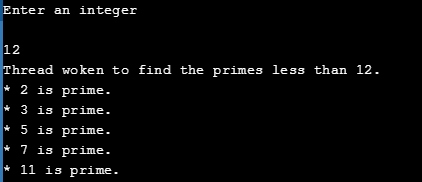
Problem 25
Step-1
Import java.net. *;
Import java .io. *
public class DateServer
{
public static void main (sting [ ] args )throws IOException
{ ServerSocket sock = null;
try {
// establish the socket
sock = new ServerSocket(DEFAULT_PORT);
while (true) {
/**
-
now listen for connections
-
and service the connection in a separate thread.
*/
Thread worker = new Thread(new Connection(sock.accept()));
worker.start();
}
}
catch (IOException ioe) { }
finally {
if (sock != null)
sock.close();
}
}
}
public void run ( )
{
try
{
PrintWriter port = new PrintWriter(worker.getOutputStream( ), true );
port.println (new java.util.Date( ).toString ( ) );
worker.Close ( );
} catch ( Exception e ) ;
{
}
}
}
Problem 26
Step-1
Program:
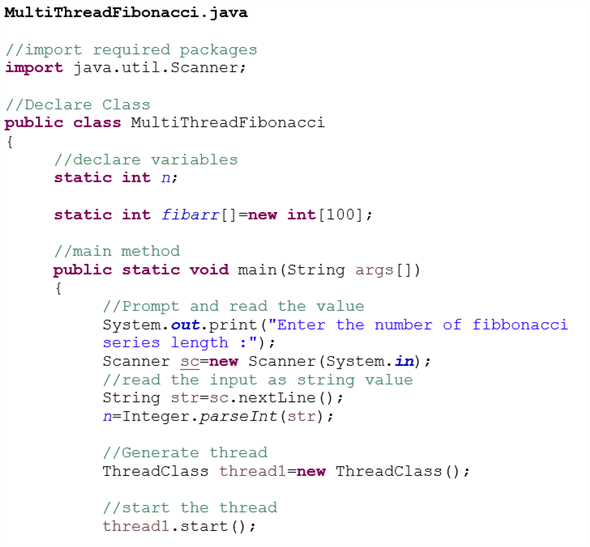
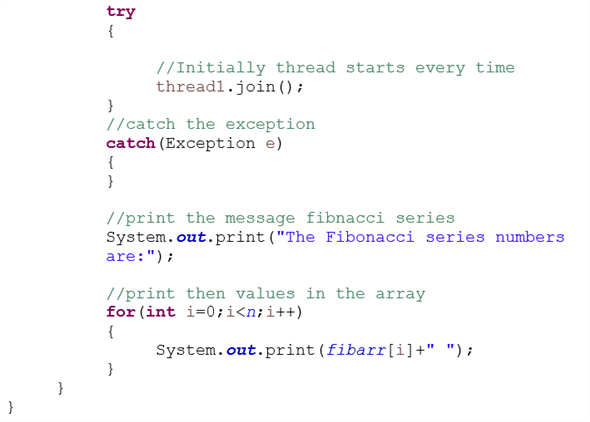
Step-2
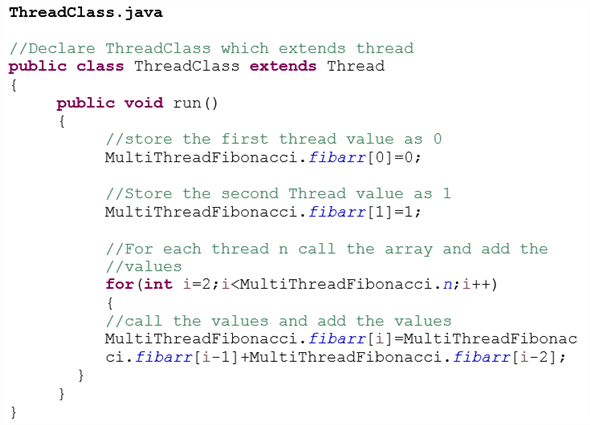
Step-3
Sample output:
Enter the number of Fibonacci series length :7
The Fibonacci series numbers are:0 1 1 2 3 5 8
Problem 27
Step-1
import java.net.*;
import java.io.*;
public class echo3 { public static void main(String args[])throws IOException {// declaration section:// declare a server socket and a client socket for the server// declare an input and an output stream ServerSocket echoServer = null; String line; DataInputStream is; PrintStream os; Socket clientSocket = null;// Try to open a server socket on port 9999// Note that we can’t choose a port less than 1023 if we are not// privileged users (root) try { echoServer = new ServerSocket(9999); } catch (IOException e) { System.out.println(e); } // Create a socket object from the ServerSocket to listen and accept // connections.// Open input and output streamstry {while (true) {
/**
-
now listen for connections
-
and service the connection in a separate thread.
*/
Thread worker = new Thread(new Connection(sock.accept()));
worker.start();
}
} catch (IOException e) { System.out.println(e); } }
void run()
{
is = new DataInputStream(clientSocket.getInputStream());os = new PrintStream(clientSocket.getOutputStream());// As long as we receive data, echo that data back to the client. while (true) { line = is.readLine(); os.println(line); }}}