Problem 1
Step-1
Critical section problems are often solved by preventing interrupts while shared variable is being modified.This process is simple to use in uniprocessor.But in case of multiprocessor, this is not feasible solution because disabling interrupts on a multiprocessor is most time consuming as the message is passed to all processors. Each time, a process needs to acquire a lock in the following way before entering into the critical section.
Step-2
do
{
acquire lcok
critical section
release lock
remainder section
}while(TRUE);
Step-3
This message passing technique delays getting entry into critical section. So, the system efficiency decreases. If the interrupts need to be updated by the system clock, then system clock is affected in updating the clock cycles by frequent interrupts being
occurred.
Step-4
Minimization of interrupts:
Special hardware instructions like TestAndSet() and swap() instructions can be used to test and modify the content of a word or to swap the contents of two words automatically. By using these instructions, the affect can be minimized.
Step-5
Following is the way to implement the TestAndSet() instruction
do
{
While(TestAndSet(&lock;));
lock=FALSE;
}while(TRUE);
Step-6
Similarly ,the swap() instruction operates on the contents of two words where lock is initialized to FALSE and key is Boolean variable to each process.
do
{
key=TRUE;
while(key==TRUE)
Swap(&lock;,&key;);
//critical section
lock=FALSE;
}while(TRUE);
Problem 2
Step-1
Multiple Locking Mechanisms
Solaris, Linux and Windows XP all three operating systems implements multiple locking mechanism to protect the access of critical section code.
Consider a case given below:
• Processes perform many operations like read, write, update on the critical section. If OS doesn’t use any locking mechanism, every process uses the critical section and change the code it will results inconsistency.
To avoid inconsistency, the above mentioned operating systems have multiple locking mechanisms. The multiple locking mechanisms implementation is shown below:
• A process p1 acquires a lock to critical section for its execution.
• At the same time, a process p2 wants to use the critical section but, it will be locked by some other process.
• P2 must wait until the lock releases by p1. Here, no chance to occurrence of inconsistency.
Step-2
Windows:
• Windows uses mutex lock , when the number of threads waits in a queue. Thread acquires mutex lock on a nonsignaled dispatcher and releases the lock on a signed dispatcher.
• Critical-section uses spin lock when a thread waits for another thread to release the lock.
Step-3
Linux:
• Linux uses mutex_lock () and mutex_unlock () function to acquire and release the locks.
• Linux uses Spin locks only for short duration processes.
• When a process requires a lock for long duration, it must use semaphores.
Step-4
Solaris:
• Solaris uses adaptive mutex lock to protect the access of each data item in the critical section. If a data is locked, adaptive mutex lock follows two things:
o If lock is held by a thread currently running on the CPU, the thread spins until the lock becomes available.
o If the thread holding the lock is not in the running state, thread sleeps until the release of lock.
• Solaris uses mutex lock when a thread contains less than 500 instructions.
• Solaries uses condition variables and semaphores for longer code segments.
Problem 3
Step-1
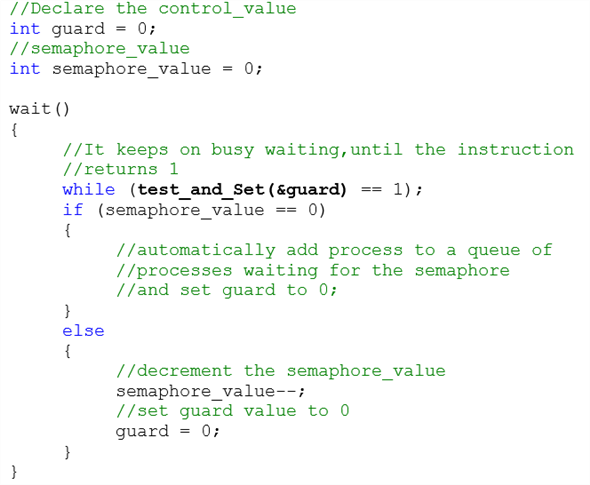
Processes waiting to enter the critical section use the CPU to keep checking if they can enter their critical section. The act of using the CPU to repeatedly check for entry to the critical section is called busy waiting.
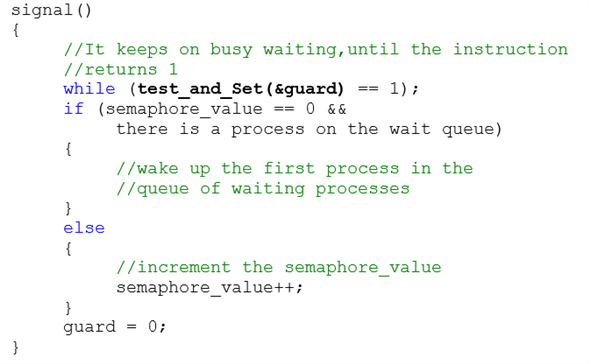
Busy waiting can be overcome by a wait ( ) and signal ( ) semaphore operation. When a process executes the wait ( ) operation and find that the semaphore value is not positive, it must wait. However, rather than engaging in busy waiting, process can block itself.
To avoid busy waiting, we’ll create resources that enforce mutual exclusion and make them accessible by through the operating system. Processes waiting to enter a critical section will be put in the blocked state, just like they were waiting for I/O, so that other processes can continue doing useful work.
Problem 4
Step-1
Busy waiting wastes CPU cycles that some other process might be able to use productively. This type of semaphore is called spin lock because the process “spins” while waiting for the lock. When locks are expected to be held for short times, spin locks are useful, they are employed on multiprocessor system where one thread can “spin” on one process while another thread performs its critical section on another processor.
Problem 5
Step-1
A semaphore S is an integer value indicates the number of resources available.
• The wait () operation decreases the value of semaphore S until the value of S become 1. When a process wants a resource, then it performs the wait () operation __to increment semaphore S __value.
• The signal () operation increases the value of semaphore S . When the process does not need the resource anymore, then it performs the signal () operation to increment semaphore S __value.
Step-2
A process must do both the operations concurrently to achieve the mutual exclusion.
If the operations wait () and signal () do not execute automatically, then mutual exclusion may be violated.
The condition where the mutual exclusion may be violated when the wait () and signal () semaphore operation are not executed automatically is shown below:
If the number of available resources S is 1, and the two processes P1 and P2 executes only wait () operation concurrently, then the mutual exclusion may be violated.
When P1 and P2 determine that value of S is 1 and both performs wait () operation, then P1 decrements S by 1 and enters critical section and P2 decrements S by 1 and enters the critical section.
But, the processes are not performing the signal () operation after the wait () operation. This condition leads to the violation of the mutual exclusion.
The timeline of the processes P 1 and P 2 is as shown below:
T0: P1 determines that value of S = 1.
T1: P2 determines that value of S = 1.
T2: P1 decrements S by 1 and enters the critical section.
T3: P2 decrements S by 1 and enters the critical section.
Problem 6
Step-1
A variable that is used to control multiple processes under parallel programming is often known as a semaphore.
Operating system defines two types of semaphores; one is a counting semaphore and another one is binary semaphore.
A binary semaphore may only range between 0 and 1 value, and hence its functional operations are similar to that of a mutex lock.
Step-2
When it comes to represent the implementation of mutual exclusion with the use of a single binary semaphore, for ‘ n ’ number of processes, user can execute it as given below:
Let the ‘ n ’ number of processes be described as “ Pi ”. Now for the mutual exclusion between these n processes we take a semaphore mutex which is initialized to ‘1’.
Hence, each Pi process would undergo the below condition:
do
{
wait (mutex);
signal (mutex);
}
while (true);
In this piece of code we can see a “do-while” condition. Here, the wait() function lies under critical section of mutual exclusion; whereas signal() function lies under the remainder section of same.
Problem 7
Step-1
A situation where several processes access and manipulate the same data concurrently and the outcome of the execution depends on the particular order in which the access takes place, is called a race condition.
Step-2
Let us consider a shared bank account existing between a husband and wife and they have shared balance amount sharedBalance = 1000
The two transactions will be started by both husband and wife simultaneously
| Husband | Wife |
|---|---|
| withdraw() | deposit() |
| husbandT1: withdraw 500 from sharedAccount | wifeT1: deposit 500 into shared account |
| sharedBalance = sharedBalance – amountWithdrawn from sharedAccount | SharedBalance = sharedBalance+amountDeposit |
| sharedBalance = 1000 – 500 = 500 | sharedBalance = 1000 + 500 = 1500 |
Step-3
Here sharedBalane is a resource data to be shared by both accounts simultaneously.
Due to the access of the shared data at the same time, inconsistency in the balance occurred. This is called updation anomoly.
Step-4
Prevent from race condition
Before acquiring the shared data we need to acquire a lock on shared data. After completion of withdrawal from shared balance, then release the lock. Then the next sequence of instruction like depositing into account will be started.
| Husband | Wife |
|---|---|
| withdraw() Lock(): husbandT1: withdraw 500 From shared Account shared Balance = sharedBalance – amountWithdrawn sharedBalance =1000-500 =500 release(): | deposit() lock() wifeT1: deposit 500 into sharedAccount sharedBalance = sharedBalance + amountDeposit sharedBalance = 500+50 = 1000 release(): |
Problem 8
Step-1
Refer to the algorithm of the process  shown in Figure 5.21 in Chapter 5 from the textbook.
Consider the two processes  and
and  share the following variables of the algorithm:
boolean flag[2];
int turn;
The three requirements to solve the critical section problem are,
1. Mutual exclusion
2. Progress
3. Bounded waiting
Step-2
1. Mutual exclusion:
This requirement of the critical section states that only one process  can execute its critical section at a time. If one process is executing its critical section, then the remaining processes must not execute their critical sections at the same time.
Refer the structure of process  shown in Figure 5.21 in Chapter 5 from the textbook.
The other process is  .
.
As per the algorithm, the process can enter the critical section only if its  variable is true. The code in the while loop makes the
  variable of only one process as true at a time.
The process  enters its critical section only if
  or
or  .
.
If  , the while loop repeats till the
  becomes
  and makes the variable
  to
to  . Then process
 executes its critical section. After completion of the execution of process
 , it makes
  and allows process
  to execute its critical section. That mean, the process can only execute its critical section when other process updates the
 and
and  variables.
Hence, the algorithm allows only one process to executes its critical section at a time.
Therefore, the Dekker’s algorithm satisfies the Mutual exclusion property.
Step-3
2. Progress:
When more than one process wants to enter the critical section at the same time, then a deadlock will occur. To avoid the deadlock only one process must execute its critical section at a time.
Therefore, when the processes want to enter the critical section at the same time, the processes which are not executing their remainder section can select which process may use its critical section.
If the processes  and
and  want to execute their critical section at same time, the process in the remainder section decides which process can enter into the critical section.
Suppose  , then
  executes its critical section. After completion of the
  execution, the code in the remainder section makes the variable
  and
and  . Now the turn is for process
  . Then, process
  executes its critical section.
Therefore, the Dekker’s algorithm satisfies the Progress property.
Step-4
2. Bounded waiting:
The amount of time a process waits after it made a request and before the request is accepted to enter its critical section. The process must not wait for a long time to get the resources. There is a limit on the amount of time the process waits to enter into its critical section.
In the algorithm, one process updates the value of the variable  of the other process. If the process
  wants to enter its critical section, then
  . After completion of the
  execution, it sets the
  variable to
  and allows the process
  to executes its critical section. Hence, both processes need not wait for indefinite time.
Therefore, the Dekker’s algorithm satisfies the Bounding waiting property.
Problem 9
Step-1
The three requirements for the critical-section problem are as follows:
• Mutual exclusion
• Progress requirement
• Bounded-waiting
The algorithm satisfies the three requirements/conditions for the critical-section problem.
Step-2
Mutual exclusion:
• A process enters into the critical section only when flag variable of any other process is not set to in_cs.
• The process sets its flag to in_cs before entering the critical section.
• Then the process checks if there is any other process whose flag variable is in_cs.
• Thus, it can be ensured that no two processes will be in the critical section.
Step-3
Progress requirement:
• Assume that more than one processes set their flag variable to in_cs at same time.
• After each sets its flag, they check if there is any other process whose flag variable is in_cs.
• As each realize that there is another competing processes whose flag variable is in_cs, each process move to the next iteration of the while() loop.
• Then they set their flag variable to in_want.
• Among all the processes, the process whose index value is near to turn variable will set its flag variable to in_cs.
• At each iteration, the index of the processes who set their flag variable to in_cs move closer to turn.
• Thus, it is ensured that only one process can sets its flag variable to in_cs.
Step-4
Bounded-waiting:
• Suppose a process k wants to enter the critical section. Then its flag variable to in_cs.
• If the index of any process that wants to enter the critical section is not in between turn and k, then it cannot enter the critical section.
• If the index of any process is between turn and k, then they can enter the critical section and the turn value will come closer to k.
• So, turn will become k at some point and can enter the critical section.
• Thus, the condition of bounded-waiting is satisfied.
Problem 10
Step-1
If a user-level program is given the ability to disable interrupts, then it can disable the timer interrupt and prevent context switching from taking place ,there by allowing it to use the processor without letting other processes to execute.
Problem 11
Step-1
Disabling interrupts on every processor can be a difficult task and further more can seriously diminish performance. Disabling interrupts on a multiprocessor can be time consuming, as the message is passed to all the processors. This message passing delays entry into each critical section and system efficiency decreases. Also, consider the effect on a system’s clock, if the clock is kept updated by interrupts.
Problem 12
Step-1
A lock that makes threads of a process enter into wait condition, while searching for availability of desired lock is known as a spinlock.
Process cannot hold a spinlock while attempting to acquire a semaphore because of the following reasons:
• Semaphores are sleeping lock in Linux. If a task wants to retrieve the semaphore which is already held then the task should be put on the waiting queue to sleep.
• Spinlocks are just another form of interrupt disabler and hence they cannot go into a sleeping state.
• As the wait duration is usually very small, no thread goes into sleep mode. Rather the threads remain active but still do not perform any useful work.
• As the wait time is very small, no process can sleep while holding a spinlock. The process will keep attempting until it get the lock.
• Trying to acquire a semaphore variable may take longer time than the wait duration of a spinlock. Hence, one cannot use a semaphore while being in a spinlock condition.
• Sleeping while holding spinlocks may force rest of the threads in the process to enter infinite loops until and unless the thread becomes active again.
Problem 13
Step-1
Race condition:
The condition occurs inside critical section, critical section means when multiple threads access a shared variable at the same time.
Kernel Data Structure:
• Scheduling queue
• Kernel process table
• Process id management system (pidms)
Step-2
Scheduling Queue:
The scheduling queues in the kernel data structure, receive the process. One process in queue has been waiting for the I/O resources, and the resource is free now. The resource is allocated to the process. Second process waiting for the same I/O resource is still pending in the queue. These two processes in the queue are in a race with each other for the allocation of the I/O resources to move to the runnable queue for execution. Hence processes create a race condition in the runnable queue.
Kernel Process Table:
The kernel table also triggers a race for two processes created at the same time for allocation of space in the kernel table.
Process id management system: The pidms permits two processes to be created at the same time, accessing same resources, triggering a race between the two for getting the unique process id (pid).
Problem 14
Step-1
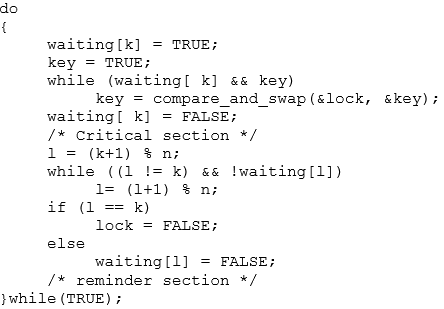
Consider the following piece of code to illustrate how a compare_and_swap () instruction helps in achieving mutual exclusion under bounded-waiting policies.
Bounded-waiting mutual exclusion with compare_and_swap():
Step-2
EXPLANATION:
Here, variable key is local to “Pk” process. The entire code goes on with two main shared variables, both taken as Booleans:
• lock
• waiting [ n ]
Both the Boolean variables are initialized to FALSE, for all ongoing processes that is “Pk”; where k = 0 to n-1 values.
According to the above code:
If lock = FALSE**,** no upcoming processes are in critical section. Whereas, if waiting[k] = FALSE is achieved Pk process not ready to enter into its critical section.
• According to Bounded Waiting, after a request is generated by a process to get into its critical section and before granting the request, there exist the limit on number of times other process are approved to get into its critical section.
• Bounded-waiting cannot be satisfied by the basic synchronization instructions available for hardware components.
• But the instructions available can be modified into a new program which satisfies the condition of bounded-waiting.
Problem 15
Step-1
Some special hardware instructions are given by many machines that are used to test and swap the content of words automatically.
The functions test_and_set() and compare_and_swap() are the two hardware instruction used for the same.
Mutex structure is defined as:
typedef struct
{
int available**;**
} lock**;**
Step-2
Implementation using test_and_set() :
• In the lock struct, when the variable “available 1”, it means that lock is not available. However when “available 0” means that lock is released and available.
• The function test_and_set() provides mutual exclusion and is implemented automatically. Definition of the instruction is provided below as:
boolean test_and_set**(** boolean ***** target**)**
{
boolean rv =* target**;**
***** target = true**;**
return rv**;**
}
• Initialization of the lock is done in init(lock *mutex) function in which the variable available is initialized as 0 which means it is available and can be locked by some thread.
• Then, in the function acquire(lock *mutex), atomic hardware instruction test_and_set() is called when it is locked by some thread to do thread’s processing.
• The function release(lock * mutex) clears the value of the variable available to 0.
Step-3
The definitions of functions are as follows:
void init**(** lock ***** mutex**)**
{
//lock is available at value 0, 1 otherwise.
mutex**→** available**=** 0**;**
}
void acquire**(** lock ***** mutex**)**
{
// keep on testing the mutex until it is
// acquired
while**(** test_and_set**( &mutex→** available**,** 1**)** == 1**);**
}
void release**(** lock ***** mutex**)**
{
// release the mutex by clearing the
// available to 0
mutex**→** available**=** 0**;**
}
Step-4
Implementation using compare_and_swap():
• The function compare_and_swap() has three parameters as opposed to the function test_and_set() which has only one parameter.
• This instruction returns the original value of the first parameter.
• The function compare_and_swap() is defined as below:
boolean compare_and_swap**(** int ***** value**,** int expected**,**
int new_value**)**
{
int temp = ***** value**;**
if**(** value**==** expected**)**
***** value = new_value**;**
return temp**;**
}
• In the function compare_and_swap() also, when the variable “available 1”, it means that lock is not available. However, when “available 0”, it means that lock is released and available.
• The value is updated only if first parameter in compare_and_swap() function is pointing to a value which is same as second parameter, expected, in the compare_and_swap() function.
• Similar to test_and_set()function, release(lock * mutex) function clears the value of variable available to 0.
Step-5
The definitions of fun ctions are as follows:
void init**(** lock ***** mutex**)**
{
//lock is available at value 0, 1 otherwise.
mutex**→** available**=** 0**;**
}
void acquire**(** lock ***** mutex**)**
{
// keep on comparing until the condition
// is met
while**(** compare_and_swap**(**
& mutex**→** available**,** 0**,** 1**)** == 1**);**
}
void release**(** lock ***** mutex**)**
{
// set the value of muted to 0
& mutex**→** available**=** 0**;**
}
Problem 16
Step-1
If a process is executing in its critical section, at same time process wants to get into its critical section, then it goes into the continuous loop in the entry section. This condition is known as busy waiting.
Step-2
The changes necessary to solve busy waiting: ****
• Connected with each mutex lock might a chance to be a queue of waiting processes.
• When A procedure determines those lock is unavailable, they need aid put under those queue.
• At A transform discharges the lock, it removes Also awakens the main procedure from the rundown for sitting tight procedures.
Problem 17
Step-1
A lock that makes threads of a process enter into wait condition, while searching for availability of desired lock is known as a spinlock.
Mutual exclusion (mutex): When one process lies in its critical section, and the other process wanted to enter its critical section, then it cannot enter.
Step-2
In first condition, the lock is to be held for a short duration and hence “Spinlock” will be the best option for the processes. As the spinlock mechanism locks the threads for shortest possible time and do not go into long looped mechanisms.
Step-3
In second condition, the lock is to be held for a long duration and hence in this scenario “Mutex Lock” will be the best choice. As Mutex locks may sometimes undergo long time duration and are far apart from spinlock’s short duration holds.
Step-4
In third condition, the thread may be put to sleep while holding the lock; and hence once again a “Mutex Lock” would be the better one among two available lock choices. The main reason behind this is spinlocks do not allow threads to go in sleep mode, while holding the lock.
Problem 18
Step-1
A lock that makes threads of a process enter into wait condition, while searching for availability of desired lock is known as a spinlock.
Mutual exclusion (mutex): When any process is already present in its critical section and the other process wants to enter its critical section but cannot enter; then the mutual exclusion is achieved.
Step-2
• A lock can easily be replaced by another type of lock, just by changing the lock variable.
• Spinlocks can be used for short periods only; they typically avoid or do not allow the threads to sleep.
• Whereas, a mutex lock is totally opposite of spinlock. It allows long spinning loops, which means threads are allowed to sleep in the wait queue until the lock gets released by the current thread.
Step-3
Given below is a piece of code that illustrates the normal switching among spinlock and mutex lock while undergoing a program:
while(Lock_Obj.dest != Lock_Obj.compare)
{
if(HasThreasholdReached())
{
if(n_iterations + YIELD_ITERATION >=
MAX_SLEEP_ITERATION)
pthread_mutex_init(&mutex;, NULL);
Sleep(0);
}
else
{
pthread_spin_init(&spinlock;, 0);
SwitchToThread();
}
}
Step-4
• Assuming the time taken for context switching will be T. The code has few variables that work under “if-else” condition.
• If the total time taken to make a switch or locate available lock takes longer than the “max_sleep_iteration” time, then the thread is allocated to a mutex lock. And the reverse is allocated with the spinlock.
• The upper bound for holding a spinlock must be less than double of T = because if a spinlock is waited for a longer period of time more than T, then it would be faster to put the thread to sleep which requires one context switch. Then, to awaken it will require a second context switch.
Step-5
Hence, the upper bound for holding a spin lock should be ** ** .
** .
Problem 19
Step-1
• Locks are basically used to destroy interrupts in multi-threaded systems. Locks prevent threads from entering a deadlock state. In the given piece of code, locks are used to overkill the interrupts.
• Before going beyond, how locks are created or occupied should be known. A lock usually requires a system call for performing context switch when one or two threads in a program tend to sleep.
• The thread then raises a request to acquire a lock; in case the lock is unavailable the process is looped up with another context switch consequently.
Step-2
• In the given piece of code, the atomic integer updates the variable allocated for ‘hits’ to ensure the system does not exceeds the race condition on hits.
• The condition of achieving no race condition on hits can only be achieved if the process call is not interrupted by Kernel.
Step-3
In the first approach it can be seen the race condition being applied on hits. The race condition is successfully shown by “hits++;” line. Hence, this is not the efficient approach among the two.
Step-4
In the second approach, no race condition is noticed. Hence, the second approach is more efficient as compared to the first approach.
Problem 20
Step-1
Race condition is the scenario where many processes retrieve and modify the same data simultaneously and outcome of the program is based on the sequence in which they are accessed.
Step-2
a.
• The given code illustrates the presence of one race condition; that is on the variable number_of_processes.
• The function fork() checks and increments the variable number_of_processes while; the exit()decrements the variable number_of_processes.
• Thus, both update the contents of the variable number_of_processes.
• The variable can be modified by the processes of fork() and exit() simultaneously and will result in inconsistencies due to the race condition occurring among various processes.
• Therefore, the final value of number_of_processes depends upon the process execution order.
Step-3
b.
• To prevent the race condition, the mutex lock with acquire() and release() operations can be placed at the beginning and end of a critical section in both the fork() and exit() functions.
• In the fork() function’s allocate_process(),the acquire()should be placed before the test condition while, release() should be placed after incrementing the variable number_of_processes.
• In the exit() function’s release_process()the acquire()should be placed before the decrement of the variable number_of_processes while; release() should be placed after the decrement of the variable number_of_processes.
• The updated code snippet is:
int allocate_process()
{
int new_pid;
acquire();
if(number_of_processes==MAX_PROCESSES)
return -1;
else{
++ number_of_processes;
release();
return new_pid;
}
void release_process(){
acquire();
— number_of_processes;
release();
}
Step-4
c.
• All the operations on atomic_t variable are atomic i.e. they execute within one clock cycle.
• If the variable number_of_processes is made atomic_t, the increment and decrement operations on the variable will become atomic but the race condition can still occur in the allocate_process() function.
• This is because the value of number_of_processes is initially tested in the if-condition of the allocate_process() function.
• Consider the case where the value of the variable number_of_processes is 254 at the time of the test. But due to the race condition, another process makes it 255.
• Thus, when the process executes, the value of variable becomes 256 which is inconsistent.
Step-5
Therefore, replacing the integer variable with atomic_t will not prevent the race condition.
Problem 21
Step-1
Solution:
Semaphores are defined as inter-pr ocess communication.
• It is used to control and monitor the open socket connections.
• It allows the process to create the open socket connections that communicate with the other processes.
• It describes the open connection’s existence and properties among the sockets.
• The server deals with each connection via semaphore communication, it instructs new connections are done until the limit is reached.
• It makes the individual processes to exit to make a way to new connections.
A semaphore is initialized with open socket connections, the number of allowable connections is made.
Here,
• the acquire() function is called if the connection is accepted.
• the release() function is called if the connection is released.
• The repeated number of calls to acquire() will block the existing connection, where the number of allowable socket connections to the system is reached.
• The release() method is invoked where the existing connection is terminated.
Step-2
Process:
Initialize the semaphore so its value is N.
• When a connection comes in, wait on the semaphore.
• When a connection is released, signal the semaphore.
Semaphore operations are defined as
S=N;
acquire (s)
{
val—;
if(val<0)
{
//add the process to the list
block;
}
}
release(S)
{
val++;
if(val⇐0)
{
//remove the process p from the list
wake_up(p);
}
}
Step-3
The main disadvantage of mutual exclusion is that they require all process to be busy waiting.
• Busy waiting degrades the CPU cycles, it leads other process does not use it.
• A semaphore that gives the result “spin” is called spin lock while the process will be waiting for a lock situation.
• The main advantage of the spin lock is, when the process must wait on a lock situation and the context switch takes much time.
• Therefore, no context switch is required
• Hence spin lock is useful for short locks.
• They are often used in multi-processor system where one thread spin while another thread performs its critical section.
The process instead of busy waiting, it will block itself, it places the process into the waiting queue.
• Then, the process is switched to the waiting queue state with the association of semaphore.
• Then the CPU scheduler schedules another process to execute where the control is transferred to it.
• It restarts the process and transferred to the ready queue for the process execution.
• Depends on the CPU scheduling algorithm, the CPU switches between the running process to the ready process possibly.
Semaphore

Problem 22
Step-1
Benefits of slim- reader and writer (SRW) locks:
1.SRM locks activate the threads of single process to access a shared resource.SRM locks provide two modes exclusively for reading and writing the data .
2.Shared Mode which grants shared data read only to multiple threads and multiple threads can access the shared data concurrecntly.so,the performance can be increased.
3.Exclusive Mode, when a lock is acquired by a thread in write mode,then the lock will not be release until the total operation will complete.And no thread will access the same lock Until the writer releases the lock.
4.Once a SRM acquires a lock in shared mode then the there is no possibility to upgrade to exclusive lock state and similarly a lock acquired in exclusive mode donot down grade to shared mode.
5.SRM is light weigth and small i.e the size of the pointer (32 or 64 bits) and there are no associated kernel objects for waiting so that it requires minimal resources.
Problem 23
Step-1
wait():
The wait() system call used to wait for another process to complete its execution in the operating system and it may wait until any of its child processes to exit in the operating system.
Step-2
signal():
It is a system call or a software interrupt generated by the operating system and sent to the process with some number. That number is called signal ID or signum. The signal is generated when the process is aborted, quit, trace, or hang while the process is executing.
Step-3
test_and_set():
test_and_set() function performs two operations individually and cannot be interrupted in the middle of the process execution. This function used for handling the synchronization problem of two processes. It takes a shared lock variable as an input parameter which is either 0 (unlock) or 1(lock).
Step-4
Implementation of wait() and signal() are as follows:
Problem 24
Step-1
Parent and child Thread.
To get a value generated by the child thread to the parent thread sooner it is generated is done by sending the value to the class handling the child thread; as reference argument. Any change made in the receiving array is reflected in the original array. Hence sooner the child thread generates a value it is passed to the parent.
The modified program is given below:
// class for generating series
public class Fibonacci
{
The constructor declares an array of size TermCount. It allocates the first two terms and starts the child thread to get remaining values.
// constructor
Fibonacci(int TermsCount)
{
// array to store the fibonacci terms
int[] FibTerms = new int[TermsCount];
Assign the first two values.
// assign first two default values
FibTerms[0] = 1;
FibTerms[1] = 2;
// create object of the child class
ChildClass child = new ChildClass(FibTerms);
Start the child thread.
// start thread of the child class
child.start();
// starting index
int from = 0;
Loop is executed to get the terms from the child class.
// loop till series is generated
while(from < FibTerms.length)
{
// get the index of the child
int to = child.getIndex();
For loop to display the fibonacci series generated by the child.
// loop to display the series elements from beginning to end.
for(int seriesLoop = from; seriesLoop ⇐ to; seriesLoop++)
{
System.out.println(” ” + FibTerms[seriesLoop]);
}
from = to + 1;
}
}
The main function fires the constructor to initiate the child thread.
// main function to fire constructor and start execution
public static void main(String[] args)
{
// fire the constructor
new Fibonacci(10);
}
The class child thread recieves the array as pass by reference and generates the fibonacci series in it.
// sub class to generate child thread
class ChildClass extends Thread {
// array to make a copy of the original
private int[] FibTerms;
// to store the index of the array
private int index;
Constructor to copy the generated series element to current object this.
// constructor of the child class
ChildClass(int[] FibTerms)
{
// copy the fibonacci term
this.FibTerms = FibTerms;
index = 2;
}
// function to get the last index filled.
int getIndex()
{
return index;
}
Run function is executed as soon as a thread is called.
// to run the thread
public void run()
{
For loop to generate the fibonacci series.
// loop to generate the series
for(int seriesLoop = 2; seriesLoop < FibTerms.length; seriesLoop++)
{
// generate the term
FibTerms[ seriesLoop ] = FibTerms[ seriesLoop – 2 ] + FibTerms[ seriesLoop – 1 ];
// assign value to index of the array
index = seriesLoop;
}
}
}
}
Step-2
Sample Output:
1
**** 2
3
5
8
13
21
34
55
89
Problem 25
Step-1
Implementation of semaphore using monitor code:
// Semaphore of type monitor
monitor semaphore
{
// Variable declarations
int n = 0;
condition con;
// Function definition
semaphore increment()
{
// Increment the value
n++;
// Resume the suspended process
con.signal();
}
// Function definition
semaphore decrement()
{
// Condition to suspend the process
while (n == 0)
// Process is suspended
con.wait();
// Decrement the value
n—;
}
}
Step-2
Explanation:
• The variable “con” of condition is represented by threads waiting in a queue for variable “con”.
• A semaphore is coupled with each thread during its entry into the queue.
• In the semaphore increment operation, signal() operation is performed by a thread on a condition variable “con” to wake up the suspended process.
• In the semaphore decrement, wait() operation is performed by a thread on a condition variable “con”, which creates new semaphore.
o The value of new semaphore is initialized as 0.
o Then, the semaphore is decremented to block the new semaphore.
Problem 26
Step-1
Implementation:
• The algorithm in the bounded-buffer problem will copy the production value into the monitor’s local buffer and again copies it back to the consumer from the monitor’s local buffer.
• By the algorithm, with the usage of these copy operations will increase the cost of the system.
• The increased cost will lead to the decrease in the throughput of the system.
• The problem can be minimized by using buffer portions and by storing pointers in the system.
• Also, it is easy to modify the code and to store the pointer in the buffer region from out of the monitor’s state.
• Thereby, it is less costly and less expensive that the operations can be held shorter.
• Therefore, it will increase the throughput of the monitor.
Step-2
Algorithm for a bounded-buffer monitor:
//Implementation of Monitor
Monitor
{
//condition to check full or empty
Condition full, empty;
//create a Queue
Queue q;
//Insert the items in the list
BbInsert(item)
{
//use while() loop to check
//whether the queue is full or empty
while (queue.isFull())
//if queue is full, wait for the release
full.wait();
//insert a item
q.insert(item);
//release the queue
//make it empty
empty.release();
}
//Remove the items in the list
item BbRemove()
{
//use while() loop to check
//whether the queue is full or empty
while (queue.isEmpty())
//if queue is empty, wait for the insertion
empty.wait();
//remove the item in the queue
result = q.remove();
//release the queue
//make it full
full.release();
return result;
}
}//end the Monitor
Step-3
Algorithm for a bounded-buffer monitor with the producer-consumer relation:
//Implementation of Monitor bounded buffer
monitor bounded buffer
{
//declare the items
//in the integer variables as array
int items[MAX ITEMS];
//declare the numItems as 0
int numItems = 0;
//condition to check full or empty
condition full, empty;
//Create a method produce
//with the argument v
void produce(int v)
{
//use while() loop to check
//whether the numItems
//is equal to Max ITEMS
while (numItems == MAX ITEMS)
//if queue is full, wait for the release
full.wait();
//increment the numItems and declared in v
items[numItems++] = v;
//release the signal
//make it empty
empty.signal();
}
//Create a method consume
int consume()
{
//declare the variable retVal
//in the integer
int retVal;
//use while() loop to check
Step-4
//whether the numItems
//is equal to 0
while (numItems == 0)
//if queue is empty, wait for the insertion
empty.wait();
//decrement the numItems and declared in retVal
retVal = items[—numItems];
//release the signal
//make it full
full.signal();
//return the value retVal
return retVal;
}
}
Problem 27
Step-1
The explanation for the given statement is as follows:
• The answer to the bounded buffer question provided above copies the value obtained in the monitors’ local buffer and replicates it from the monitors’ local buffer to the consumer.
• The copy tasks can be costly if one were consuming huge amount of memory on behalf of every buffer.
• The augmented outlay of copy process signifies that the monitor is occupied for a elongated time interval while a process is in the produce or consumes task.
• This lessens the systems total output.
• The above setback can be relieved by storing pointers to buffer regions within the monitor as opposed to storing the buffer regions themselves.
• Therefore, one can revise the code provided to replicate the pointer to the buffer region in and out of the monitors’ state.
• The above task must be comparatively cheap and so the time interval that the monitor is being occupied is shorter, thereby improving the output of the monitor.
Step-2
monitor ResourceAllocator
{
boolean busy;
condition x;
void acquire(int time)
{if(busy)
x.wait(time);
busy=TRUE;
}
void release()
{
busy=FALSE;
x.signal();
}
initialization_code()
{
busy=FALSE;
}
}
Problem 28
Step-1
Throughput in the readers-writers problem is increased by favoring multiple readers as opposed to allowing a single writer to exclusively access the shared values. On the other hand, favoring readers could result in starvation for writers.
The starvation in the readers writers problem could be avoided by keeping timestamps associated with waiting processes. When a writer is finished with its task, it would wake up the process that has been waiting for the longest duration. When a reader arrives and notices that another reader is accessing the database, then it would enter the critical section only if there are no waiting writers. These restrictions would guarantee fairness.
Problem 29
Step-1
In monitor x. signal ( ) operation resumes exactly one suspended process. If no process is suspended, then the signal ( ) operation has no effect;that is the state of x is the same as if the operation had never been executed contrast this operation with the signal ( ) operation associated with semaphores, which always affects the state of the semaphore.
Problem 30
Step-1
Wait (mutex);
------
body of F
--- - - -
if (next – count >0)
signal (next);
else
signal (mutex);
Mutual exclusion within a monitor is ensured.
Operation x. signal ( ) can be implemented as
if (x – count >0)
{ next – count ++;
Signal (x – sem);
Wait (next);
Next _ count — — ;
}
When a thread T1 calls signal(), the control switches to another thread T2 that is waiting for the condition immediately. In Hoare’s implementation, when T2 leaves the monitor or calls another wait(), the control should be switched back to T1, not to the other threads that are waiting to get into the monitor. Since T1 is still inside the monitor, although it is inactive now, it would be better to let T1 finish its work first than admit the others into the monitor. The next semaphore and the next_count variable are used to keep track of this situation.
If signal() is the last statement of every monitor procedure, we are ensured that T1 is no longer in the monitor and therefore we do not need next semaphore and the next_count variable anymore.
Problem 31
Step-1
A monitor helps in achieving process synchronization. It allows threads to have both, mutual exclusion and the ability to wait for a certain condition to be true.
Consider a system with n -processes, having unique priority number. The goal is to write a monitor to allocate these processes to three identical printers:
• An array for the three printers in created.
• A procedure, acquire() , is created to check and allocate processes to the printer, using the priority numbers of the processes.
• Check if the printers are busy.
• If true, the process is suspended until one of the printer is free.
• Each process is assigned to one of the printers, by their priority number.
• Create a procedure, release() , to resume a process associated with the priority number.
• If a printer is free, the process is resumed and allocated to that printer.
Step-2
The implementation of the monitor is shown using the pseudocode:
type resource = monitor var P: array[0..2] of boolean; X: condition; procedure acquire (id: integer, printer-id: integer); begin if P[0] and P[1] and P[2] then X.wait(id) if not P[0] then printer-id := 0; else if not P[1] then printer-id := 1; else printer-id := 2; P[printer-id]:=true; end
procedure release (printer-id: integer) begin P[printer-id]:=false; X.signal; end
begin P[0] := P[1] := P[2] := false; end
Problem 32
Step-1
Consider,
• A file is shared between different processes, and each of the processes have a unique number.
• The file can be accessed simultaneously by multiple processes, with a constraint that the sum of unique numbers of the processes currently accessing should be less than n.
A monitor to coordinate this access, can be created as:
• Place the current count and file descriptor as the shared variables, in the monitor.
• Create a method, get() , to check the constraint.
• The thread should wait till the sum is greater than n.
• Otherwise, the thread should change the state, and add to the value of sum.
• Create a method, release() , to decrement the sum and wake other threads to check the constraint.
Step-2
The pseudocode can be given as:
monitor file_processes
{
// declare the file descriptor
enum{THINKING, WAITING, READING} state[n];
condition self[n];
// declare shared variable to assign sum of id
int sum;
// define method to check if the sum of id
void get(int id)
{
// assign WAITING to state[id]
state[id] = WAITING;
// check if the sum of process id is
// greater than n
if(sum > n)
// process id is suspended
self[id].wait();
// provide access to the process associated
// with the id
state[id] = READING;
// add the id to the sum and re-assign to sum
sum = sum + id;
}
// define method to resume process associated to id
void release(int id)
{
// assign THINKING to state[id]
state[id] = THINKING;
// subtract id from sum and re-assign to sum
sum= sum - id;
for(int i = (n-sum-1); i >= 0; i—)
{
// check if process associated with the id
// is in waiting state
if(state[id] == WAITING)
// resume the process associated
// with the id
self[i].signal();
}
}
// define the initialization method
initialization_code()
{
for(int id = 0; id < n; id++)
// assign THINKING to state[id]
state[id] = THINKING;
}
}
Problem 33
Step-1
The solution for the previous exercise will be correct under both conditions. It may suffer from a problem in which if a process wants to get a signal and if another process already in signal state, then the first process will prevail in waiting state.
Step-2
When the second process leaves the monitor from the signaling state, then the first process will progress forward to the signaling state.
The first process will wait to get into the signaling state else it will wait for another condition.
Step-3
A process will follow the while loop when it is in the wait state and it is replaced by ‘if’ condition if the process is ready to move in to the signaling state.
Therefore, a process will be in either of the following state.
• Signal and wait: First process either waits until second process leaves the monitor or waits for another condition.
• Signal and continue: Second process either waits until the first process leaves the monitor or waits for another condition.
Problem 34
Step-1
We also require that writers have priority over readers: if a writer needs to write, current readers may complete reading, but new readers must be suspended until all writers are sleeping again.
We solve the problem by first introducing three shared integer variable: naw for the number f active writers (at most 1), nar for the number of active readers, and nww for the number of willing (nonsleeping) writers. The solution is now expressed by refining the regions CSR and CSW:
Monitor dp
{
Void write process ( )
{
do
{
wait (wrt)
- - - - — - -
// writing is performed
- - - - - - - -
signal (wrt);
} while (true);
void read process ( )
{
do
{ wait (mutex);
read count ++;
of (read count = = 1
wait (wrt)
signal (mutex);
- - - - - -
// reading is performed
- - - - - - -
wait (mutex);
read count - - - -;
of (read count = = 0)
signal (wrt);
signal ( mutex);
} while (true);
}
Problem 35
Step-1
Algorithm plan:
• Create a monitor to implement an alarm clock.
• Initialize a condition variable named as cond.
• Initialize an integer time variable for current time named as currentTime.
• Create a function with one integer type parameter that will accept the number of ticks.
• Declare an integer type variable named as alarms.
• Alarms = currentTime + ticks
• while (currentTime < alarms)
• Wait for the alarm signal.
• Create a function with name tick()
• Increment the value of current time
• currentTime = currentTime + 1;
• call the signal.
Step-2
Pseudocode:
monitor alarm
{
condition cond;
int currentTime = 0;
void timeDelay(int ticks)
{
int alarms;
alarms = currentTime + ticks
while (currentTime < alarms)
cond.wait(alarms);
cond.signal;
}
void tick()
{
currentTime = currentTime + 1;
cond.signal;
}
}
Problem 36
Step-1
Program Plan:
• Declare a function runner which takes one value as arguments which is the function for the threads.
• Define the main function from where the execution of the function begins.
• Iterate the for loop NUM_THREADS times to create the threads.
• Iterate the for loop NUM_THREADS times to wait for the threads to exit
• Declare the function runner which is the starting function for the threads.
• In header file 3-20PP.h allocation and releasing of the bitmap and pid is done.
• In source file 3-20PP.c methods are implemented.
Step-2
Program:
/*********************************************************** Modifying a program by using Pthreads mutex locks so * * that process identifier is safe from the race conditions* **********************************************************/
3-20PP.h
ifndef API_3_20PP_H
define API_3_20PP_H
// Allocate the bitmap
extern int allocate_map**(** void**);**
// Release the bitmap
extern void release_map**(** void**);**
// Allocate a pid
extern int allocate_pid**(** void**);**
// Release a pid
extern void release_pid**(** int pid**);**
Step-3
3-20PP.c
include “3-20PP.h”
Define the value of minimum pid, maximum pid and number of bits at position in the bitmap.
// Minimum value of pid
define MIN_PID 300
// Maximum value of pid
define MAX_PID 5000
// The number of bits at a position in the bitmap
define NUM_BITS 8
Initialize the size. Index, offset and process id of bitmap. All variable are declared as static as there value is not changing throughout the program.
// The bitmap of pids
static unsigned char ***** s_bitmap = NULL**;**
// The size of the bitmap
static int s_size = - 1**;**
// The current index into the bitmap
static int s_index = - 1**;**
// The current offset into the index of the bitmap
static int s_offset = - 1**;**
// The last assigned pid
static int s_pid = - 1**;**
Allocate the map for process ids calculating the size of bitmap that is required.
//Allocate the map for the pids.
int allocate_map**(** void**)**
{
// Does the bitmap need to be allocated?
if (! s_bitmap**)**
{
// Calculate the size of the bitmap required
s_size = ( int**)** (( double**)** ( MAX_PID
- MIN_PID + 1
+ NUM_BITS - 1**)**
/ NUM_BITS**);**
// Allocate the bitmap
s_bitmap = ( typeof( s_bitmap**))** malloc**(** s_size**);**
}
// Does the bitmap exist?
Step-4
if ( s_bitmap**)**
{
// Initialize the variables
s_index = s_offset = 0**;**
s_pid = MIN_PID - 1**;**
return 1**;**
} else
return - 1**;**
}
//Release the bitmap
void release_map**(** void**)**
{
// Does the bitmap exist?
if ( s_bitmap**)**
{
// Free it & deinitialize the variables
free**(** s_bitmap**);**
s_bitmap = NULL**;**
s_index = s_offset = s_pid = - 1**;**
}
}
Allocate a pid in a range. It assumes that bitmap is valid. While loop is used to execute the condition until pindex is less then size.
static int allocate_pid_range**(** int ***** pindex**,**
const int size**)**
{
// While the index is less than the size
while (* pindex < size**)**
{
// While the offset within an element
// is less than the number of bits
while ( s_offset < NUM_BITS**)**
{
// Increment the pid
s_pid**++;**
// Did the pid exceed the maximum?
if ( s_pid > MAX_PID**)**
{
// Reset the pid and the offset
s_pid = MIN_PID - 1**;**
s_offset = 0**;**
return - 1**;**
}
// Is the offset free?
if (!( s_bitmap**[*** pindex**]**
& ( 1u < < s_offset**)))**
{
// Fill the offset
s_bitmap**[*** pindex**]** |= 1u < < s_offset**;**
// Increment the offset
s_offset**++;**
return 0**;**
}
// Increment the offset
s_offset**++;**
}
// Reset the offset
s_offset = 0**;**
// Increment the index
(* pindex**)++;**
}
return - 1**;**
}
In allocate_pid function allocate the pid from current index to size of bitmap. If pid is allocated then ret value will be 0 otherwise less than 0.
//Allocate a pid.
int allocate_pid**(** void**)**
{
// Does the bitmap exist?
if ( s_bitmap**)**
{
// Try to allocate a pid from the current index
// to the size of the bitmap
int index = s_index**;**
int ret = allocate_pid_range**( &index,** s_size**);**
// Could a pid be allocated?
if ( ret < 0**)**
{
// Reset the index and try again
index = 0**;**
ret = allocate_pid_range**( &index,** s_index**);**
}
// Was a pid successfully allocated?
if ( ret == 0**)**
{
// Update the index
s_index = index**;**
// Return the pid
return s_pid**;**
Step-5
}
}
return - 1**;**
}
//Release an allocated pid.
void release_pid**(** int pid**)**
{
// Does the bitmap exist and is the pid valid?
if ( s_bitmap & & pid >= MIN_PID & & pid < = MAX_PID**)**
{
// Subtract MIN_PID so it can be
// used to access the bitmap
pid -= MIN_PID**;**
// Clear the entry for the pid in the bitmap
s_bitmap**[** pid / NUM_BITS**]**
& = ~( 1u < < ( pid % NUM_BITS**));**
}
}
Step-6
13258-5-36PP.c
Include a header file for performing the operation.
include “3-20PP.h”
// The number of threads that will be created
const int NUM_THREADS = 100**;**
// The maximum amount of time a thread can sleep for
const int MAX_SLEEP_TIME = 10**;**
Declare a function runner which takes one value as arguments which is the function for the threads.
void ***** runner**(** void ***** param**);**
Define the main function from where the execution of the function begins.
int main**(** void**)**
{
// The pthread attributes
pthread_attr_t attr**;**
// An array for storing the thread ids
pthread_t thread_ids**[** NUM_THREADS**];**
// Used to index into the thread_ids array
int index**;**
// The value returned by functions
int ret**;**
// Allocate a map of pids
ret = allocate_map**();**
Check the condition using if statement whether map of pid is equal to 1.
if ( ret != 1**)**
{
printf**(** “allocate_map didn’t work - %d\n”, ret**);**
return 1**;**
}
// Initialize the random number generator
// with the current time
srand**(** time**(NULL));**
// Initialize pthreads
if ( pthread_attr_init**( &attr)** != 0**)**
{
fputs**(** “pthread_attr_init didn’t work\n”,
stdout**);**
// Release the map of pids
release_map**();**
return 2**;**
}
printf**(** “Creating %d threads\n”, NUM_THREADS**);**
Iterate the for loop NUM_THREADS times to create the threads.
for ( index = 0**;** index < NUM_THREADS**;** index**++)**
{
// Create a thread
ret = pthread_create**( &thread_ids[** index**],**
& attr**,** runner**,** NULL**);**
Check the condition using if statement whether ret is equal to 0 or not.
if ( ret != 0**)**
{
Step-7
printf**(** “Couldn’t create thread number %d\n”,
index + 1**);**
thread_ids**[** index**]** = - 1**;**
}
}
Iterate the for loop NUM_THREADS times to wait for the threads to exit
for ( index = 0**;** index < NUM_THREADS**;** index**++)**
if ( thread_ids**[** index**]** >= 0**)**
{
// Wait for a thread to exit
ret = pthread_join**(** thread_ids**[** index**],**
NULL**);**
Checking the condition whether ret is equal to 0 or not.
if ( ret != 0**)**
printf**(** “pthread_join didn’t work for ”
“thread id %lx\n”,
thread_ids**[** index**]);**
}
// De-initialize pthreads
pthread_attr_destroy**( &attr);**
// Release the map of pids
release_map**();**
return 0**;**
}
Declare the function runner which is the starting function for the threads.
void ***** runner**(** void ***** param**)**
{
// Allocate a pid
int thread_id = allocate_pid**();**
printf**(** “Allocated thread id %d\n”, thread_id**);**
// Sleep a random amount of time
sleep**(** rand**()** % MAX_SLEEP_TIME + 1**);**
// Release the pid
release_pid**(** thread_id**);**
printf**(** “Released thread id %d\n”, thread_id**);**
// Exit from the thread
pthread_exit**(** 0**);**
}
Step-8
Sample Output:
Creating 100 threads
Allocated thread id 300
Allocated thread id 301
Allocated thread id 302
Allocated thread id 303
Allocated thread id 304
Allocated thread id 305
Allocated thread id 306
Allocated thread id 307
Allocated thread id 308
Allocated thread id 309
Allocated thread id 310
Allocated thread id 311
Allocated thread id 312
Allocated thread id 313
Allocated thread id 314
Allocated thread id 315
Allocated thread id 316
Allocated thread id 317
Allocated thread id 318
Allocated thread id 319
Allocated thread id 320
Allocated thread id 321
Allocated thread id 322
Allocated thread id 323
Allocated thread id 324
Allocated thread id 325
Allocated thread id 326
Allocated thread id 327
Allocated thread id 328
Allocated thread id 329
Allocated thread id 330
Allocated thread id 331
Allocated thread id 332
Allocated thread id 333
Allocated thread id 334
Allocated thread id 335
Allocated thread id 336
Allocated thread id 337
Allocated thread id 338
Allocated thread id 339
Allocated thread id 340
Allocated thread id 341
Allocated thread id 342
Allocated thread id 343
Allocated thread id 344
Allocated thread id 345
Step-9
Allocated thread id 346
Allocated thread id 347
Allocated thread id 348
Allocated thread id 349
Allocated thread id 350
Allocated thread id 351
Allocated thread id 352
Allocated thread id 353
Allocated thread id 354
Allocated thread id 355
Allocated thread id 356
Allocated thread id 357
Allocated thread id 358
Allocated thread id 359
Allocated thread id 360
Allocated thread id 361
Allocated thread id 362
Allocated thread id 363
Allocated thread id 364
Allocated thread id 365
Allocated thread id 366
Allocated thread id 367
Allocated thread id 368
Allocated thread id 369
Allocated thread id 370
Allocated thread id 371
Allocated thread id 372
Allocated thread id 373
Allocated thread id 374
Allocated thread id 375
Allocated thread id 376
Allocated thread id 377
Allocated thread id 378
Allocated thread id 379
Allocated thread id 380
Allocated thread id 381
Allocated thread id 382
Allocated thread id 383
Allocated thread id 384
Allocated thread id 385
Allocated thread id 386
Allocated thread id 387
Allocated thread id 388
Allocated thread id 389
Allocated thread id 390
Allocated thread id 391
Allocated thread id 392
Allocated thread id 393
Allocated thread id 394
Allocated thread id 395
Allocated thread id 396
Allocated thread id 397
Allocated thread id 398
Allocated thread id 399
Released thread id 300
Released thread id 322
Released thread id 333
Released thread id 340
Released thread id 350
Released thread id 370
Released thread id 391
Released thread id 305
Released thread id 320
Released thread id 323
Released thread id 345
Released thread id 347
Released thread id 353
Released thread id 361
Released thread id 389
Released thread id 397
Released thread id 311
Released thread id 318
Released thread id 327
Released thread id 335
Released thread id 339
Released thread id 344
Released thread id 346
Released thread id 355
Released thread id 363
Released thread id 368
Released thread id 371
Released thread id 372
Released thread id 383
Released thread id 394
Released thread id 302
Released thread id 312
Released thread id 329
Released thread id 336
Released thread id 343
Released thread id 396
Released thread id 301
Released thread id 304
Released thread id 309
Released thread id 314
Released thread id 342
Released thread id 352
Released thread id 358
Released thread id 360
Released thread id 364
Released thread id 379
Step-10
Released thread id 382
Released thread id 386
Released thread id 392
Released thread id 306
Released thread id 310
Released thread id 313
Released thread id 341
Released thread id 375
Released thread id 380
Released thread id 307
Released thread id 317
Released thread id 324
Released thread id 337
Released thread id 349
Released thread id 365
Released thread id 366
Released thread id 373
Released thread id 378
Released thread id 381
Released thread id 385
Released thread id 388
Released thread id 398
Released thread id 303
Released thread id 315
Released thread id 325
Released thread id 326
Released thread id 330
Released thread id 348
Released thread id 367
Released thread id 369
Released thread id 374
Released thread id 376
Released thread id 384
Released thread id 390
Released thread id 393
Released thread id 316
Released thread id 321
Released thread id 328
Released thread id 332
Released thread id 334
Released thread id 338
Released thread id 351
Released thread id 356
Released thread id 357
Released thread id 362
Released thread id 387
Released thread id 395
Released thread id 399
Released thread id 308
Released thread id 319
Released thread id 331
Released thread id 354
Released thread id 359
Released thread id 377
Problem 37
Step-1
a. Race condition:
The situation of numerous processes concurrently accessing and operating the same data and execution result is based on specific order in which access takes place is referred as race condition.
Here, the variable “available_resources” is data which is accessed and operated concurrently.
• The variable “available_resources” is data which is not synchronized between the threads. The value may not be up to date when one thread decreases this “available_resources” variable value.
Thus, the “available_resources” variable is act as data which involved in race condition.
Step-2
b. Locations in the code where the race condition occurs:
In the code, the race condition occurs in the two statements. There are,
• The code that decrement the available resources in decrease_count() method. The statement in this method is,
o available_resource -= count;
• The code that increment the available resources in decrease_count() method. The statement in this method is,
o available_resource += count;
Step-3
c. Fix the race condition using semaphore:
The semaphore is used to fix the race condition.
• Replace the increment and decrement operations by semaphore increment “signal()” method and semaphore decrement operations “wait()” method.
• Then, the code is given below:
define MAX RESOURCES 5
int available_resources = MAX RESOURCES;
When a process wants to get a number of resources, it invokes the decrease_count() function using the wait() semaphore.
/* Decrease the available resources by count resources
and return 0, if sufficient resources available. */
int decrease_count(int count)
{
//Decrement the number of resource using wait()
wait(available_resources)
{
while (available_resources ⇐ 0)
available_resources -= count;
}
return 0;
}
When a process wants to return a number of resources, it calls the increase_count() function using the signal() semaphore.
/* increase available_resources by count */
int increase_count(int count)
{
//Increment the number of resource using signal()
signal(available_resources)
{
// Increment the available resources value
available_resources += count;
}
// Return statement
return 0;
}
Problem 38
Step-1
Monitor:
Semaphore provides the effective mechanism for process the synchronization but it is difficult to detect those errors. Instead use monitor to deal with such errors.
The syntax for monitor is given below:
monitor monitor_name
{
//Variable declarations
function function_name()
{
…
}
.
.
.
}
Step-2
Rewrite the code using monitor:
• The monitor is used to fix the race condition in the code (Note: Refer Question 5.37E in the book).
• Then, the code is given below:
monitor resources
{
// Variable declaration
int available_resources;
condition resource_available;
When a process wants to get a number of resources, it invokes the decrease_count() function using the wait() semaphore.
/* Decrease the available resources by count resources and return 0, if sufficient resources available. */
int decrease_count(int count)
{
while (available_resources < count)
resource_available.wait();
available_resources -= count;
}
When a process wants to return a number of resources, it calls the increase_count() function using the signal() semaphore.
/* increase available_resources by count */
int increase_count(int count)
{
// Increment the available resources count
available_resources += count;
resource_available.signal();
}
}
Problem 39
Step-1
Program Plan:
• Define the randf function to calculate a random floating point number in the range [-1,1]
• Define the calc_num which takes one value as arguments to calculate the number of randomly chosen points that lie inside a circle with radius equal to 1.0.
• Define the main method from where the execution of the program begins.
• In the main method creation of the mutex lock is done.
• Iterate for loop to create the threads that will calculate the number of randomly chosen points that lie in the circle.
• Iterate for loop to wait for the thread to exit.
Step-2
Program:
/*********************************************************** Modify a program so that several thread is created * * which basically generates random points and determining * * whether it fall within the circle. * **********************************************************/
Include a header file for performing the operation.
// The number of times the Monte Carlo technique
// will be used
const int COUNT = 10000**;**
// The number of threads that will be created
const int NUMBER = 100**;**
// The number of times that the randomly chosen
// point lies inside the circle
static int num**;**
// The pthread mutex lock
pthread_mutex_t mutex**;**
Declare the randf function to calculate a random floating point number in the range [-1, 1].
float randf**(** void**);**
Declare the function calc_num which takes one value as an argument. The start functions for the thread that determines the number of points that lie inside the circle.
void ***** calc_num**(** void ***** param**);**
Define the main method from where the execution of the program begins.
int main**(** void**)**
{
// The pthread attributes
pthread_attr_t attr**;**
// The ids of the threads
pthread_t tids**[** NUMBER**];**
// Index into the tids array
int index**;**
// Initialize the random number generator
// with the current time
srand**(** time**(NULL));**
// Create the mutex lock
if ( pthread_mutex_init**( &mutex,** NULL**)** != 0**)** {
fputs**(** “pthread_mutex_init didn’t work\n”,
stdout**);**
return 1**;**
}
// Initialize pthreads
if ( pthread_attr_init**( &attr)** != 0**)** {
fputs**(** “pthread_attr_init didn’t work\n”,
stdout**);**
// Destroy the mutex
pthread_mutex_destroy**( &mutex);**
return 2**;**
}
// Zero out the number of points that lie
// in the circle
num = 0**;**
Iterate for loop to create the threads that will calculate the number of randomly chosen points that lie in the circle.
for ( index = 0**;** index < NUMBER**;** index**++)**
if ( pthread_create**( &tids[** index**],** & attr**,**
calc_num**,** NULL**)** != 0**)** {
printf**(** “Couldn’t create thread #%d\n”,
Step-3
index**);**
// Set the tid to an invalid value
tids**[** index**]** = - 1**;**
}
Iterate for loop to wait for the thread to exit.
for ( index = 0**;** index < NUMBER**;** index**++)**
if ( tids**[** index**]** >= 0
& & pthread_join**(** tids**[** index**],** NULL**)** != 0**)**
printf**(** “pthread_join didn’t work for ”
“thread #%d\n”, index**);**
// Calculate the value of PI and print it out
printf**(** “PI = %f\n”, 4.0f ***** num / ( COUNT ***** NUMBER**));**
// Destroy the mutex
pthread_mutex_destroy**( &mutex);**
// De-initialize pthreads
pthread_attr_destroy**( &attr);**
return 0**;**
}
Define the randf function to calculate a random floating point number in the range [-1,1]
float randf**(** void**)**
{
return (( float**)** rand**())** / RAND_MAX ***** 2.0f - 1.0f**;**
}
Define the calc_num which takes one value as arguments to calculate the number of randomly chosen points that lie inside a circle with radius equal to 1.0.
void ***** calc_num**(** void ***** param**)**
{
// Count how many times the points have been chosen
int index**;**
Iterate for loop to count the times.
for ( index = 0**;** index < COUNT**;** index**++)**
{
// Get a random x co-ordinate
float x = randf**();**
// Get a random x co-ordinate
float y = randf**();**
// Is the square of the length of line between
// (x, y) and the origin less than or equal to
// the square of the radius
if ( x ***** x + y ***** y < = 1.0f**)** {
// Acquire the mutex
pthread_mutex_lock**( &mutex);**
// Increment the number of times
// the point lied in the circle
num**++;**
// Release the mutex
pthread_mutex_unlock**( &mutex);**
}
}
// Exit from this thread
pthread_exit**(** 0**);**
}
Step-4
Sample Output:
18:32 5$ ./13258-5-39PP
PI = 3.143444
18:33 5$ ./13258-5-39PP
PI = 3.141392
18:33 5$ ./13258-5-39PP
PI = 3.141364
18:33 5$ ./13258-5-39PP
PI = 3.141512
Problem 40
Step-1
Program Plan:
• Make a startup function to initialize random generator with current time.
• Method calc_num**()** is used to calculate random number of points.
• openMap is used for parallel execution.
• Randf() return the random number in the range [-1,1]
Step-2
Program:
/***********************************************************Program to examine the value of pie using MontoCarlo *
*technique where OpenMP is also used. *
**********************************************************/
// The number of times the Monte Carlo technique
// will be used
const int COUNT = 1000000**;**
// The number of times that the randomly chosen
// point lies inside the circle
static int num**;**
// Calculate a random floating point number
// in the range [-1, 1]
float randf**(** void**);**
// The function that determines the number of
// points that lie inside the circle
void calc_num**(** void**);**
Initialize the main() as a startup function which is used to call Srand() function and calc_num() function. The function Srand()is used to generate random number generator and calc_num()is used to calculate random chosen points.
int main**(** void**)**
{
// Initialize the random number generator
// with the current time
srand**(** time**(NULL));**
// Zero out the number of points that lie
// in the circle
num = 0**;**
// Calculate the number of random points that
// are inside the circle
calc_num**();**
// Calculate the value of PI and print it out
printf**(** “PI = %f\n”, 4.0f ***** num / COUNT**);**
return 0**;**
}
Calculate a random floating point number in the range[-1, 1].
float randf**(** void**)**
{
return (( float**)** rand**())** / RAND_MAX ***** 2.0f - 1.0f**;**
}
Calculate the number of randomly chosen points that lie inside a circle with radius equal to 1.0 .
void calc_num**(** void**)**
{
// Count how many times the points have been chosen
int index**;**
// Tell OpenMP that the for loop is to
// be executed in parallel
// pragma omp parallel for Loop for COUNT times
for ( index = 0**;** index < COUNT**;** index**++)**
{
// Get a random x co-ordinate
float x = randf**();**
// Get a random x co-ordinate
float y = randf**();**
// Is the square of the length of line between
// (x, y) and the origin less than or equal to
// the square of the radius
if ( x ***** x + y ***** y < = 1.0f**)**
pragma omp critical
{
num**++;**
}
}
}
**
Step-3
Sample ** Output:
18:38 5$ ./13258-5-40PP
PI = 3.142260
18:38 5$ ./13258-5-40PP
PI = 3.137600
18:38 5$ ./13258-5-40PP
PI = 3.142444
18:38 5$ ./13258-5-40PP
PI = 3.138684
Problem 41
Step-1
Program Plan:
• Initialize the barrier library for n number of threads.
• Deinit()function to De-initialize the barrier library.
• The barrier_point**()** method is used to wait in this function until all the threads have entered it.
• The value of count is zero i.e. all the threads have reached the barrier point.
Step-2
Program:
/***********************************************************Program to examine the barrier point and release all the * *threads from the barrier when the last thread reaches at * *this point. *
**********************************************************/
5-41PP.h
Include the header files for performing the operations.
ifndef API_5_41PP
define API_5_41PP
extern int init**(** const int n**);**
extern void deinit**(** void**);**
extern int barrier_point**(** void**);**
Step-3
5-41PP.c
include “5-41PP.h”
// Has the library been initialized?
static int s_init = 0**;**
// The number of threads that have to be synchronized
static int s_num_thread = - 1**;**
// The number of threads that
// haven’t reached the barrier point
static int s_count = - 1**;**
// The flag used to indicate that all
// the threads have reached the barrier point
static int s_flag = 1**;**
// The mutex used to avoid race conditions
// for access to the flag and the count
static pthread_mutex_t s_mutex**;**
// The condition variable to indicate that
// the value of the flag has been modified
static pthread_cond_t s_cond**;**
Initialize the barrier library for n number of threads.
int init**(** const int n**)**
{
// Was a valid value of n passed
if ( n < = 0**)**
return - 1**;**
// Has the library not been initialized?
if (! s_init**)**
{
// Create the mutex
if ( pthread_mutex_init**( &s_mutex,** NULL**)** < 0**)**
return - 1**;**
// Create the condition variable
if ( pthread_cond_init**( &s_cond,** NULL**)** < 0**)**
{
// Destroy the mutex
pthread_mutex_destroy**( &s_mutex);**
return - 1**;**
}
// Initialization was successful
s_init = 1**;**
}
// Was initialization successful?
if ( s_init**)**
// Set the number of threads
// and the count to n
s_num_thread = s_count = n**;**
return 0**;**
}
De-initialize the barrier library.
void deinit**(** void**)**
{
// Was the library initialized?
if ( s_init**)**
{
// Destroy the condition variable
pthread_cond_destroy**( &s_cond);**
// Destroy the mutex
pthread_mutex_destroy**( &s_mutex);**
// The library is not initialized
// so set the init variable
s_init = 0**;**
// Set the number of threads and
// the count to an invalid value
s_num_thread = s_count = - 1**;**
}
}
The barrier point - all the threads will wait in this function until all the threads have entered it.
int barrier_point**(** void**)**
{
// Wasn’t the library initialized?
if (! s_init**)**
return - 1**;**
// Lock the mutex
pthread_mutex_lock**( &s_mutex);**
// Decrement the value of count by 1
s_count**—;**
// Is the value of the count positive
if ( s_count**)**
{
// The old value of the flag
int flag = s_flag**;**
// While the old value of flag is
// equal to the current value of flag
while ( flag == s_flag**)**
// Wait on the condition variable
pthread_cond_wait**( &s_cond,** & s_mutex**);**
}
The value of count is zero i.e. all the threads have reached the barrier point.
else
{
// Reset the value of count
// to the number of threads
s_count = s_num_thread**;**
// Invert the value of flag
s_flag = ! s_flag**;**
// Unblock all the other threads
// blocked on the condition variable
pthread_cond_broadcast**( &s_cond);**
}
// Release the mutex
pthread_mutex_unlock**( &s_mutex);**
return 0**;**
}
Step-4
13258-5-41PP.c
include “5-41PP.h”
// The number of threads
const int NUM_THREADS = 20**;**
// The number of times that a thread will loop for
const int NUM_LOOPS = 5**;**
// The maximum amount of time, in seconds,
// a thread will sleep for
const int MAX_SLEEP = 10**;**
// The thread runner function
void ***** runner**(** void ***** param**);**
The startup function.
int main**(** void**)**
{
// The pthread attributes
pthread_attr_t attr**;**
// The ids of the threads
pthread_t tids**[** NUM_THREADS**];**
// The number of a thread
int tno**[** NUM_THREADS**];**
// Index into the tids array
int index**;**
// The return value of a function
int ret**;**
// Initialize the barrier library
if ( init**(** NUM_THREADS**)** < 0**)** {
fprintf**(** stderr**,** “init(%d) blew\n”, NUM_THREADS**);**
return 1**;**
}
// Initialize pthreads
if ( pthread_attr_init**( &attr)** < 0**)** {
fputs**(** “pthread_attr_init blew\n”, stderr**);**
deinit**();**
return 2**;**
}
// Initialize the random number generator
// with the current time
srand**(** time**(NULL));**
// Create NUM_THREADS threads
for ( index = 0**;** index < NUM_THREADS**;** index**++)**
{
// Set the thread number
tno**[** index**]** = index + 1**;**
// Create the thread
ret = pthread_create**(** tids + index**,** & attr**,**
runner**,** tno + index**);**
if ( ret != 0**)**
{
fprintf**(** stderr**,** “Error on creating thread ”
”#%d\n”, index + 1**);**
tids**[** index**]** = - 1**;**
}
}
// Wait for the threads to returnp
for ( index = 0**;** index < NUM_THREADS**;** index**++)**
if ( tids**[** index**]** >= 0**)** {
ret = pthread_join**(** tids**[** index**],** NULL**);**
if ( ret != 0**)**
fprintf**(** stderr**,** “Thread #%d did’t ”
“join\n”, index + 1**);**
}
// De-initialize pthreads
pthread_attr_destroy**( &attr);**
// De-initialize the barrier library
deinit**();**
return 0**;**
}
The starting function for the thread. It is passed the thread number.
void ***** runner**(** void ***** param**)**
{
// Get the thread number
int num = (( int ) param);**
// Index into the number of loops
int index**;**
// Loop NUM_LOOPS times
for ( index = 0**;** index < NUM_LOOPS**;** index**++)**
{
// Get a random sleep time
int sleep_time = rand**()** % MAX_SLEEP + 1**;**
printf**(** “Thread %3d: Sleeping for %d seconds\n”,
num**,** sleep_time**);**
// Sleep
sleep**(** sleep_time**);**
printf**(** “Thread %3d: Entering barrier\n”, num**);**
// Wait for the other threads
barrier_point**();**
printf**(** “Thread %3d: Exitted barrier\n”, num**);**
}
// Exit from this thread
printf**(** “Thread %3d: Exitting thread\n”, num**);**
pthread_exit**(** 0**);**
}
Step-5
Sample Output:
Thread 4: Sleeping for 7 seconds
Thread 3: Sleeping for 9 seconds
Thread 2: Sleeping for 8 seconds
Thread 5: Sleeping for 3 seconds
Thread 1: Sleeping for 3 seconds
Thread 6: Sleeping for 1 seconds
Thread 13: Sleeping for 6 seconds
Thread 14: Sleeping for 6 seconds
Thread 15: Sleeping for 2 seconds
Thread 16: Sleeping for 5 seconds
Thread 17: Sleeping for 4 seconds
Thread 18: Sleeping for 8 seconds
Thread 19: Sleeping for 5 seconds
Thread 20: Sleeping for 8 seconds
Thread 12: Sleeping for 10 seconds
Thread 11: Sleeping for 8 seconds
Thread 10: Sleeping for 4 seconds
Thread 7: Sleeping for 1 seconds
Thread 9: Sleeping for 8 seconds
Thread 8: Sleeping for 2 seconds
Thread 6: Entering barrier
Thread 7: Entering barrier
Thread 8: Entering barrier
Thread 15: Entering barrier
Thread 1: Entering barrier
Thread 5: Entering barrier
Thread 17: Entering barrier
Thread 10: Entering barrier
Thread 16: Entering barrier
Thread 19: Entering barrier
Thread 14: Entering barrier
Thread 13: Entering barrier
Thread 4: Entering barrier
Thread 2: Entering barrier
Thread 20: Entering barrier
Thread 18: Entering barrier
Thread 11: Entering barrier
Thread 9: Entering barrier
Thread 3: Entering barrier
Thread 12: Entering barrier
Thread 12: Exitted barrier
Thread 12: Sleeping for 4 seconds
Thread 6: Exitted barrier
Thread 6: Sleeping for 8 seconds
Thread 7: Exitted barrier
Thread 7: Sleeping for 6 seconds
Thread 15: Exitted barrier
Thread 15: Sleeping for 5 seconds
Thread 5: Exitted barrier
Thread 5: Sleeping for 8 seconds
Thread 17: Exitted barrier
Thread 17: Sleeping for 1 seconds
Thread 10: Exitted barrier
Thread 10: Sleeping for 10 seconds
Thread 16: Exitted barrier
Thread 16: Sleeping for 6 seconds
Thread 19: Exitted barrier
Thread 19: Sleeping for 2 seconds
Thread 14: Exitted barrier
Thread 14: Sleeping for 7 seconds
Thread 13: Exitted barrier
Thread 13: Sleeping for 3 seconds
Thread 4: Exitted barrier
Thread 4: Sleeping for 10 seconds
Thread 20: Exitted barrier
Thread 20: Sleeping for 1 seconds
Thread 18: Exitted barrier
Thread 18: Sleeping for 3 seconds
Thread 11: Exitted barrier
Thread 11: Sleeping for 9 seconds
Thread 2: Exitted barrier
Thread 2: Sleeping for 9 seconds
Thread 9: Exitted barrier
Thread 9: Sleeping for 5 seconds
Thread 3: Exitted barrier
Thread 3: Sleeping for 6 seconds
Thread 1: Exitted barrier
Thread 1: Sleeping for 6 seconds
Thread 8: Exitted barrier
Thread 8: Sleeping for 8 seconds
Thread 17: Entering barrier
Thread 20: Entering barrier
Thread 19: Entering barrier
Thread 18: Entering barrier
Thread 13: Entering barrier
Thread 12: Entering barrier
Thread 15: Entering barrier
Thread 9: Entering barrier
Thread 7: Entering barrier
Thread 16: Entering barrier
Step-6
Thread 1: Entering barrier
Thread 3: Entering barrier
Thread 14: Entering barrier
Thread 6: Entering barrier
Thread 5: Entering barrier
Thread 8: Entering barrier
Thread 11: Entering barrier
Thread 2: Entering barrier
Thread 4: Entering barrier
Thread 10: Entering barrier
Thread 10: Exitted barrier
Thread 10: Sleeping for 1 seconds
Thread 20: Exitted barrier
Thread 20: Sleeping for 10 seconds
Thread 19: Exitted barrier
Thread 19: Sleeping for 5 seconds
Thread 18: Exitted barrier
Thread 18: Sleeping for 5 seconds
Thread 13: Exitted barrier
Thread 13: Sleeping for 7 seconds
Thread 12: Exitted barrier
Thread 12: Sleeping for 4 seconds
Thread 15: Exitted barrier
Thread 15: Sleeping for 4 seconds
Thread 9: Exitted barrier
Thread 9: Sleeping for 2 seconds
Thread 16: Exitted barrier
Thread 16: Sleeping for 7 seconds
Thread 1: Exitted barrier
Thread 7: Exitted barrier
Thread 1: Sleeping for 4 seconds
Thread 7: Sleeping for 3 seconds
Thread 3: Exitted barrier
Thread 3: Sleeping for 2 seconds
Thread 14: Exitted barrier
Thread 14: Sleeping for 1 seconds
Thread 6: Exitted barrier
Thread 6: Sleeping for 8 seconds
Thread 5: Exitted barrier
Thread 5: Sleeping for 8 seconds
Thread 8: Exitted barrier
Thread 8: Sleeping for 10 seconds
Thread 11: Exitted barrier
Thread 4: Exitted barrier
Thread 4: Sleeping for 1 seconds
Thread 17: Exitted barrier
Thread 17: Sleeping for 9 seconds
Thread 11: Sleeping for 6 seconds
Thread 2: Exitted barrier
Thread 2: Sleeping for 2 seconds
Thread 10: Entering barrier
Thread 14: Entering barrier
Thread 4: Entering barrier
Thread 9: Entering barrier
Thread 3: Entering barrier
Thread 2: Entering barrier
Thread 7: Entering barrier
Thread 12: Entering barrier
Thread 1: Entering barrier
Thread 15: Entering barrier
Thread 19: Entering barrier
Thread 18: Entering barrier
Thread 11: Entering barrier
Thread 13: Entering barrier
Thread 16: Entering barrier
Thread 6: Entering barrier
Thread 5: Entering barrier
Thread 17: Entering barrier
Thread 20: Entering barrier
Thread 8: Entering barrier
Thread 8: Exitted barrier
Thread 8: Sleeping for 6 seconds
Thread 10: Exitted barrier
Thread 10: Sleeping for 10 seconds
Thread 14: Exitted barrier
Thread 14: Sleeping for 2 seconds
Thread 4: Exitted barrier
Thread 4: Sleeping for 6 seconds
Thread 9: Exitted barrier
Thread 9: Sleeping for 2 seconds
Thread 3: Exitted barrier
Thread 3: Sleeping for 2 seconds
Thread 2: Exitted barrier
Thread 2: Sleeping for 6 seconds
Thread 12: Exitted barrier
Thread 12: Sleeping for 8 seconds
Thread 7: Exitted barrier
Thread 7: Sleeping for 7 seconds
Thread 15: Exitted barrier
Thread 15: Sleeping for 2 seconds
Thread 19: Exitted barrier
Thread 19: Sleeping for 6 seconds
Thread 18: Exitted barrier
Thread 18: Sleeping for 9 seconds
Thread 11: Exitted barrier
Thread 11: Sleeping for 3 seconds
Thread 13: Exitted barrier
Thread 13: Sleeping for 2 seconds
Thread 16: Exitted barrier
Thread 16: Sleeping for 5 seconds
Step-7
Thread 6: Exitted barrier
Thread 6: Sleeping for 9 seconds
Thread 5: Exitted barrier
Thread 5: Sleeping for 8 seconds
Thread 17: Exitted barrier
Thread 17: Sleeping for 9 seconds
Thread 1: Exitted barrier
Thread 1: Sleeping for 10 seconds
Thread 20: Exitted barrier
Thread 20: Sleeping for 4 seconds
Thread 14: Entering barrier
Thread 3: Entering barrier
Thread 9: Entering barrier
Thread 13: Entering barrier
Thread 15: Entering barrier
Thread 11: Entering barrier
Thread 20: Entering barrier
Thread 16: Entering barrier
Thread 4: Entering barrier
Thread 8: Entering barrier
Thread 2: Entering barrier
Thread 19: Entering barrier
Thread 7: Entering barrier
Thread 12: Entering barrier
Thread 5: Entering barrier
Thread 6: Entering barrier
Thread 18: Entering barrier
Thread 17: Entering barrier
Thread 10: Entering barrier
Thread 1: Entering barrier
Thread 1: Exitted barrier
Thread 1: Sleeping for 2 seconds
Thread 3: Exitted barrier
Thread 3: Sleeping for 4 seconds
Thread 13: Exitted barrier
Thread 13: Sleeping for 7 seconds
Thread 15: Exitted barrier
Thread 15: Sleeping for 4 seconds
Thread 11: Exitted barrier
Thread 11: Sleeping for 4 seconds
Thread 20: Exitted barrier
Thread 20: Sleeping for 5 seconds
Thread 16: Exitted barrier
Thread 16: Sleeping for 6 seconds
Thread 9: Exitted barrier
Thread 9: Sleeping for 4 seconds
Thread 4: Exitted barrier
Thread 4: Sleeping for 5 seconds
Thread 19: Exitted barrier
Thread 19: Sleeping for 3 seconds
Thread 12: Exitted barrier
Thread 12: Sleeping for 7 seconds
Thread 5: Exitted barrier
Thread 5: Sleeping for 2 seconds
Thread 18: Exitted barrier
Thread 18: Sleeping for 2 seconds
Thread 6: Exitted barrier
Thread 6: Sleeping for 10 seconds
Thread 17: Exitted barrier
Thread 17: Sleeping for 10 seconds
Thread 10: Exitted barrier
Thread 10: Sleeping for 3 seconds
Thread 14: Exitted barrier
Thread 14: Sleeping for 1 seconds
Thread 7: Exitted barrier
Thread 7: Sleeping for 5 seconds
Thread 2: Exitted barrier
Thread 2: Sleeping for 10 seconds
Thread 8: Exitted barrier
Thread 8: Sleeping for 10 seconds
Thread 14: Entering barrier
Thread 1: Entering barrier
Thread 5: Entering barrier
Thread 18: Entering barrier
Thread 19: Entering barrier
Thread 10: Entering barrier
Thread 11: Entering barrier
Thread 15: Entering barrier
Thread 3: Entering barrier
Thread 9: Entering barrier
Thread 20: Entering barrier
Thread 4: Entering barrier
Thread 7: Entering barrier
Thread 16: Entering barrier
Thread 13: Entering barrier
Thread 12: Entering barrier
Thread 17: Entering barrier
Thread 2: Entering barrier
Thread 6: Entering barrier
Thread 8: Entering barrier
Thread 8: Exitted barrier
Thread 8: Exitting thread
Thread 14: Exitted barrier
Thread 14: Exitting thread
Thread 5: Exitted barrier
Thread 5: Exitting thread
Thread 18: Exitted barrier
Thread 18: Exitting thread
Thread 10: Exitted barrier
Thread 10: Exitting thread
Step-8
Thread 19: Exitted barrier
Thread 19: Exitting thread
Thread 11: Exitted barrier
Thread 11: Exitting thread
Thread 15: Exitted barrier
Thread 15: Exitting thread
Thread 3: Exitted barrier
Thread 3: Exitting thread
Thread 20: Exitted barrier
Thread 20: Exitting thread
Thread 4: Exitted barrier
Thread 4: Exitting thread
Thread 9: Exitted barrier
Thread 9: Exitting thread
Thread 16: Exitted barrier
Thread 16: Exitting thread
Thread 13: Exitted barrier
Thread 13: Exitting thread
Thread 12: Exitted barrier
Thread 12: Exitting thread
Thread 17: Exitted barrier
Thread 17: Exitting thread
Thread 6: Exitted barrier
Thread 6: Exitting thread
Thread 2: Exitted barrier
Thread 2: Exitting thread
Thread 7: Exitted barrier
Thread 7: Exitting thread
Thread 1: Exitted barrier
Thread 1: Exitting thread