Problem 1
Step-1
Logical address:
Logical Address is generated directly by the CPU during the execution of the program or process. It is also called Virtual address.
Physical address:
A Physical address is generated by the memory unit and is thus loaded with in the memory of memory address register.
Step-2
The differences between the Logical address and the Physical address of the main memory is as follows:
| S.No | Logical Address | Physical Address |
|---|---|---|
| 1. | Logical address of any program can be viewed by a user. | Physical address of a program can never be viewed by a user. |
| 2. | A Logical address consists of the logical address space that consists of the set of all the logical addresses that are generated by the unit of program and is referred to as the abstract address. | A physical address space is basically a set of all physical addresses that corresponds to the logical addresses and is referred to as the actual physical address. |
| 3. | Logical address is generated by the CPU directly. | Physical address is computed by the device called Memory Management unit. |
Problem 2
Step-1
2481-8-12E SA: 8683
SR: 6376
Some of the advantages of the segmentation scheme are:
It supports the data sharing effectively. As the data is only shared in read-only mode, it provides secure data sharing. Illegal access can be avoided.
It has an effective mechanism for code and data sharing.
It supports user view of memory as separate read-only segments.
Disadvantage:
The disadvantage with this scheme is, the code and data must be separated. Usually they will be combined.
Problem 3
Step-1
Page is used in the technique paging**.** Paging is a memory management scheme, which can transfer pages from the secondary storage to the main memory. It can be implemented by breaking the address space into pages and offset values.
Step-2
• The logical address space is divided into a page number X and an offset value Y.
• It is difficult to calculate the page number and the offset value by performing arithmetic operations on the address.
• Each bit position in the address represents a power of 2.
• To calculate the page number and the offset value more efficiently, split the address bits as even number of bits.
• This results to take a page size always powers of 2. So, it takes invariably powers of 2.
Page sizes are ranging from the 4,096(212) to 4,194,304(222) bytes.
Problem 4
Step-1
2481-8-14E SA: 8683
SR: 6376
a)
Given,
Number of pages = 64
Page size = 1024 words
Number of bits required in the logical address = 
Logical address space = (Number of pages in Logical address space) x (Page size)
= 64 x 1024
= 
= 
So, Logical address space =  words.
Step-2
Number of bits required in the logical address = 
= 
= 16 bits
Bits required in logical address = 16 bits
Step-3
b)
Given number of frames = 32
Frame size = 1024 words (since, Frame size = page size)
Number of bits required in the physical address = 
Physical address space = (Number of frames in physical address space) x (Frame size)
= 32 * 1024
= 25 * 210
= 215
So, Physical address space = 215 words.
Number of bits required in the physical address = 
= Log2 215
= 15 bits
Bits required in physical address = 15 bits
Problem 5
Step-1
Paging
Frames are the fixed–sized blocks of physical memory and pages are basically the blocks of the same size of logical memory. Page table thus consists of page number that is used as an index and the offset of the page. Thus, the effect of allowing the two entries with in the page table so as to point on to the same page frame with in the memory is that by allowing this the user could easily share the code and the data.
Step-2
If the code is entered again and again or is reentrant in the memory then large amount of memory space could be saved by using the large programs that includes editors of text, database systems and the compilers. Thus copying the large amount of the memory is effected by having the various page tables that point on to the same location in the memory.
Step-3
Updating some bytes on one page would effect on the other page in the memory as the nonreentrant data and code shared by the user could access the code and certain modifications made on the code will reflect the other user as the data copy.
Problem 6
Step-1
2481-8-17E SA: 8683
SR: 4660
The following is the mechanism by which one segment could belong to the address space of two different processes.
In segmentation mechanism , each process has a segment table associated with it. We have entries in segment table and each entry in the segment table has a segment base and segment limit. The segment base contains the starting physical address where the segment resides in memory, and the segment limit specifies the length of the segment.
Step-2
One segment of memory would****belong to the address space of two different processes , when entries in the segment tables of two different processes point to the same memory location. For example, if segment base and segment limit values in the segment tables of both the processes contains the same memory address say 1000 and 300 respectively, then we can say that the particular segment is shared between those two processes. This sharing appears simple, but it must see all sharing processes must define the shared code segment to have the same segment number.
Step-3
One of the typical scenarios explaining this situation is Linux on Pentium systems uses only few segments. The segments for user code and user data are shared by all processes running in user mode. This is possible because all processes use the same logical address space and all segment descriptors are stored in the global descriptor table(GDT) which can be accessible to all the processes.
Problem 7
Step-1
2481-8-23E SA: 8683
SR: 4478
a) If two processes shared the same segment containing a library routine using two different segment numbers, then what segment number should the library use to refer to itself? That is, the routine may have jump statement or a call statement with a transfer address as an argument. This transfer address will be a virtual address that references a segment number. What should this segment number be?
The problem is solved in dynamically linked systems as in such systems all calls or jumps to library routines cause a stub function to be invoked. This stub function can examine memory and determine where it should jump to. In statically linked systems, the library routines are incorporated into the binary image of the program. Such routines are private to the program and are not shared. However, it is not known where these routines would be loaded into main memory and hence what their addresses should resolve to.
Given this understanding of the problem, the best way to solve it is to introduce a level of indirection. This can be done in various ways. Addresses in the shared code segment are given as offset from the beginning of the segment or relative to a register containing the current segment number, then all addresses in the shared code segment would be resolved properly without requiring the segment number to be the same. This would also work in the case where there is static linking and no sharing of pages.
Step-2
b)
This scheme which allows pages to be shared without requiring that the page numbers be the same, is analogous to the above mentioned scheme for sharing segments. The difference here is that we have pages and not segments. Thus the desired code segment can be mapped to several pages and hence several physical memory frames which may be scattered throughout memory. Hence the schemes proposed above with addresses being given relative to the segment base would not work here. One alternative is to use addresses relative to the base of the code segment but then use the page size to figure which page the offset would fall in. One can then use the page table to find out which frame to transfer to in memory.
Problem 8
Step-1
a.
Bare-machine as the memory-management scheme will not have any protection, utilities and overhead. Out of all the memory management is the simplest form.
It couldn’t provide the protection to the IBM/370, thus to do so set the key of the system to 0.
Step-2
b.
Here, only one user will do the tasks in parallel mode for IBM/370 such that the system key is set to 0 only when it is in the supervisor mode.
Step-3
c.
In multiprogramming with a fixed number of processes, the size of the memory region will be fixed such that the region size gets the increments of 2k bytes and thus it allocates the key within the blocks of the memory.
Step-4
d.
In multiprogramming with the variable number of the processes, the size of the memory region will be fixed such that region size gets the increments of 2k bytes and thus it allocates the key within the blocks of the memory.
Step-5
e.
In the paging scheme, the frame size would be incremented by 2k bytes and thus allocation of the key is done with the pages.
Step-6
f.
In the segmentation scheme, the size of the segment would be incremented by the 2k bytes and thus allocation of the key is done with the segments.
Problem 9
Step-1
Systems with fixed-sized allocation units, such as the single-partition scheme and paging, suffer from internal fragmentation. Systems with variable-sized allocation units, such as the multiple –partition schemes and segmentation, suffer from external fragmentation.
Also internal fragmentation is the area in a region or a page that is not used by the process it is allocated to. The space is wasted until the process terminates. External fragmentation occurs when there is enough free space to satisfy a request for memory, but none of the free \holes” between processes in memory is large enough to satisfy the request.
Problem 10
Step-1
The linkage editor needs to change the unresolved symbolic addresses with the actual addresses which is associated with the variables in the program binary. The following is the process to change the address.
Step-2
• The object modules should keep track of instructions which refers to unresolved symbols.
• During the linking, each object is assigned to a sequence of memory addresses in the entire program binary.
• At that time, the unresolved references to the symbols are exported by the program binary could be patched in another module.
• Therefore, every other module contains the list of binding instructions which needs to be patched.
Problem 11
Step-1
First fit: It searches for the first hole that is big enough to place the process. Search starts at either at the beginning or at the location where the recent first-fit search stopped.
Best fit: It searches for the smallest hole that is big enough to place the process. Best-fit searches entire list.
Worst fit: It searches for the largest hole to place the process.
Step-2
Consider the given partitions of memory and sizes of processes
• M1=300 KB M2=600 KB M3=350 KB M4=200 KB M5=750 KB M6=125 KB
• P1=115 KB P2=500 KB P3=358 KB P4=200 KB P5=375 KB
First fit Algorithm:
Initially partitions of memory are as follows:
| 300 KB | 600 KB | 350 KB | 200 KB | 750 KB | 125 KB |
|---|
Allocate the processes one by one as follows:
• First process, P1 is of size 115 KB. The first-fit partition is 300 KB.
Thus, place 115 KB process in 300 KB partition.
After allocation, partitions of memory are as follows:
| 185 KB | 600 KB | 350 KB | 200 KB | 750 KB | 125 KB |
|---|
• Process, P2 is of size 500 KB. The first-fit partition is 600 KB.
Thus, place 500 KB process in 600 KB partition.
After allocation, partitions of memory are as follows:
| 185 KB | 100 KB | 350 KB | 200 KB | 750 KB | 125 KB |
|---|
• Process, P3 is of size 358 KB. The first-fit partition is 750 KB.
Thus, place 358 KB process in 750 KB partition.
After allocation, partitions of memory are as follows:
| 185 KB | 100 KB | 350 KB | 200 KB | 392 KB | 125 KB |
|---|
• Process, P4 is of size 200 KB. The first-fit partition is 350 KB.
Thus, place 200 KB in 350 KB partition.
After allocation, partitions of memory are as follows:
| 185 KB | 100 KB | 150 KB | 200 KB | 392 KB | 125 KB |
|---|
• Process, P5 is of size 375 KB. The first-fit partition is 392 KB.
Thus, place 375 KB process in 392 KB partition.
After allocation, partitions of memory are as follows:
| 185 KB | 100 KB | 150 KB | 200 KB | 17 KB | 125 KB |
|---|
Step-3
Best-fit Algorithm:
Initially partitions of memory are as follows:
| 300 KB | 600 KB | 350 KB | 200 KB | 750 KB | 125 KB |
|---|
Allocate the processes one by one as follows:
• First process, P1 is of size 115 KB. The Best-fit partition is 125 KB.
Thus, place 115 KB process in 125 KB partition.
After allocation, partitions of memory are as follows:
| 300 KB | 600 KB | 350 KB | 200 KB | 750 KB | 10 KB |
|---|
• First process, P2 is of size 500 KB. The Best-fit partition is 600 KB.
Thus, place 500 KB process in 600 KB partition.
After allocation, partitions of memory are as follows:
| 300 KB | 100 KB | 350 KB | 200 KB | 750 KB | 10 KB |
|---|
• First process, P3 is of size 358 KB. The Best-fit partition is 750 KB.
Thus, place 358 KB process in 750 KB partition.
After allocation, partitions of memory are as follows:
| 300 KB | 100 KB | 350 KB | 200 KB | 392 KB | 10 KB |
|---|
• First process, P4 is of size 200 KB. The Best-fit partition is 200 KB.
Thus, place 200 KB process in 200 KB partition.
After allocation, partitions of memory are as follows:
Step-4
| 300 KB | 100 KB | 350 KB | 0 KB | 392 KB | 10 KB |
|---|
• First process, P5 is of size 375 KB. The Best-fit partition is 392 KB.
Thus, place 375 KB process in 392 KB partition.
After allocation, partitions of memory are as follows:
| 300 KB | 100 KB | 350 KB | 0 KB | 17 KB | 10 KB |
|---|
Step-5
Worst-fit Algorithm:
Initially partitions of memory are as follows:
| 300 KB | 600 KB | 350 KB | 200 KB | 750 KB | 125 KB |
|---|
Allocate the processes one by one as follows:
• First process, P1 is of size 115 KB. The worst-fit partition is 750 KB.
Thus, place 115 KB process in 750 KB partition.
After allocation, partitions of memory are as follows:
| 300 KB | 600 KB | 350 KB | 200 KB | 635 KB | 125 KB |
|---|
• Process, P2 is of size 500 KB. The worst-fit partition is 635 KB.
Thus, place 500 KB process in 635 KB partition.
After allocation, partitions of memory are as follows:
| 300 KB | 600 KB | 350 KB | 200 KB | 135 KB | 125 KB |
|---|
• Process, P3 is of size 358 KB. The worst-fit partition is 600 KB.
Thus, place 358 KB process in 600 KB partition.
After allocation, partitions of memory are as follows:
| 300 KB | 242 KB | 350 KB | 200 KB | 135 KB | 125 KB |
|---|
• Process, P4 is of size 200 KB. The worst-fit partition is 350 KB.
Thus, place 200 KB process in 350 KB partition.
After allocation, partitions of memory are as follows:
| 300 KB | 242 KB | 150 KB | 200 KB | 135 KB | 125 KB |
|---|
• Process, P5 is of size 375 KB. The worst-fit algorithm unable to find a largest block to place the 375 KB process, as there are no blocks that are big enough to place 375 KB process. Thus, the request is failed to allocate, and the process must wait.
Step-6
• In the given example, Best-fit is the most efficient, as it uses the memory more efficiently.
• First-fit is also efficient, but it causes internal fragmentation.
• Worst-fit is not efficient, as it causes external fragmentation and thus failed to satisfy the request for process P5.
Problem 12
Step-1
(a) Contiguous-memory allocation : It might require relocation of the entire program since there is not enough space for the program to grow its allocated memory space.
(b) Pure segmentation : It might also require relocation of the segment that needs to be extended since there is not enough space for the segment to grow its allocated memory space.
(c) Pure paging : Incremental allocation of new pages is possible in this scheme without requiring relocation of the program’s address space.
Problem 13
Step-1
Memory organization schemes
Contiguous memory allocation:
a) This memory allocation suffers from external fragmentation since the address spaces are allocated continuously. The gaps in the memory are developed when the old processes dies and the new process are initiated.
b) This memory allocation doesn’t suffer from internal fragmentation.
c) This memory allocation does not allow processes to share code. Since the memory allocation is continuous, a process’s virtual memory segment cannot break into non – contiguous fine grained segments. So it has no ability to share code across processes.
Step-2
Pure Segmentation memory allocation:
a) This memory allocation suffers from external fragmentation. A segment of a process is in physical memory is laid our continuously. When segments of dead process are replaced by segments of new processes fragmentation can occur.
b) This memory allocation doesn’t suffer from internal fragmentation.
c) This memory allocation allows processes to share code. A code segment which has distinct data segments can be shared by two different processes.
Step-3
Pure Paging memory allocation:
a) This memory allocation suffers does not suffer from external fragmentation.
b) This memory allocation suffers from internal fragmentation. Processes are allocated in page granularity. When a page is not completely utilized, it results in internal fragmentation. Space is wasted corresponding to the internal fragmentation.
c) This memory allocation allows processes to share code. At the granularity of the pages, it enables the processes to share code.
Problem 14
Step-1
An Operating system uses a paging scheme to access the memory of the process as described below:
• A logical address is generated by the CPU to determine the physical page in the main memory.
• The logical address contains page number and offset fields.
• The page number provides the frame number of the actual page with the help of page table.
• The frame number provides the physical page of the process in the physical memory.
The operating system accesses the memory of a process which is own because, it controls the contents of the table and can limit a process to access the pages only which are allocated to the process.
Therefore, there is no way to access the page, which not owned by the process.
Step-2
Possible way to allow access to the other memory:
If an operating system allows the entries for non-process memory to the processes page table, it will provide the access to other memory.
The main advantage of allowing other memory access is efficient Inter Process Communication (IPC).
Problem 15
Step-1
Swapping is**** the process performed by an operating system, to swap data between Hard Disk and RAM (Random Access Memory) is known as swapping. In other words, it is a simple memory management technique with which an operating system maintains the efficiency of a processing unit.
Reasons why swapping is not supported by iOS and Android:
• Mobile operating systems do not opt for swapping memory. Instead they use flash memory. The main reason behind doing so is a mere heck of introducing spacious hard disk storages on mobile devices.
Since flash memory can be written for only a limited number of times after which they begin functioning improperly and they also lack bandwidth, swapping is not supported by mobile platforms.
• Android uses its own virtual machine that keeps allocating processes to execution. The run time keeps track of process lifetimes so that no process takes entire hold over application memory.
As soon as a fresh process requires processor or any other resource in the mobile operating system, the Android run time starts warning current applications to save their state.
Once the applications are done with saving their current state, android run time starts killing less important processes which can be restarted from that very state later on.
• Similarly, iOS adapts a strategy somehow matching the one in Android mobile Operating System.
Rather than having a virtual machine and run time for performing all memory allocation tasks, iOS voluntarily informs all running processes on the main memory to free up some space. The processes which quit by this time can reload their read-only data from the flash memory later.
If iOS encounters any problems in getting sufficient free memory for fresh process, low prioritized process are terminated by the operating system itself.
Problem 16
Step-1
Android mobile OS does not support swap space on account of an extra spacious hard disk storage system. It provides an option of setting up an externally inserted swap space with use of SD (Secure Digital) card.
• One can create a swap space for the android device on their non-volatile storage space, that is, SD card.
• For this, the operating system usually allows one to extend the physical memory with external resources. After that, a section on that non-volatile memory storage is turned into swap space.
• So, in case the system runs into a situation of low memory, the processor could move halted processes to this swap space for the time. Thus, active and fresh processes get even memory space on device’s physical memory.
Step-2
Advantages of Creating Swap Space on SD Card:
There are several reasons behind disallowing a swap space on the physical memory of a mobile operating system and allowing the same on non-volatile memory storage instead. Few of the advantages by doing so are listed below:
• The memory type used in SD cards is a very slow memory. Hence, an idle process being swapped out from device’s physical memory will be copied to this very slow memory.
It would hardly have an impact on the mobile device performance.
Once the processor runs the process being stored in the swap space, it will be swapped in to the physical memory, which is relatively faster and the application’s performance will not be affected as well.
• Introducing a swap space on the SD memory prevents any major impacts on the memory management scheme followed up by Android. Hence, the system does not need to run any native scheme for killing active processes until and unless the swap space is highly occupied.
Problem 17
Step-1
Paging:
• Paging is a form of memory management that eliminates the need for contiguous allocation of physical memory.
• It stores data in a computer and retrieves data from the secondary storage in the main memory.
• It is a method of writing data and reading it from the secondary storage for use in the primary storage (main memory).
• In an operating system, reading of data from the secondary storage in blocks is called as pages.
• It is more efficient and faster to use for storage.
• When paging is used , it does not have to comprise a single physically contiguous allocation in the secondary storage.
Step-2
Segmentation:
• It is one of the most common ways to achieve the memory protection.
• In a computer system, by using the segmentation it identifies the segments and it includes the memory location.
• It stores all the information’s in a segment.
• When a process is executed , its corresponding segmentation is loaded into non-contiguous memory.
• Although, every segment is loaded into a contiguous block of available memory.
Step-3
Converting virtual address to physical address:
In a memory system, the virtual memory of a program is divided into fixed pages and allocated in fixed sized physical memory frames.
• In a program, the runtime mapping of the virtual address to a physical address is done by the memory management unit (MMU).
• The mechanism convert virtual address to a physical address is that the base register is added to every address generated by a user process, treated as offset at the time.
• The user program deals with the virtual address, it never sees the physical address.
• The program uses the virtual address. When the program runs, the hardware converts each virtual address to a physical address.
Step-4
Solution:
Paging with segmentation with respect to the amount of memory required by the address translation structures are:
o Paging requires more memory overhead to maintain the translation structures.
o Segmentation requires just two registers per segment: one to maintain the base of the segment and the other to maintain the extent of the segment.
o Paging, on the other hand, requires one entry per page , and this entry provides the physical address in which the page is located.
Problem 18
Step-1
Address Space Identifiers (ASIDs) are included in each translation look-aside buffer (TLB)entries because:
1. An address-space Identifier provides address-space protection for each process. It is a unique identifier for each process.
2. When resolving virtual page numbers by TLB, the ASID of the running process matches with the ASID of the virtual page
3. If the ASID of the running process does not match with the ASID of the virtual page it is considered as a TLB miss
Step-2
4. Because of ASID , the TLB contains entries for different processes simultaneously.
5. If ASID are not present in each process , then whenever a new page table is selected the TLB must be erased each time for the new running process not to contain wrong translation information.
6. Without ASID the TLB would include old entries having valid virtual addresses but pointing to incorrect physical processes of the left over processes.
Problem 19
Step-1
a.
Contiguous-memory allocation: In the contiguous-memory allocation, the operating system must reallocate the complete program into the virtual address space. The execution of the program must require more space to execute. But, the memory space is not enough in this memory allocation. Therefore, this memory allocation requires relocation of the address space of the program.
b.
Pure segmentation: In the pure segmentation, it allows the operating system to extend the memory space to some extent. But, it also requires relocation of the segments of the program and allows to grow the memory towards the virtual address.
c.
Pure paging: The operating system does not extend the virtual space for the execution of the program. The pure paging requires large page table for spanning the programs in the virtual memory address space. This allocates the new page when the program extends the stack or heap size and the page table entry is reallocated.
Problem 20
Step-1
Number of pages and offset for address references:
For address reference 3085:-
As size of each page is 1-KB,

Now, perform the following division operation to obtain the full page required:

Take floor value, hence number of full pages required is 
Also the remainder, 
Hence, the offsets required is 
Step-2
For address reference 42095:
As size of each page is 1-KB,

Now, perform the following division operation to obtain the full page required:

Take floor value, hence number of pages required is 
Also the remainder, 
Hence offsets required are 
Step-3
For address reference 215201:
As size of each page is 1-KB,

Now, perform the following division operation to obtain the full page required:

Take floor value, hence number of pages required is 
Also the remainder, 
Hence offsets required are 
Step-4
For address reference 65000:
As size of each page is 1-KB,

Now, perform the following division operation to obtain the full page required:

Take floor value, hence number of pages required is 
Also the remainder, 
Hence offsets required are 
Step-5
For address reference 2000001:
As size of each page is 1-KB,

Now, perform the following division operation to obtain the full page required:

Take floor value, hence number of pages required is 
Also the remainder, 
Hence offsets required are 
Problem 21
Step-1
Number of entries in a conventional single-level page table:-
Size of logical address space would be, 
Where, ‘ m ’ is the number of bits the logical address consists of. In this case,  .
.
Here page size is 2KB, or .
.
Hence,

Or,

As number of pages is equivalent to number of entries in the page table. Therefore,

Step-2
Number of entries in an inverted page table:-
In inverted page table, the number of entries corresponds to the number of frames. Size of physical address would be,

Where, ‘ m ’ is the number of bits in the physical address. Therefore,  .
.
Page size is 2KB, or . Thus

Therefore

Now, number of frames is equivalent to number of entries in the page table. Therefore,

Problem 22
Step-1
A memory space that typically resides in the systems Random Access Memory (RAM) is known as the physical memory of any system. Depending upon the type of RAM a system uses, physical storage may also vary in particulars.
RAMs are of two types- dynamic and static. That is, DRAM and SRAM respectively.
Step-2
Maximum Amount of Physical Memory:
Every operating system has its own limitation criteria’s regarding physical memory space on the system. Being habitual to the entire product line of Windows Operating Systems, the physical memory limitations of few are:
• Windows 2000:- Starting with the Windows 2000 Professional and server, it supports a maximum of 4096 MB storage for physical RAM whereas the Advanced Server by Windows 2000 supports 8192 MB for the same.
Apart from these two using the PAE feature, Windows 2000 Datacenter Server is capable of supporting 32,768 MB in all which is the highest amount of physical storage supported among these Windows 2000 OS.
• Windows XP: - Going far beyond Windows 2000 Datacenter’s limit of physical storage support, Windows XP Datacenter edition supports a total amount of 64 GB storage space for physical RAM whereas Windows XP Professional and Server 2003 versions support a 4 GB RAM.
Problem 23
Step-1
The logical address space containing 256 pages is mapped into physical memory containing 64 frames. The page size is 4-KB.
The logical address space size:
Consider m as the number of bits present in logical address. Then ‘ m ’ will be derived as:-

Thus 
Hence, the logical address would require  bits.
bits.
Step-2
Size of physical address space
Consider x as the number of bits in physical address. Here frame size is equivalent to page size.
Thus ‘ x ’ will be derived as:-

Thus 
Hence, the physical address would require  bits.
bits.
Problem 24
Step-1
The logical address has 32 bits and page size is 4 KB. The physical memory is 512 MB in size. Hence, the number of entries in the following:
A conventional single-level page table:-
Size of logical address space would be, 
Where, ‘ m ’ is the number of bits the logical address consists of. In this case,  .
.
Here page size is 2KB, or .
.
Hence,

Or,

As number of pages is equivalent to number of entries in the page table. Therefore,

Step-2
An inverted page table:-
In inverted page table, the number of entries corresponds to the number of frames. Size of physical address would be,

Where, ‘ m ’ is the number of bits in the physical address.
The physical memory is 512 MB in size. Thus

Therefore,  .
.
Page size is 4KB, or
 .
.
Step-3
Thus

Therefore

Now, number of frames is equivalent to number of entries in the page table. Therefore,

Problem 25
Step-1
Two memory accesses are required for a paged memory reference to reach the actual reference.
• Access the frame number on basis of page number
• Access the data on basis of frame number
The time taken for each memory reference is 50 nanoseconds.
The time taken to access the page table in RAM is 50 nanoseconds.
The time taken to access the data at the memory space is 50 nanoseconds.
Hence, the total memory reference time is  nanoseconds.
Step-2
In case, translation look aside buffers (TLB) with 75% hit ratio are added, the effective memory reference time would be calculated as follows:
CASE 1: Page table entry is present in TLB:
The time taken for memory reference is equal to the sum of time taken to check TLB and time taken to access the data/Instruction.
Time taken to access a page-table entry in the TLBs=2 nanoseconds
Time taken to access the data/Instruction =50 nanoseconds
Hence, memory access time = nanoseconds.
Step-3
CASE 2: Page table entry is not present in TLB:
The time taken for memory reference is equal to the sum of time taken to check TLB, time taken to fetch page table entry from memory and time taken to access the data/Instruction.
Time taken to check TLB=2 nanoseconds
Time taken to fetch page table entry from memory=50 nanoseconds
Time taken to access the data/Instruction=50 nanoseconds
Hence, memory access time = nanoseconds.
Step-4
As only 75% of all page-table references are found in TLB, thus effective access time is calculated as shown below:

Hence, effective access time is  nanoseconds.
Problem 26
Step-1
Segmentation and paging are often combined in order to improve upon each other. Segmented paging is helpful when the page table becomes very large. A large contiguous section of the page table that is unused can be collapsed into a single segment table entry with a page-table address of zero. Paged segmentation handles the case of having very long segments that require a lot of time for allocation. By paging the segments, we reduce wasted memory due to external fragmentation as well as simplify the allocation.
Problem 27
Step-1
Reentrant code:
The reentrant code remains constant during the execution of the program. The code cannot be changed even if two or more processes use this code at same.
Step-2
Sharing the reentrant module is easier when segmentation is used than when pure paging is used because segmentation does not allow the contiguous address space of a process. Segmentation provides external fragmentation. Paging does not provide external fragmentation. Segmentation uses logical division of the memory and Paging used physical division of the memory. The segments tend to share the same code. Therefore, sharing the reentrant module is easier when segmentation is used than when pure paging is used.
Problem 28
Step-1
After consulting the segment table
• Physical address of the logical address 0,430 is 219 + 430 = 649
• Physical address of the logical address 0, 10 = 2300 + 10 = 2310
• Reference to the physical address of the logical address 2, 500 will result in illegal reference and a trap to the operating system will be generated.
• Physical address of logical address 3,400 will be 1327 + 400 = 1727.
• Reference to physical address of the logical address 4, 112 will result in illegal reference and a trap will be generated to the operating system.
Problem 29
Step-1
Purpose of paging the page tables:
Paging scheme is used when the size of the page table becomes large and difficult to manage the swapping operations.
For example, some large code fragment in the main memory need to be swapped out, it must be placed in a backing store. Since the backing store must have same space to store the large code but practically it is impossible because the size of the code fragments is varying dynamically.
To avoid this problem, fixed size of pages is allocated instead of variable chunks. Therefore the total physical address space is allocated with fixed size of chunks in non-contiguous manner.
As each page having the same size it is simple to swap the pages form main memory to backing store.
Step-2
Hence, the main purpose of paging the page tables is to avoid the memory allocation problems.
Problem 30
Step-1
VAX architecture supports a variation of two – level paging. The VAX is a 32 bit machine with a page size of 512 bytes. The logical address space of process is divided into four equal section, each consists of  bytes. Each section represents different part of logical address space of a process. The first 2 high – order bits of logical address designate the appropriate section, the next 21 bits represents the logic page number of that section, and final 9 bits represent an offset in desired page, By partitioning in desired page table, OS leave partition unused until a process needs them.
Section page offset
| S | P | d |
|---|
2 21 9
The size of one – level page table for VAX process is 
Problem 31
Step-1
Comparison of segmented page scheme with hash page table is shown below:
| S.no | Hash table | Segmentation |
|---|---|---|
| 1 | Hash table is used to store the large address spaces larger than 32-bits. | In segmentation, storage size is typically in thousands of bytes. |
| 2 | Logical address contains two fields which are page number and displacement or offset address. | Logical address is the collection of segments such as Subroutine, Stack, Symbol table, Sqrt, Main program. |
| 3 | Applying hash function to the page number gives the hash table entry. | Each segment has its own address space which is identified by two fields Segment-number and offset. |
| 4 | Virtual page number in the hash table is checked with the elements of the linked list. Page frame for the physical address is determined by matched element in the linked list. | Physical address can be determined from the segment table which contains segment base used to identify the starting address and segment limit used to specify the length of the segment. |
| 5 | Hash table entries are checked with linked lists which are in linear array format. | Segmentation is a user’s view of memory consists of unordered segments with various purposes. |
| 6 | Hash table limits the search to one or few page table entries. | Search is limited by base and limit pair in the segment table. |
| 7 | Bits are associated with page tables hence, protection is difficult. | Address is associated with logic unit (data, code and etc. are stored in segments). Hence, protection can be provided to each segment. |
| 8 | Variable allocation can’t be possible because, the size of the hash table can’t be varied. | Variable allocation is possible because segment length can vary. |
| 9 | Many pages map to the same entry, traversing the linked list incur significant overhead. | Segment table stores the address regarding to one page only. Hence, no overhead. |
| 10 | A hash page table is preferred when a program occupies only a small portion of its large virtual address space. | Segmented page scheme is preferred for large programs as the segment size can vary. |
Problem 32
Step-1
a.
Translating the logical address into physical address:
An Intel Pentium process CPU generates a logical address. which involves following phases to convert it into physical addresses:

1. Segmentation unit
2. Paging unit
Step-2
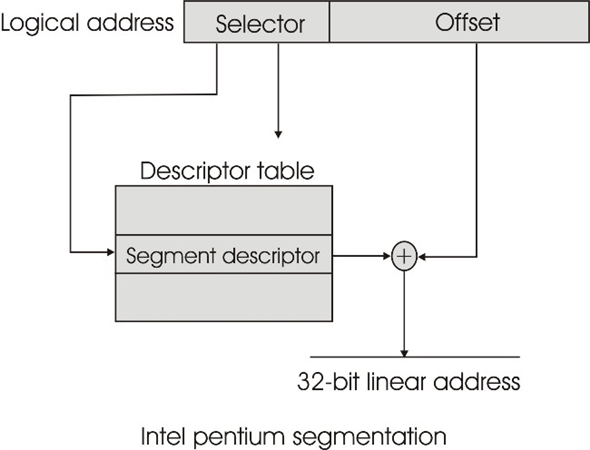
Segmentation unit:
• The logical address is given to the segmentation unit.
• Logical address has two fields which are selector and offset.
o Selector is a 16-bit field which is used as an index to the descriptor table.
o Each segment has three fields which are segment number (s), whether the segment is a Local or Global Descriptor table (LDT or GDT) and protection field (p).
• The selector filed selects one of the segments and perform an EX-OR with the offset to generate a 32-bit linear address.
Step-3
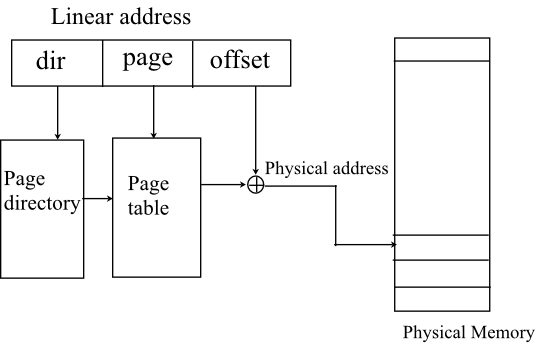
Paging unit:
• The 32-bit linear address is given to the paging unit. It has three fields which are dir, page and the offset.
• The filed dir is used as an index to the page directory. The entry from the page directory selects the page table.
• The filed page is used as an index to the page table.
• The entry of the page table is EX-ORed with the offset to generate the physical address.
• The physical memory is accessed by the physical address.
Step-4
b. Advantages to the address-translation system:
• The page translation mechanism of an Intel processor provided more flexibility and the kernel implementation is simple.
• An operating system implements the entire memory scheme in hardware, instead of having to implement some parts in hardware and some parts in software.
• Therefore, the efficiency of the Intel Pentium processor is increasing.
Step-5
c. Disadvantages to the address-translation system:
• The translation of logical address into physical address involves multiple table lookups and it takes longer due to invoke each table.
• Cache is used in the segmentation unit to read the descriptor but, there will still be cache misses.
Problem 33
Step-1
Program Plan:
• Initialize the integer and character variables.
• Pass the unsigned long integer the mapped address and the page and the offset values.
• Compute the offset and page number using the command line arguments.
• Display the Sample Output.
Step-2
Program:
/A C program that is passed a virtual address in decimal/ /*format on the command line and gives in output */
/the offset and the page number for the address given/ /*using the data type to store 32 bits. */
//include the header file
int main(int argc,char *argv[])
{
long unsigned long int MapAdd= atoll(argv[1]);
long unsigned long int pg = MapAdd;
long unsigned long int oset = MapAdd;
//print the long unsigned long address
printf( “The MappedAddress %llu contains:\n”, MapAdd );
pg = (int)MapAdd/4096;
printf( “Page Number : %llu\n”, pg );
//Compute the modulo of the decimal offset value for the mapped address.
//since it’s a 32 bit operand thus add the offset to //it
oset = MapAdd %4096;
//print the value of offset
printf( “Offset = %llu\n\n”, oset );
//end of main program
return 0;
//main program ends
}
Step-3
Sample Output:
The MappedAddress 19986 contains:
Page Number: 4
Offset = 3602