Problem 1
Step-1
2481-9-12E SA: 8683
SR: 4478
A page fault occurs when a process addresses a page whose valid/invalid bit is set to invalid. It also can be stated that this happens when a process addresses a point in logical memory that is not currently in physical memory.
When the page fault occurs, the operating system traps, suspending the process. It checks to see if the reference itself is legal (the reference is to a page not currently in memory) or illegal (the reference is to a page that doesn’t actually exist).
If the reference was illegal, then the process is aborted. If the reference was legal, the operating system prepares to bring the needed frame into physical memory. If there is a frame available from the free frame list, then the page is simply loaded. If there is not a free frame available, the operating system selects a current frame as a victim (using a page replacement algorithm), may write this frame back to secondary storage, and loads the needed page into the newly available frame. Finally, the page table is updated to reflect this modification, and the process’s execution is restarted from the line which caused the trap.
Problem 2
Step-1
Page Faults
a) Since the page-reference string is initially empty, each page must be inserted in the beginning. The number distinct page numbers is n and thus each one of them must be loaded in the memory. Therefore,  is the lower bound.
Step-2
b) The upper bound on the number of page faults depends on the size of the memory. Given that the length of the page-reference string is p , if the number of frames i.e. m is greater than the distinct page numbers i.e. n , the upper bound would be n no matter what the value of p is.
Otherwise, when the value of m is less than n , then the upper bound will be equal to the p.
Problem 3
Step-1
2481-9-2E SA: 8683
SR: 4478
Given Number of bits in Logical Address = 12-bit
Page size = 256 bytes
= 28 bytes.
Logical address consists of page number andpage offset.
Number of bits used in page offset = Log2 (Page size).
= Log2 28
= 8 bits.
Step-2
So, 12-bit Logical address is divided into 4-bit page number and 8-bit page offset.
Logical address can be mapped into physical address as shown below.
C P U
| Page number | Page offset |
|---|
Page 1
Page 6
: :
Page table
| Page | Page frame |
|---|---|
| 0 | - |
| 1 | 2 |
| : : | : : |
| Frame no. | offset |
| --- | --- |
Step-3
Procedure to convert given logical address into physical address,
Step 1 : convert given hexadecimal number into binary and then use first 4-bits as page
number to locate the frame number.
Step 2 : Add the frame number corresponding to the page number in the given page table
with the offset to get the physical address.
Step-4
Given Logical address in hexadecimal = (9EF)16 .
Calculating physical address for the given logical address using above procedure.
(9EF)16 = (1001 1110 1111)2
From the above binary equivalent of (9EF)16 , the page number = (1001)2
= 9
Frame number corresponding to page number 9 is 0 and offset is (1110 1111)2.
So, physical address = (0000 1110 1111)2
= (0EF)16.
Physical address for the logical address (9EF) 16 is (0EF) 16.
Step-5
Given Logical address in hexadecimal = (111)16 .
Calculating physical address for the given logical address using above procedure.
(111)16 = (0001 0001 0001)2
From the above binary equivalent of (111)16 , the page number = (0001)2
= 1
Frame number corresponding to page number 1 is 2 and offset is (0001 0001)2.
So, physical address = (0010 0001 0001)2
= (211)16.
Physical address for the logical address (111) 16 is (211) 16.
Given Logical address in hexadecimal = (700)16 .
Calculating physical address for the given logical address using above procedure.
(700)16 = (0111 0000 0000)2
From the above binary equivalent of (700)16 , the page number = (0111)2
= 7
Frame number corresponding to page number 7 is – that means page is not in memory, so we put this page in first available free frame ‘D ’ and offset is (0000 0000)2.
So, physical address = (1101 0000 0000)2
= (D00)16.
Physical address for the logical address (700) 16 is (D00) 16.
Step-6
Given Logical address in hexadecimal = (0FF)16 .
Calculating physical address for the given logical address using above procedure.
(0FF)16 = (0000 1111 1111)2
From the above binary equivalent of (0FF)16 , the page number = (0000)2
= 0
Frame number corresponding to page number 0 is – that means page is not in memory, so we put this page in first available free frame ‘E’ and offset is (1111 1111)2.
So, physical address = (1110 1111 1111)2
= (EFF)16.
Physical address for the logical address (0FF) 16 is (EFF) 16.
Step-7
Summary :
| S.No | Logical address | Physical address |
|---|---|---|
| 1 | 9EF | 0EF |
| 2 | 111 | 211 |
| 3 | 700 | D00 |
| 4 | 0FF | EFF |
Problem 4
Step-1
Algorithm comparison
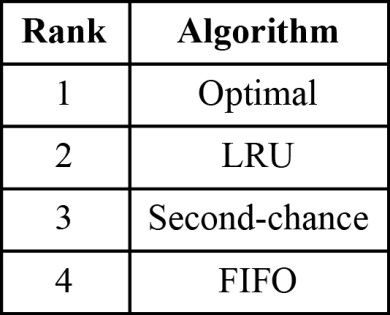
The algorithms are ranked in the table below based on their page-fault rates:
Step-2
a) The LRU associates a time with each page in the memory and the ones with the greatest value are replaced. It does not suffer from Belady’s anomaly.
Step-3
b) The FIFO replacement algorithm replaces the page which was first brought into the memory followed by the next and so on. This algorithm suffers from Belady’s anomaly.
Step-4
c) An optimal algorithm would never suffer from Belady’s anomaly according to its definition. It would replace a page which is not in use for the longest time.
Step-5
d) The second-chance works on the FIFO algorithm and uses a reference bit. This algorithm suffers from Belady’s anomaly as the FIFO algorithm.
Problem 5
Step-1
Loading the entire program into memory results in loading the executable code for all options, regardless of whether an option is ultimately selected by the user or not. Initially loading pages are needed. This is known as demand paging.
With this scheme we need some form of hardware support to distinguish between the pages that are in memory and the pages that are on the disk.The valid –invalid bit scheme described can be used for this purpose.This time ,however,when this bit is set to “valid”,the associated page is both legal and in memory.If the bit is set to “invalid”,the page either is not valid but is currently on the disk.The page-table entry for a page that is brought into memory is set as usual,but the page-table entry for a page that is not currently in memory is either simply marked invalid or contains the address of the page on disk.
The hardware supports are:
Secondary memory usually disk, pager and swapper.
Figure 9.5
Problem 6
Step-1
Effective access time
The time taken to read or write a page resulting from replacement can be defined as the sum of the rotational delay and the time to transfer the page.
Given that the drum rotates at , or
, or 
Thus 1 revolution of the drum takes  (or)
(or)  . The average rotational time is
  (or)
(or)  .
.
Step-2
Next, given that 1 million or  words are transferred per second, the transfer time can be calculated as follows:

Thus,

Step-3
The effective access time is given by the following formula:

Where p is the probability of a page fault and ma is the memory access time,
Given that  instructions access a page other than the current page,
Step-4
The total access time is calculated as follows:
Time taken by  instructions which access the same page:

The rest  instructions access a page other than the current page
  of which are already in the memory, thus the time taken by these is

 of pages which are not in the memory and need replacement, take

 of pages which are not in the memory and do not need replacement, take

Step-5
Thus the total time taken is

Therefore the effective instruction time on the given system is  .
.
Problem 7
Step-1
2481-9-16E SA: 8683
SR: 4478
a.) 5,000 page faults, because the program text will never be the least recently used page, since program instructions are run between any two assignments to the array. Therefore, we can ignore the program and consider only the 2 physical pages for the data. The book assumes that matrices are stored in row-major order. In initialization loop of (a), the row index ‘ i’ is incremented in the inner loop, while the column index is incremented in the outer loop. As a result, each increment of the inner loop skips half of the page size by skipping to the same column position within the next row. Thus, a new page is referenced every two times around the inner loop. The number of rows is large enough that no data page will still be one of the two in memory when it is touched again, so every second page reference generates a page fault. Since the array A has 10,000 elements, this leads to a total of 5,000 page faults , since every other array reference will visit a data page that is not one of the 2 currently in memory.
Step-2
b.) 50 page faults , because the initialization loop of (b), the page holding the program will also never be paged out, for the same reason as in (a). So, once again, we can assume 2 physical pages for the matrix data. In this case, the inner loop increments ‘ j’ and thus visits every member of a row before visiting the next. Thus, each page is entirely initialized and then never touched again. So there is exactly one page fault per page holding the array. Since the array has 10,000 elements and the page size is 200, there will be 10,000 / 200 = 50 page faults.
Problem 8
Step-1
2481-9-9E SA: 8683
SR: 4478
LRU (Least Recently Used) page replacement:
In this, we can replace the page that has not been used for the longest period of time.
Given reference string is,1, 2, 3, 4, 2, 1, 5, 6, 2, 1, 2, 3, 7, 6, 3, 2, 1, 2, 3, 6.
LRU 1 2 3 4 2 1 5 6 2 1 2 3 7 6 3 2 1 2 3 6
For Frame=1
1 2 3 4 2 1 5 6 2 1 2 3 7 6 3 2 1 2 3 6
Page faults = 20
Step-2
Ref. string 1 2 3 4 2 1 5 6 2 1 2 3 7 6 3 2 1 2 3 6
For frame=2 1 1 3 3 2 2 5 5 2 2 2 7 7 3 3 1 3 3
2 2 4 4 1 1 6 6 1 3 3 6 6 2 2 2 6
Page faults =18
Step-3
Ref. string 1 2 3 4 2 1 5 6 2 1 2 3 7 6 3 2 1 2 3 6
For frame=3 1 1 1 4 4 5 5 5 1 1 7 7 2 2 2
2 2 2 2 2 6 6 6 3 3 3 3 3 3
3 3 1 1 1 2 2 2 2 6 6 1 6
Page faults =15
Step-4
Ref. string 1 2 3 4 2 1 5 6 2 1 2 3 7 6 3 2 1 2 3 6
For frame=4 1 1 1 1 1 1 1 1 6 6
2 2 2 2 2 2 2 2 2
3 3 5 5 3 3 3 3
4 4 6 6 7 7 1
Page faults =10
Step-5
Ref. string 1 2 3 4 2 1 5 6 2 1 2 3 7 6 3 2 1 2 3 6
For frame=5 1 1 1 1 1 1 1 1
2 2 2 2 2 2 2
3 3 3 6 6 6
4 4 4 3 3
5 5 5 7
Page faults =8
Step-6
Ref. string 1 2 3 4 2 1 5 6 2 1 2 3 7 6 3 2 1 2 3 6
For frame=6 1 1 1 1 1 1 1
2 2 2 2 2 2
3 3 3 3 3
4 4 4 7
5 5 5
6 6
Page faults =7
Step-7
Ref. string 1 2 3 4 2 1 5 6 2 1 2 3 7 6 3 2 1 2 3 6
For frame=7 1 1 1 1 1 1 1
2 2 2 2 2 2
3 3 3 3 3
4 4 4 4
5 5 5
6 6
7
Page faults =7
FIFO(First In First Out) page replacement : In this, we can replace the page that has brought into memory first among the others.
Given reference string is, 1, 2, 3, 4, 2, 1, 5, 6, 2, 1, 2, 3, 7, 6, 3, 2, 1, 2, 3, 6.
FIFO 1 2 3 4 2 1 5 6 2 1 2 3 7 6 3 2 1 2 3 6
For Frame=1
1 2 3 4 2 1 5 6 2 1 2 3 7 6 3 2 1 2 3 6
Page faults = 20
Step-8
Ref. string 1 2 3 4 2 1 5 6 2 1 2 3 7 6 3 2 1 2 3 6
For frame=2 1 1 3 3 2 2 5 5 2 2 3 3 6 6 2 2 3 6
2 2 4 4 1 1 6 6 1 1 7 7 3 3 1 1 1
Page faults =18
Step-9
Ref. string 1 2 3 4 2 1 5 6 2 1 2 3 7 6 3 2 1 2 3 6
For frame=3 1 1 1 4 4 4 6 6 6 3 3 3 2 2 2 6
2 2 2 1 1 1 2 2 2 7 7 7 1 1 1
3 3 3 5 5 5 1 1 1 6 6 6 3 3
Page faults =16
Step-10
Ref. string 1 2 3 4 2 1 5 6 2 1 2 3 7 6 3 2 1 2 3 6
For frame=4 1 1 1 1 5 5 5 5 3 3 3 3 1 1
2 2 2 2 6 6 6 6 7 7 7 7 3
3 3 3 3 2 2 2 2 6 6 6 6
4 4 4 4 1 1 1 1 2 2 2
Page faults =14
Step-11
Ref. string 1 2 3 4 2 1 5 6 2 1 2 3 7 6 3 2 1 2 3 6
For frame=5 1 1 1 1 1 6 6 6 6 6
2 2 2 2 2 1 1 1 1
3 3 3 3 3 2 2 2
4 4 4 4 4 3 3
5 5 5 5 5 7
Page faults =10
Step-12
Ref. string 1 2 3 4 2 1 5 6 2 1 2 3 7 6 3 2 1 2 3 6
For frame=6 1 1 1 1 1 1 7 7 7 7
2 2 2 2 2 2 1 1 1
3 3 3 3 3 3 2 2
4 4 4 4 4 4 3
5 5 5 5 5 5
6 6 6 6 6
Page faults =10
Step-13
Ref. string 1 2 3 4 2 1 5 6 2 1 2 3 7 6 3 2 1 2 3 6
For frame=7 1 1 1 1 1 1 1
2 2 2 2 2 2
3 3 3 3 3
4 4 4 4
5 5 5
6 6
7
Page faults =7
Optimal page replacement: In this, we can replace the page that will not be used for the longest period of time.
Given reference string is,1, 2, 3, 4, 2, 1, 5, 6, 2, 1, 2, 3, 7, 6, 3, 2, 1, 2, 3, 6.
Optimal
1 2 3 4 2 1 5 6 2 1 2 3 7 6 3 2 1 2 3 6
For Frame=1
1 2 3 4 2 1 5 6 2 1 2 3 7 6 3 2 1 2 3 6
Page faults = 20
Step-14
Ref. string 1 2 3 4 2 1 5 6 2 1 2 3 7 6 3 2 1 2 3 6
For frame=2 1 1 3 4 1 5 6 1 3 3 3 3 1 3 3
2 2 2 2 2 2 2 2 7 6 2 2 2 6
Page faults =15
Step-15
Ref. string 1 2 3 4 2 1 5 6 2 1 2 3 7 6 3 2 1 2 3 6
For frame=3 1 1 1 1 1 1 3 3 3 3 6
2 2 2 2 2 2 7 2 2 2
3 4 5 6 6 6 6 1 1
Page faults =11
Step-16
Ref. string 1 2 3 4 2 1 5 6 2 1 2 3 7 6 3 2 1 2 3 6
For frame=4 1 1 1 1 1 1 7 1
2 2 2 2 2 2 2
3 3 3 3 3 3
4 5 6 6 6
Page faults =8
Step-17
Ref. string 1 2 3 4 2 1 5 6 2 1 2 3 7 6 3 2 1 2 3 6
For frame=5 1 1 1 1 1 1 1
2 2 2 2 2 2
3 3 3 3 3
4 4 6 6
5 5 7
Page faults =7
Step-18
Ref. string 1 2 3 4 2 1 5 6 2 1 2 3 7 6 3 2 1 2 3 6
For frame=6 1 1 1 1 1 1 1
2 2 2 2 2 2
3 3 3 3 3
4 4 4 7
5 5 5
6 6
Page faults =7
Step-19
Ref. string 1 2 3 4 2 1 5 6 2 1 2 3 7 6 3 2 1 2 3 6
For frame=7 1 1 1 1 1 1 1
2 2 2 2 2 2
3 3 3 3 3
4 4 4 4
5 5 5
6 6
7
Page faults =7
Summary :
| Number of Frames | LRU | FIFO | Optimal |
|---|---|---|---|
| 1 | 20 | 20 | 20 |
| 2 | 18 | 18 | 15 |
| 3 | 15 | 16 | 11 |
| 4 | 10 | 14 | 8 |
| 5 | 8 | 10 | 7 |
| 6 | 7 | 10 | 7 |
| 7 | 7 | 7 | 7 |
Problem 9
Step-1
Simulating reference bit:
The reference bit is required by the paging algorithm in the operating system, but the hardware component in the system does not provide the reference bit.
Step-2
• But, the reference bit can be generated using valid and invalid bit in the hardware component.
• At first, simulation in the operating system is done using a reference. Now, the software bit in the operating is assigned to 1.
• The valid and invalid bit in the hardware component is assigned as valid.
Problem 10
Step-1
Optimal algorithm
An optimal algorithm would never suffer from Belady’s anomaly according to its definition. It would replace a page which is not in use for the longest time. Therefore, if the newly designed algorithm suffers from Belady’s anomaly even in the rarest situations, it is not an optimal algorithm.
Problem 11
Step-1
2481-9-23E SA: 8683
SR: 4460
Segment-replacement algorithm based on FIFO :
In this algorithm, all the segments are not of same size so we will search for the segment which is large enough to fit the incoming segment. If the relocation is not possible and there is no segment is large enough to fit the incoming segment then we will swap out the segment which came first to make room for the new segment. If relocation is possible then we will rearrange the segments to make a space to accommodate new segment.
Step-2
Segment-replacement algorithm based on LRU :
In this algorithm, we will search for the segment that has not been used for the longest period of time and that is large enough to fit the incoming segment. If relocation is not possible and no segment is large enough, then we will swap out next segment which has not been used for longest period to make a space for the new segment. If relocation is possible, then rearrange the oldest segments to be contiguous in memory and replace those with the new segment.
Problem 12
Step-1
2481-9-5E SA: 8683
SR: 4460
a) CPU utilization 13 percent; disk utilization 97 percent.
• Here CPU utilization is less than disk utilization means system leads to thrashing.
• The degree of multiprogramming should be decreased to increase CPU utilization.
• Here paging causes underutilization of CPU. So, it is not helping.
Step-2
b) CPU utilization 87 percent; disk utilization 3 percent.
• Utilization of CPU is very good; CPU is being busy most of the time.
• The degree of multiprogramming probably should stay the same, increasing it may lead to thrashing.
• Here paging helps to keep the CPU busy most of the time doing useful work. So, paging is helping in this case.
Step-3
c) CPU utilization 13 percent; disk utilization 3 percent.
• Utilization of CPU is not appreciable; the CPU is not getting enough work.
• The degree of multiprogramming should be increased to increase the CPU utilization.
• Here, paging is not really helping or hurting.
Problem 13
Step-1
Page tables
A page table is used to mark the entries stored in it using a valid/invalid bit. The base and limit registers signify the starting and ending address to be used in memory for a program.
If the size of the segments in memory is fixed, the base and limit registers can be simulated using a page table. This can be achieved by entering the contents of the base register into the page table and then the valid/invalid bit can be used to mark the segment which is currently in the memory. In this manner, the page table can be used to simulate base and limit registers.
Problem 14
Step-1
2481-9-27E SA: 8683
SR: 6376
a) TLB miss with no page fault : Possible.
**** TLB did not contain this page table entry but it did exist in the page table and the entry was valid.
Step-2
b) TLB miss and page fault : Possible.
TLB did not contain this page table entry so it asked the page table but the entry was either invalid or out on disk.
Step-3
c) TLB hit and no page fault : Possible.
TLB contained that entry and it was valid and in memory.
Step-4
d) TLB hit and page fault : Impossible.
It is impossible because it cannot have a TLB entry if page is not in memory. Operating system updates the page tables and TLB when a page in the memory has been flushed out to disk.
Problem 15
Step-1
2481-9-7E SA: 8683
SR: 4478
a)
Yes , a thread changes its state from the Running state to the Blocked state when a
page fault occurs because when a page fault occurs, the process starts to wait for I/O operation to finish. The OS does several things while the process is waiting. It checks whether the page is really invalid or just on disk, finds a free memory frame, schedules a disk access to load the page into the frame, updates the page table with the new logical-physical mapping, updates the valid bit of that entry, and eventually restarts the process by change its state from Blocked to Ready.
Step-2
b) Not necessarily , because if a page table entry is not found in the TLB (TLB miss), the page number is used to index and process the page table. If the page is already in main memory, then TLB is updated to include the new page entry, while the process execution continues since there is no I/O operation needed. If the page is not in the main memory, a page fault is generated. In this case, the process needs to change to the Blocked state and wait for I/O to access the disk.
Step-3
c) No because no I/O operation is needed if the address reference is resolved in the page table, which indicates the page required is loaded in the main memory already.
Problem 16
Step-1
a)
• When a process first starts execution in a system that uses pure demand paging, the page fault rate is very high, and it will be100%.
• At the starting of the execution of a process, the memory does not contain any pages. Each page reference will lead to page fault until all the pages that are required for execution will load into the memory.
Step-2
b)
Once the working set for a process is loaded into memory, the page fault rate will be 0% because the all the pages required for current execution are loaded into the memory.
Step-3
c)
If a process changes its locality and the size of the new working set is too large to be stored in available free memory, then the designers handles this situation by allowing operating system to suspend one of the process.
The other options to handle this system are:
• The process pages are written out (swapped), and its frames are allocated to the new process and the suspended process can be restarted later.
• This strategy prevents thrashing while keeping the degree of multiprogramming as high as possible.
• Thus, it optimizes the CPU utilization.
Problem 17
Step-1
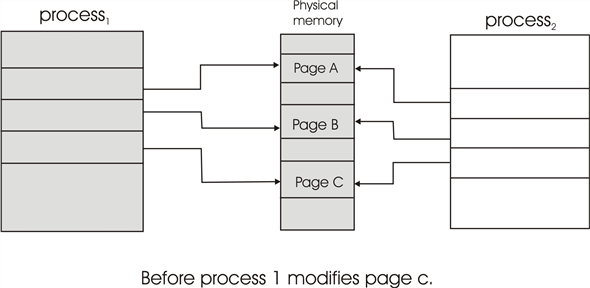
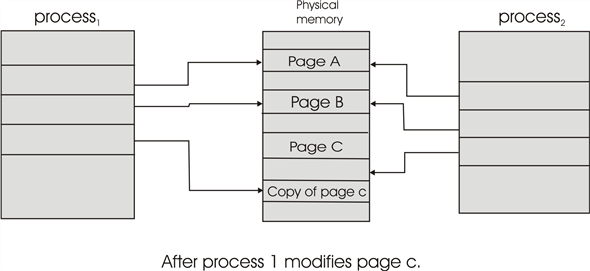
Copy-on-write: When two processes are accessing the same set of program values (for instance, the code segment of the source binary), then it is economical to use a common set of pages for these values and map the pages into the virtual address spaces of the two programs in a write-protected manner. When a write does indeed take place, then a copy must be made to allow the two programs to individually access the different copies without interfering with each other. Copy-on-write is a common technique used by several Operating Systems like windows XP, Linux and Solaris.
The hardware support required to implement copy-on-write is simply a write protection bit in the page table and TLB entries, which will force a trap to the operating system if a process attempts to write a page with the write protection bit already set.__
Copy-on-write is illustrated in figure 9.7 and figure 9.8.
Problem 18
Step-1
To convert the given virtual address in binary form, user needs to get binary numbers for the virtual address 11123456 which is in hexadecimal form.
Now consider the binary representation for each individual number:

Step-2
Below given diagram illustrates the same: -
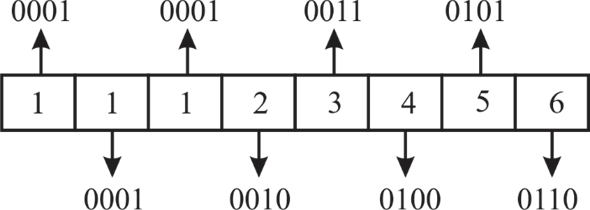
Hence, converting the virtual address in binary form gives, the following: -

Step-3
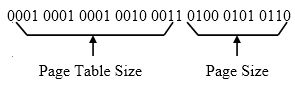
• Page size is given as 4,096 bytes  which is equivalent to 4 KB. Therefore, the size of page table will be
 (= Virtual memory size / Page size).
• So, 20 bits will be used to know the page table entry and the corresponding frame number.
• Therefore, the least significant 12 bits will be used as the displacement into page and the rest 20 bits for displacement into page table.
• It can be shown as:
Step-4
Thus, the physical location is generated by appending the offset with the resulting physical page number from the page table to get the final address.
Step-5
Hardware and Software Operations
While establishing the given physical location, a system will perform operations either for dynamic address translation (DAT) or for servicing the faulty page.
• Dynamic address translation operations are handled by the hardware part of the system.
• Whereas, servicing a faulty page, reading the resulting page and repeating the process whenever required are software operations.
Problem 19
Step-1
Demand paged memory the page table is held in registers
To service a page-fault 
If the replaced page is modified then requires 
Memory access time 
Step-2

 [Since (1- 0.7)]

[Note: everything shown in micro seconds]




Problem 20
Step-1
It is clearly stated that there exists a process with five user-level threads mapped to kernel threads in one to one mapping which means that one user thread is mapped to one kernel thread.
When a page fault occurs, the page must be blocked while waiting for the page to bring into main memory from the disk.
Therefore, only one thread which is accessing the stack is blocked. Remaining threads will not wait for the faulting page because, in one to one mapping each user level thread has a kernel level thread which has separate stacks for its operation.
Step-2
Hence, when a page fault occurs in one thread, the process requesting the page fault must block while waiting for the page to be brought from disk into physical memory, but it does not affect the other user threads.
Problem 21
Step-1
LRU: (Least Recently Used)
In LRU page replacement algorithm replaces the page which remains unused for a long duration.
Consider the page reference string and paging with three frames:
7, 2, 3, 1, 2, 5, 3, 4, 6, 7, 7, 1, 0, 5, 4, 6, 2, 3, 0, 1

Step-2
Explanation:
• First insert page 7,2,3 are inserted in the three frames, then count the number of page faults is 3.
• Second, 1 is inserted at Least recently used page which is 7, then replace the 7 with 1. It is considered as a 1-page fault
• 2 is already in the frames. So, it is not inserted into the frame. Thus, It is not considered as a page fault.
• Next, insert 5,3,4,6,7 is inserted into the frames, then count the number of page faults is 4.
• Likewise, the procedure is going on until the last page 1 is inserted into the page.
• Finally, count the number of page faults is 18.
The above paging diagram illustrates LRU page replacement for the above string. In the diagram, user represented which pages are in the three frames, each time a page fault occurs. Count all the number of page faults are eighteen.
Thus, number of faults for the above page reference string using LRU replacement algorithm is 18.
Step-3
FIFO: (First in First Out)
The name speaks it all; this page replacement method replaces pages as they occur. The oldest one is replaced first and the method goes on.
Consider the page reference string and paging with three frames:
7, 2, 3, 1, 2, 5, 3, 4, 6, 7, 7, 1, 0, 5, 4, 6, 2, 3, 0, 1

Step-4
Explanation:
• First insert page 7,2,3 are inserted in the three frames, then count the number of page faults is 3.
• Second, 1 is inserted at Least recently used page which is 7, then replace the 7 with 1. It is considered as a 1-page fault
• 2 is already in the frames. So, it is not inserted into the frame. Thus, it is not considered as a page fault.
• Next, 5 is inserted into the frame, then count the number of page faults is 1.
• To insert 3 in FIFO bases it is already in the frame, so it is not considered as page fault.
• Likewise, the procedure is going on until the last page 1 is inserted into the page.
• Finally, count the number of page faults is 17.
The diagram illustrates FIFO page replacement for the above string. In the diagram, user represented which pages are in the three frames, each time a fault occurs. In all number of faults are seventeen.
Thus, number of faults for the above page reference string using FIFO replacement algorithm is 17.
Step-5
Optimal Page Replacement:
In Optimal page replacement algorithm, the system replaces the page that would be idle for longer period in future.
Consider the page reference string and paging with three frames:
7, 2, 3, 1, 2, 5, 3, 4, 6, 7, 7, 1, 0, 5, 4, 6, 2, 3, 0, 1

**
Step-6
Explanation:**
• First insert page 7,2,3 are inserted in the three frames, then count the number of page faults is 3.
• Second, 1 is inserted at Least recently used page which is 7, then replace the 7 with 1. It is considered as a 1-page fault.
• 2 is already in the frames. So, it is not inserted into the frame. Thus, it is not considered as a page fault.
• Next, insert 5 is inserted into the frame, then count the number of page faults is 1.
• To insert 3 in Optimal replacement bases, so it is not considered as a page fault.
• Likewise, the procedure is going on until the last page 1 is inserted into the page.
• Finally, count the number of page faults is 17.
The diagram illustrates Optimal Page Replacement for the above string. In the diagram, user represented which pages are in the three frames, each time a fault occurs. In all number of faults are thirteen.
Thus, number of faults for the above page reference string using optimal Replacement algorithm is 13.
Problem 22
Step-1
Refer Figure 9.32 given in exercise of text book.
Step-2
a.
Virtual Address : A binary number in virtual memory which enables a process to use a location in main memory separately from other processes and use more space than actual in primary memory is called virtual address.
Physical Address: In main memory, physical address is represented differently from the virtual address. It is a binary number in the form of logical high and low states on an address bus that corresponds to a particular cell of main memory.
| 0xE12C | 0x312C |
|---|---|
| 0x3A9D | 0xAA9D |
| 0xA9D9 | 0x59D9 |
| 0x7001 | 0xF001 |
| 0xACA1 | 0x5CA1 |
Step-3
b.
The only options of pages are 4, 8, 12, and 13. Thus, example addresses include anything that begins with the hexadecimal sequence 0x4…, 0x8…, 0xC…, and 0xD…
Step-4
c.
• LRU page replacement algorithm: The algorithm that calculates which page have been used maximum and will be use so frequently. It throws out the page which is not in use since very long and remains will be unused too.
• The full form of LRU is least recently used. It works like its name.
Any page table entries that have a reference bit of zero. This includes the following frames {9, 1, 14, 13, 8, 0, 4}
Problem 23
Step-1
a. If the pointer is moving fast, then the program is accessing a large number of pages simultaneously. It is most likely that during the period between the point at which the bit corresponding to a page is cleared and it is checked again, the page is accessed again and therefore cannot be replaced. This results in more scanning of the pages before a victim is found.
Step-2
b. If the pointer is moving slow, then the virtual memory system is finding candidate pages for replacement quickly, indicating that many of the resident pages are not accessed .
Problem 24
Step-1
Page replacement algorithms
The least-frequently used algorithm for page replacement replaces pages on the basis of a count for each page. The count reveals the number of times a page is accessed. When a page is to be replaced, the one with least count is replaced. This algorithm performs better than least recently used when a page is accessed quite frequently though not recently.
For example, consider a memory system with capable of holding four pages. Further consider the sequence .
.
Initially the memory is empty so when 1 is needed, it is brought into the memory as shown below:

Step-2
The next reference is also 1 therefore it is accessed without any replacement and the count for page one is incremented.
Then, 2 is brought into the memory as shown below:

Step-3
Next, 3 is brought into the memory as shown below:

Step-4
Next, 4 is brought into the memory as shown below:

Step-5
Now, when the 5 is needed, the count of all pages is examined and except 1, any of the other pages can be replaced because the count of 1 is greater than the count of others. Suppose, 2 is replaced as shown below:

Step-6
This is different from least recently used (LRU) page replacement algorithm. In LRU, 1 would have been replaced.
Step-7
Now, the according to the sequence, page 1 is to be accessed again. And since it wasn’t replaced there would be no page fault. However, LRU would have resulted in a page-fault here.
Thus, least frequently used algorithm performs better than the least recently used algorithm for the given sequence.
Now, examine a case where least recently used algorithm would perform better than least frequently used algorithm. The LRU associates a time with each page in the memory and the ones with the greatest value are replaced.
Consider the sequence .
.
Initially the memory is empty so when 1 is needed, it is brought into the memory as shown below:

Step-8
The next reference is also 1 therefore it is accessed without any replacement.
Then, 2 is brought into the memory as shown below:

Step-9
Next, 3 is brought into the memory as shown below:

Step-10
Next, 4 is brought into the memory as shown below:

Step-11
Now, when the 5 is needed, the page least recently used should be replaced. Thus, 1 is replaced as shown below:

Step-12
Next page in the sequence is 2 which is already present in the memory thus no page fault occurs. If least frequently used algorithm was used instead of least recently used algorithm, 2 would have been replaced and a page fault would have occurred.
Thus, in this case, least recently used algorithm performs better than least frequently used algorithm.
Problem 25
Step-1
MFU page replacement policy:
Most Frequently Used (MFU) page replacement policy will brought the pages in the memory which was used most frequently.
• To find the page frame with most frequently used, counting mechanism should be added to the tables.
• The counting mechanism is needed to count the page references frequency.
• The contents of the page frame with high frequency counter will be swapped in by the MFU.
LRU page replacement policy:
Least Recently Used (LRU) page replacement policy will remove the pages in the memory which have the least amount of recent activity.
• It is considered that these pages will not be used in the near future.
• Mostly used pages will remain in the memory for long time.
Step-2
MFU generates fewer page faults than LRU:
Considering the sequences for a system that can hold four pages in the memory of the system such as “ ”. The MFU generates page faults less than LRU page replacement algorithm during the situation in which memory a system holds 4 pages of memory access sequence “
 ”.
”.
• Using the Least Frequently Used (LFU) algorithm the system removes out “page 4” according to MFU algorithm and inserts “page 5” into the system.
• The system throws out “page 1” according to LRU algorithm and then inserts “page 5” into the system.
According to this situation, MFU page replacement algorithm is better page replacement algorithm than LRU (Least recently Used) page replacement algorithm. But, if the page sequence is changed as “1 2 3 4 4 4 4 4 5 1” then LRU works well and can be considered as better choice than MFU page replacement algorithm.
Problem 26
Step-1
a. When a page fault occurs and if the page does not exist in the free frame pool, then one of the pages in the free frame pool needs to be evicted to the disk, creating space for one of the resident pages to be moved to the free frame pool. The accessed page is then moved to the resident set.
Step-2
b. If the page exists in the free-frame pool, then it is moved into the set of resident pages, while one of the resident pages is moved to the free-frame pool.
Step-3
c. The system degenerates into the page replacement algorithm used in the free frame pool, namely an LRU managed system.
Step-4
d. The system degenerates into a FIFO-managed system.
Problem 27
Step-1
a.
No. Installing a faster CPU will not improve the utilization of the CPU. As the CPU is attached to the motherboard, the speed and the CPU utilization are depending on the motherboard components.
Therefore, installing a faster CPU wouldn’t improv the CPU utilization.
Step-2
b.
No. If a bigger paging disk is installed in the system, it can store a greater number of pages in the secondary storage disk. This will increase the paging disk utilization. Therefore, CPU swaps the pages from the disk to a memory greater number of times.
Therefore, installing a bigger paging disk wouldn’t improve the CPU utilization.
Step-3
c.
No. The Degree of multiprogramming allows the maximum number of processes that can be executed in a single processor system. As the number of processes share the same amount of memory in multiprogramming, it will not show any improvement of CPU utilization.
Therefore, Increase the degree of multiprogramming wouldn’t improve the CPU utilization.
Step-4
d.
Yes. All the processes running in the multiprogramming environment share the common memory. If the degree of multiprogramming is decreased, then no process will be waiting for the memory and the process which is currently being executed is using the memory. It will not wait for the memory.
Therefore, decreasing the degree of multiprogramming will improves the CPU utilization.
Step-5
e.
Yes. Installing more main memory will definitely increase the CPU utilization. The main memory stores all the programs which are requested by the CPU for its execution. As the size of the main memory is large, it will not depend on the secondary disk and no need of swap outs. So that, the CPU can execute the programs by directly accessing memory.
Therefore, installing more main memory will likely to be improves the CPU utilization.
Step-6
f.
Yes. The CPU will access the disk whenever the requested page is not available in the main memory. If a faster hard disk or multiple hard disks with multiple controllers are installed, then the CPU can access a greater number of pages from the disk. This will result a removal of bottleneck and increasing throughput to the disks.
The CPU can access the data quickly and executes a greater number of programs. Therefore, installing faster hard disk or multiple hard disks will improve the CPU utilization.
Step-7
g.
Yes. A prepaging scheme is added to the page-fetch algorithms, it will bring the pages into the memory before as they are requested by the CPU. Therefore, the CPU will not wait for the data and get it quickly. Therefore, the CPU executes the pages quickly and improves the CPU utilization.
It will raise a problem, when the page is brought into the memory which is not needed by the CPU. Then, the prepaging scheme will not get benefited to improve the utilization of the CPU.
Step-8
h.
No. Increasing page size will result an increasing number of page faults when the data are being accesses sequentially. If the data is being accessed randomly, then the paging action needed by the CPU is more because, fewer pages are kept in the memory and the remaining pages are stored on disk. This will cause more data needed to be transferred per every page fault.
Therefore, increasing the page size wouldn’t improve the CPU utilization.
Problem 28
Step-1
The following pagefaults take place: page fault to access the instruction, a page fault to access the memory location that contains a pointer to the target memory location, and a page fault when the target memory location is accessed.The operating system will generate three page faults with the third page replacing the page containing the instruction. If the instruction needs to be fetched again to repeat the trapped instruction,then the sequence of page faults will continue indefinitely. If the instruction is cached in a register,then it will be able to execute completely after the third page fault.
Problem 29
Step-1
In general this would not be an especially effective policy. By using this algorithm, you would gain many more free pages in memory that can be used by newly faulted pages. However, this comes at the expense of having to bring evicted pages back into memory that LRU or second-chance would not have evicted in the first place. This would be effective in workloads where a page is used once and then never again, because it wouldn’t matter if the page was discarded.
Problem 30
Step-1
Step-2
Step-3
Problem 31
Step-1
Effective access time
Given that access time per memory access is , the time taken by
  access in memory:

Step-2
The time taken by  accesses not in memory:

Step-3
The time taken by  accesses in total:

Thus the total access time is .
.
Problem 32
Step-1
Thrashing is a situation in which paging activity is very high. If a process is thrashing, then it spends its more time in paging than in execution.
Cause of thrashing:
• A process that does not have enough frames to run, quickly page-faults again and again. That is the process spending it’s all time in paging. As a result, CPU utilization will be decreased.
• CPU scheduler, on seeing low CPU utilization, will increase the degree of multiprogramming, while all processes spending their time in paging.
Therefore, high paging operations (swap-in and swap-out) taking place, due to lack available frames and increasing degree of multiprogramming while all the processes spending all their time in paging causes thrashing.
Step-2
Detection of thrashing:
• Thrashing occurs when increasing degree of multiprogramming while all the processes spending all their time in paging.
• To increase degree of multiprogramming CPU scheduler will add new process to queue. The new process also quickly causes more page faults, as there are no free frames. Again, the new process also spends its time in paging and CPU utilization will be decreased further.
• Again, CPU scheduler adds new process to increase the degree of multiprogramming.
• In Thrashing, CPU utilization will be decreased rapidly, as increasing degree of multiprogramming.
Therefore, system can detect thrashing by observing rapid decrease in CPU utilization, as the degree of multiprogramming is increasing.
Step-3
Eliminating thrashing:
• Thrashing is caused by increasing degree of multiprogramming while processes are spending their time in paging.
• Thus, system decreases degree of multiprogramming, to eliminate thrashing. System can stop adding new processes to queue or do not allow a process that causes thrashing to steal frames from another process, to decrease the degree of multiprogramming.
Therefore, to remove thrashing, system can decrease the degree of multiprogramming immediately .
Problem 33
Step-1
Yes, in fact many processors provide two TLB’s for this very reason. As an example, the code being accessed by a process may retain the same working set for a long period of time. However, the data the code accesses may change, thus reflecting a change in the working set for data accesses
Problem 34
Step-1

 is a parameter used to examine the locality references in working set model.
• If the value of ** **is too small , it will not encompasses the entire locality because, the pages are removed from the locality which are beyond the value of
  even they may definitely useful for future.
Step-2
• If the value of ** **is too large , pages in one locality may overlapped with the pages in the another locality.
Step-3
Hence,  **** value should not be large and shout not b small.
Problem 35
Step-1
Buddy System tree for 6 KB request:
• The diagram illustrates how the total memory space is divided into equal partitions at each level. The partition divided is represented into left and right section.
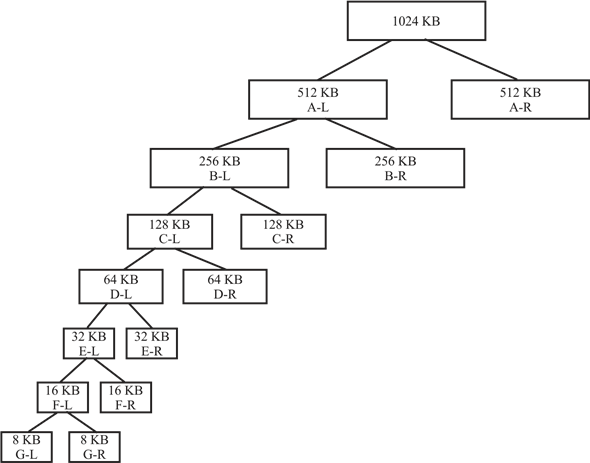
• Hence, for a 6 KB space request, user get a tree of 7-levels. Here the 6KB request will be fulfilled by the 8 KB G-L segments.
Step-2
Buddy System tree for 250 bytes request,
250 bytes = 0.25 KB
• The diagram illustrates how the total memory space is divided into equal partitions at each level.
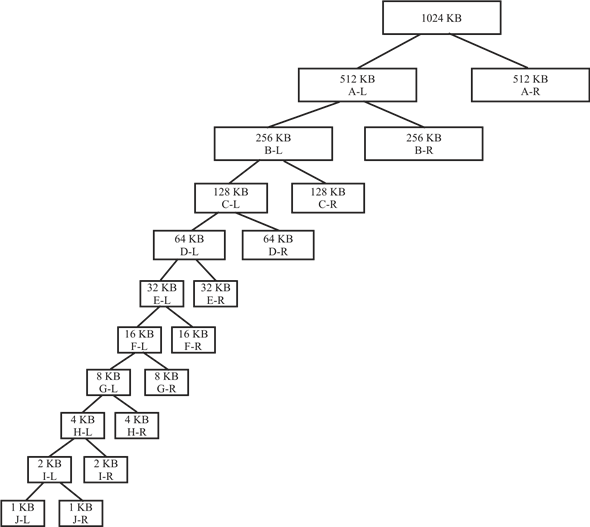
• The partition divided is represented into left and right section. Hence, for a 250 bytes space request we get a tree of 10-levels. Here the 0.25 KB request will be fulfilled by the 1 KB J-L segments.
Step-3
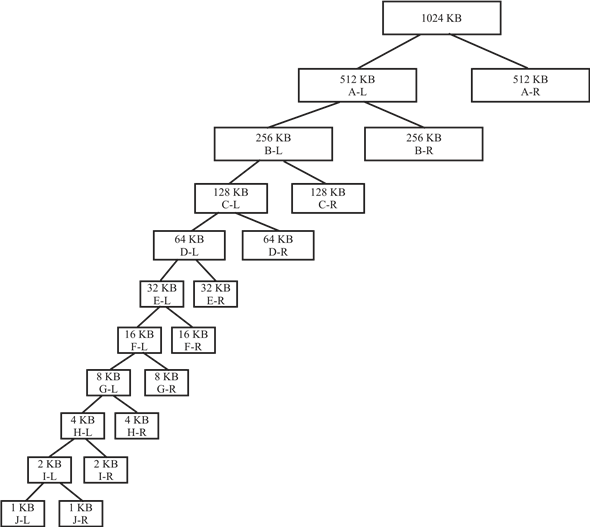
Buddy System tree for 900 bytes request,
900 bytes = 0.9 KB
• The below given tree illustrates how the total memory space is divided into equal partitions at each level.
• The partition divided is represented into left and right section. Hence, for a 900 bytes space request we get a tree of 10-levels. Here the 0.9 KB request will be fulfilled by the 1 KB J-L segments.
Step-4
Step-5
Buddy System tree for 1500 bytes request,
1500 bytes = 1.5 KB
• The diagram illustrates how the total memory space is divided into equal partitions at each level.
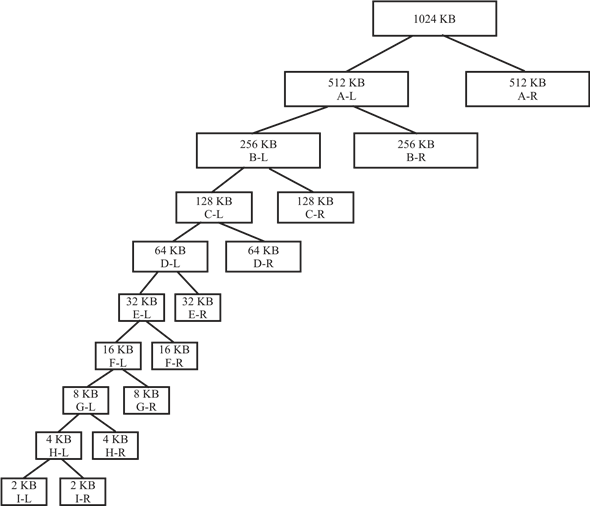
• The partition divided is represented into left and right section. Hence, for a 1500 bytes space request we get a tree of 9-levels. Here the 1.5 KB request will be fulfilled by the 2 KB I-L segments.
Step-6
Buddy System tree for 7 KB request,
• Below given tree illustrates how the total memory space is divided into equal partitions at each level.
• The partition divided is represented into left and right section. Hence, for a 7 KB space request we get a tree of 7-levels. Here the 7 KB request will be fulfilled by the 8 KB G-L segments.
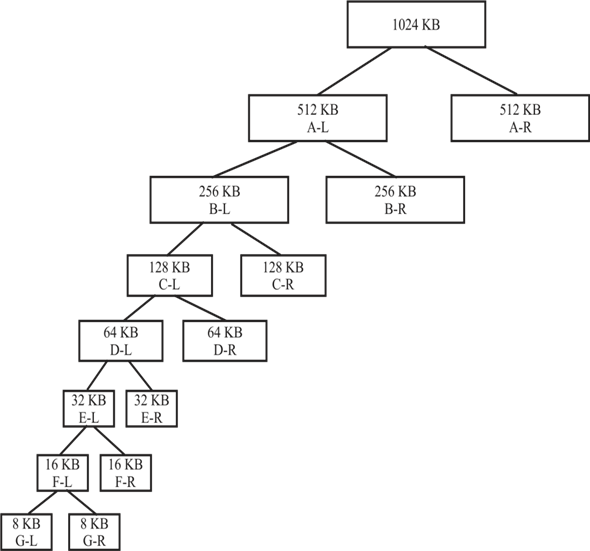
**
Step-7
After Memory Release**
After releasing 250 bytes, 900 bytes & 1500 bytes, the segment which will still be occupied is the 8 KB segment.
• Whereas, following segments will be free:-
512 KB, 256 KB, 128 KB, 64 KB, 32 KB, 16 KB, 4 KB, 2 KB and 1 KB.
• The only occupied 8 KB segment is allocated to the 6 KB and 7 KB request.
Problem 36
Step-1
Threads
Correct option******(b) a working set for each thread******
Whenever a new user-level thread is created in the system, a kernel thread mapping to it is also created. Thus in a multithreading environment, a process consists of a working set for each thread.
Problem 37
Step-1
slab allocator
• The slab allocator is introduced with the idea of using a separate cache for each different object type. For example, allocator uses one cache to store all file objects, one cache to store process descriptor objectors and another cache to store semaphore objects etc.
• If there is no such object based allocator, the kernel spends lot of its time allocating, initializing and destroying objects.
• The slab allocator maintains a variable number of caches per each object type. Each cache contains one or more blocks of contiguous pages in memory called slabs which are used to store objects.
Step-2
Problem with using one cache per object type
• Assume system maintaining one cache per object type. Then the system does not provide good scalability with multiple CPUs, as global slab cache must be locked while it is being accessed.
• For example, if two processes want to allocate file objects from file objects cache. Then allocation request of first process should hold a lock on the file object cache and allocation request of second block must be blocked until the file object of first process is allocated.
• Thus, cache accesses must be serialized on multiprocessor systems. This will reduce the efficiency of the allocator.
Solution to scalability issue
• Solaris addressed the scalability problem by implementing slab allocator with several internal layers.
• These additional layers give a cache, called per-CPU object cache, for each CPU. That is, each CPU has its own cache of objects.
• Thus, without holding a lock on global cache , a process can store its object from local per-CPU object cache.
Problem 38
Step-1
The program may have a large code segment or user large-sized arrays of data. These portions of the program could be allocated to larger pages, thereby decreasing the memory overheads associated with a page table. The virtual memory system would then have to maintain multiple free lists of pages for the different sizes and should also need to have more complex code for address translation to take into account different page sizes.
Problem 39
Step-1
Program plan:
• Initialize and declare the variables to store the page frames and reference string.
• Declare the functions to implement the algorithms.
• Define the main function.
o Prompt and read the total number of pages
o Prompt and read the reference string
o Display the menu
o prompt and read the menu for the choice of algorithm
o use the switch case to switch based choice of user
• implementation of FIFO
o Initialize and declare the variables
o Prompt and read the frame size
o Implement the FIFO logic
o Determine the page faults and display its count
• implementation of optimal
o Initialize and declare the variables
o Prompt and read the frame size
o Implement the optimal logic
o Determine the page faults and display its count
• implementation of LRU
o Initialize and declare the variables
o Prompt and read the frame size
o Implement the LRU logic
o Determine the page faults and display its count****
Step-2
Program:
/* A program to implement the FIFO, LRU and Optimal page replacement Algorithms */
// include the required library header files
//declare and initialize the variables
//initialize the two arrays named page, frame
//page to store the given string
//frame to store the elements in the frame
int n, page[30], frame[10];
//function to perform the FIFO algorithm
void fifo();
//function to perform the Optimal algorithm
void optimal();
//function to perform the LRU algorithm
void lru();
// main function
void main()
{
//declare the variables
int i, ch;
//prompt and read the total number pages from the user
printf(“\nEnter total number of pages:”);
scanf(“%d”, &n;);
//prompt and read the page references from the user
printf(“\nEnter page references:”);
for (i = 0; i < n; i++)
scanf(“%d”, &page;[i]);
do
{
//display the menu to choose the choice of //algorithm
printf(“\n\tMENU\n”);
printf(“\n1)FIFO”);
printf(“\n2)OPTIMAL”);
printf(“\n3)LRU”);
printf(“\n4)Exit”);
//prompt and read the choice
Step-3
printf(“\nEnter your choice:”);
scanf(“%d”, &ch;);
// swithc case statements
switch (ch)
{
case 1: fifo();
break;
case 2: optimal();
break;
case 3: lru();
break;
}
} while (ch != 4);
getchar();
}
// implementation of FIFO function
void fifo()
{
// declaration of variables
int i, f, r, s, count, flag, num, psize;
// initialization of variables
f = 0;
r = 0;
s = 0;
flag = 0;
count = 0;
// prompt and read the size of the frame in page
printf(“\nEnter size of page frame:”);
scanf(“%d”, &psize;);
for (i = 0; i < psize; i++)
{
frame[i] = -1;
}
while (s < n)
{
flag = 0;
num = page[s];
//check for page faults, if the page is already //exits or not
// if exists, count how many times it occur
for (i = 0; i < psize; i++)
{
if (num == frame[i])
{
s++;
flag = 1;
break;
}
}
//if the page is not exist
if (flag == 0)
{
if (r < psize)
{
frame[r] = page[s];
r++;
s++;
count++;
}
else
{
if (f < psize)
{
frame[f] = page[s];
s++;
f++;
count++;
}
else
f = 0;
}
}
//print the values in the page frame
printf(“\n”);
for (i = 0; i < psize; i++)
{
printf(“%d\t”, frame[i]);
}
}
// print the number of page faults
printf(“\nPage Faults=%d”, count);
getchar();
}
// implementation of optimal resource algorithm
void optimal()
{
//declare and initialize the variables
int count[10], i, j, k, l, m, n, p, r, fault, fSize;
int flag, temp, max, tempflag = 0;
fault = 0;
k = 0;
//prompt and rad the size of the frame
printf(“\nEnter frame size:”);
scanf(“%d”, &fSize;);
//initilizing frame array
for (i = 0; i < fSize; i++)
{
count[i] = 0;
frame[i] = -1;
}
for (i = 0; i < n; i++)
{
flag = 0;
temp = page[i];
//check for page faults, if the page is already //exits or not
// if exists, count how many times it occur
for (j = 0; j < fSize; j++)
{
if (temp == frame[j])
{
flag = 1;
break;
}
}
//if the page is not already exist and frame has //empty slot
if ((flag == 0) && (k < fSize))
{
fault++;
frame[k] = temp;
k++;
//printf(“\n Test 0”);
}
//if the page is not already exist and frame is //full
else if ((flag 0) && (k fSize))
{
fault++;
for (l = 0; l < fSize; l++)
{
count[l] = 0;
}
//apply optimal replacemnt strategy
for (m = 0; m < fSize; m++)
{
tempflag = 0;
for (r = i + 1; r < n; r++)
{
if (frame[m] == page[r])
{
if (count[m] == 0)
count[m] = r;
tempflag = 1;
}
}
if (tempflag != 1)
{
count[m] = n + 1;
}
}
//optimal page to replace the frames
p = 0;
max = count[0];
for (l = 0; l < fSize; l++)
{
if (count[l] > max)
{
max = count[l];
p = l;
}
}
frame[p] = temp;
}
//Display the page frame
printf(“\n”);
for (l = 0; l < fSize; l++)
{
printf(“%d\t”, frame[l]);
}
}
//display the total number of page faults
printf(“\nTotal number of faults=%d”, fault);
getchar();
}
//implementation of LRU algorithm
void lru()
{
// declare and initialize the variables
int count[10], i, j, k, fault, f, flag, temp, current; int c, dist, least, m, cnt, p, x;
fault = 0;
dist = 0;
k = 0;
//prompt and read the frame size
printf(“\nEnter frame size:”);
scanf(“%d”, &f;);
//initializing distance and frame array
for (i = 0; i < f; i++)
{
count[i] = 0;
//it helps to determine recently used page
frame[i] = -1;
}
for (i = 0; i < n; i++)
{
flag = 0;
temp = page[i];
//check for page faults, if the page is already //exits or not
// if exists, count how many times it occur
for (j = 0; j < f; j++)
{
if (temp == frame[j])
{
flag = 1;
count[j] = i;
break;
}
}
//if the page is not already exist and frame has //empty slot
if ((flag == 0) && (k < f))
{
fault++;
frame[k] = temp;
count[k] = i;
k++;
}
//if the page is not already exist and frame is //full
else if ((flag 0) && (k f))
{
fault++;
//determine the least recently used page
least = count[0];
for (m = 0; m < f; m++)
{
if (count[m] < least)
{
least = count[m];
p = m;
}
}
frame[p] = temp;
count[p] = i;
p = 0;
}
//display the page frame
printf(“\n”);
for (x = 0; x < f; x++)
{
printf(“%d\t”, frame[x]);
}
}
//display the number of page faults
printf(“\nTotal number of faults=%d”, fault);
getchar();
}//end of the
Step-4
Sample output:
Step-5
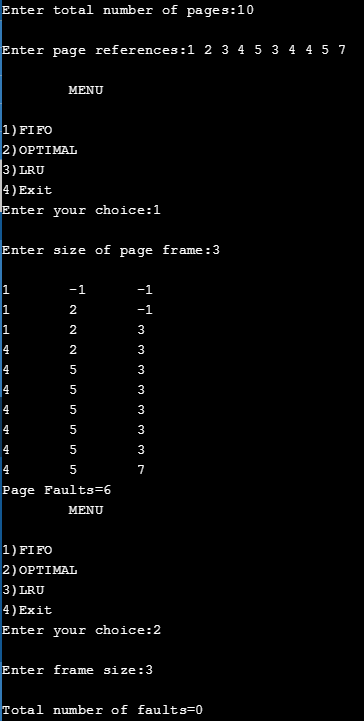
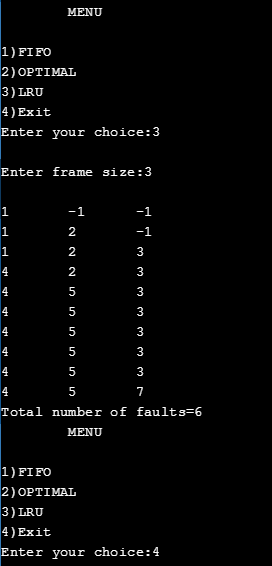
Problem 40
Step-1
Program Plan:
• Two modules Producer and Consumer Created.
• Common header files are included in both the modules.
• Method printLastError() print out the message and then print out the string corresponding to the last error that occurred.
• Method printLastError() takes two argument and print the last error.
• Method writeCollatz()is used to sequence the shared memory.
• Map the view of the file mapping into the address space.
• Allow the read/write access.
• Return the sequence of number from the shared memory.
Step-2
Common.h
ifndef __COMMON_H
define __COMMON_H
// Print out the last error
extern void printLastError**(** const char ***** message**,**
const DWORD lastError**);**
Step-3
Common.c
include “common.h”
Print out the message and then print out the string corresponding to the last error that occurred.
void printLastError**(** const char ***** message**,**
const DWORD lastError**)**
{
// Pointer to the buffer that will
// contain the string for lastError
LPTSTR pTemp = NULL**;**
// The size of the buffer allocated to pTemp
DWORD retSize**;**
// Was a message passed?
if ( message**)**
// Print it out
fputs**(** message**,** stderr**);**
// Format pTemp with the error for lastError
retSize**=** FormatMessage**(**
// Allocate a buffer
FORMAT_MESSAGE_ALLOCATE_BUFFER
// Search the system message-table
// resource for the message
| FORMAT_MESSAGE_FROM_SYSTEM
// The arguments parameter is a
// pointer to an array of values
| FORMAT_MESSAGE_ARGUMENT_ARRAY**,**
// Ignored as none of the relevant flags are set
NULL**,**
// The error that occurred
lastError**,**
// Use default custom locale language
LANG_NEUTRAL**,**
// Point to the buffer for the error message
( LPTSTR**)** & pTemp**,**
// The size of the buffer
0**,**
// No arguments are passed
NULL**);**
// Does pTemp have a valid value?
if ( pTemp**)**
{
// Was the returned size positive?
if ( retSize > 0**)**
// Print out pTemp
fputws**(** pTemp**,** stderr**);**
// Free pTemp
LocalFree**((** HLOCAL**)** pTemp**);**
}
}
**
Step-4
Producer.c**
include “common.h”
// The name of the memory mapping
const WCHAR MAPPING_NAME**[]** = L”13258-9-40PP”;
const WCHAR FILE_NAME**[]** = L”13258-9-40PP.txt”;
const int MAP_SIZE = 4096**;**
// Process the number input to the program
static void processNumber**(** const int iNumber**,** char
****** ppAddress**,** int ***** pSize**);**
// Write the Collatz sequence to the shared memory
static void writeCollatz**(** int iNumber**,** char ****** ppAddress**,**
int ***** pSize**);**
The startup function.
int main**(** int argc**,** char***** argv**[])**
{
// The handle of the actual file
HANDLE hFile**;**
// The handle of the file to be mapped
HANDLE hMapFile**;**
// The address of the shared memory
LPVOID lpMapAddress**;**
// The number of Collatz numbers to generate
int iNumber**;**
// The size of the shared memory
int iSize**;**
if ( argc != 2**)** {
fprintf**(** stderr**,** “%s +ve-integer\n”, ***** argv**);**
return 1**;**
}
Get the number of Collatz numbers to be generated.
iNumber = atoi**(** argv**[** 1**]);**
if ( iNumber < = 0**)** {
fprintf**(** stderr**,** “%s +ve-integer\n”, ***** argv**);**
return 2**;**
}
// Create a file on disk
hFile = CreateFile**(**
// The name of the file
FILE_NAME**,**
// Allow read/write access
GENERIC_READ | GENERIC_WRITE**,**
// Don’t allow sharing
0**,**
// Use the default security security attributes
NULL**,**
// Always create the file
CREATE_ALWAYS**,**
// Use the normal attributes for the file
FILE_ATTRIBUTE_NORMAL**,** NULL**);**
if ( hFile == INVALID_HANDLE_VALUE**)** {
printLastError**(** “CreateFile didn’t work.\n”,
GetLastError**());**
return 3**;**
}
Create a file mapping, which handle to the disk file to be mapped and use the default security attributes allow read/write access to the mapped pages the high DWORD of the size of the mapping the low DWORD of the size of the mapping the name of the mapping.
hMapFile = CreateFileMapping**(** hFile**,NULL,** PAGE_READWRITE**,**
0**,(** DWORD**)** MAP_SIZE**,** MAPPING_NAME**);**
if ( hMapFile == NULL**)** {
printLastError**(** “CreateFileMapping didn’t ”
“work.\n”, GetLastError**());**
// Close the handle to the disk file
CloseHandle**(** hFile**);**
return 4**;**
}
Map the view of the file mapping into the address space.
lpMapAddress = MapViewOfFile**(** hMapFile**,**
**** FILE_MAP_ALL_ACCESS**,** 0**,** 0**,** 0**);**
if ( lpMapAddress == NULL**)**
{
printLastError**(** “MapViewOfFile didn’t work\n”,
GetLastError**());**
// Close the handle to the disk file
CloseHandle**(** hFile**);**
// Close the handle to the mapped file
CloseHandle**(** hMapFile**);**
return 5**;**
}
// Set the size of the shared memory
// to be passed to processNumber
iSize = MAP_SIZE**;**
// Generate the Collatz numbers
processNumber**(** iNumber**,** ( char ) & lpMapAddress,**
& iSize**);**
// Wait for the consumer
printf**(** “Generated %d numbers. Enter a number to ”
“continue: ”, iNumber**);**
scanf_s**(** “%d”, & iNumber**);**
// Unmap the view
UnmapViewOfFile**(** lpMapAddress**);**
// Close the handle to the disk file
CloseHandle**(** hFile**);**
// Close the handle to the mapped file
CloseHandle**(** hMapFile**);**
return 0**;**
}
void processNumber**(** const int iNumber**,** char ****** ppAddress**,**
int ***** pSize**)**
{
int iIndex**;**
for ( iIndex = 1**;** iIndex < = iNumber**;** iIndex**++)**
writeCollatz**(** iIndex**,** ppAddress**,** pSize**);**
}
void writeCollatz**(** int iNumber**,** char ****** ppAddress**,**
int ***** pSize**)**
{
int iWriteSize**;**
if ( iNumber < 0 || ! ppAddress || ! pSize
|| !* ppAddress || ***** pSize < = 0**)**
return**;**
while ( iNumber > 1**)** {
iWriteSize = _snprintf_s**(*** ppAddress**,** ***** pSize**,**
_TRUNCATE**,**
“%d\n”, iNumber**);**
// Check for iWritesize.
if ( iWriteSize < 0**)** {
***** ppAddress += ***** pSize**;**
***** pSize = 0**;**
return**;**
}
***** ppAddress += iWriteSize**;**
***** pSize -= iWriteSize**;**
iNumber = ( iNumber % 2**)** ? ( 3 ***** iNumber + 1**)**
: ( iNumber / 2**);**
}
iWriteSize = _snprintf_s**(*** ppAddress**,** ***** pSize**,**
_TRUNCATE**,**
“%d\n”, iNumber**);**
if ( iWriteSize < 0**)** {
***** ppAddress += ***** pSize**;**
***** pSize = 0**;**
} else {
***** ppAddress += iWriteSize**;**
***** pSize -= iWriteSize**;**
}
}
Step-5
Sample Output:
D:\13258\13258-9-40PP>Producer\Debug\Producer.exe 5
Generated 5 numbers. Enter a number to continue: 1
**
Step-6
Consumer.c**
include “common.h”
// The name of the memory mapping
const WCHAR MAPPING_NAME**[]** = L”13258-9-40PP”;
int main**(** int argc**,** char***** argv**[])**
{
// The handle of the file to be mapped
HANDLE hMapFile**;**
// The address of the shared memory
LPVOID lpMapAddress**;**
// Open a named file mapping object
hMapFile = OpenFileMapping**(**
// Allow read/write access
FILE_MAP_ALL_ACCESS**,**
// No inheritance
FALSE**,**
// The name of the mapping
MAPPING_NAME**);**
if ( hMapFile == NULL**)** {
printLastError**(** “OpenFileMapping didn’t ”
“work.\n”, GetLastError**());**
return 1**;**
}
// Map the view of the file mapping
// into the address space
lpMapAddress = MapViewOfFile**(**
// The handle of the object to map
hMapFile**,**
// Allow read/write access
FILE_MAP_ALL_ACCESS**,**
0**,** // Map the
0**,** // whole file at
0**);** // whatever offset
if ( lpMapAddress == NULL**)** {
printLastError**(** “MapViewOfFile didn’t work\n”,
GetLastError**());**
// Close the handle to the mapped file
CloseHandle**(** hMapFile**);**
return 2**;**
}
fputs**((** char ) lpMapAddress*,** stdout**);**
UnmapViewOfFile**(** lpMapAddress**);**
// Close the handle to the mapped file
CloseHandle**(** hMapFile**);**
return 0**;**
}
Step-7
Sample Output:
:\13258\13258-9-40PP>Consumer\Debug\Consumer.exe
1
2
1
3
10
5
16
8
4
2
1
4
2
1
5
16
8
4
2
1